








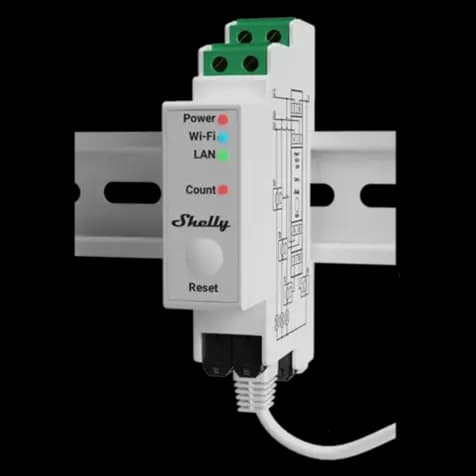
Shelly Pro 3EM
Monitors three-phase energy metering via Modbus TCP on Shelly Pro 3EM
Modbus TCP template for the Shelly Pro 3EM three-phase energy meter. It reads voltage, current, active power, apparent power, power factor, and accumulated energy across all three phases and neutral. No writable control registers are included.
- Protocol
- Modbus TCP
- Connection
- Ethernet, Modbus TCP
- Registers
- 61, read only
- Brand
- Shelly
- Key readings
- Voltage A, B, C · Current A, B, C · Active power A, B, C and total · Apparent power A, B, C and total · Power factor A, B, C · Total active energy (perpetual)
- Compatible models
- Shelly Pro 3EM
- Last updated
Registers (61)
61 read, 0 write
| Name | Unit | Access | Address (Hidden until you enter your email) | Function (hidden) | Type (hidden) |
|---|---|---|---|---|---|
| Phase A meter error | Read | ||||
| Phase B meter error | Read | ||||
| Phase C meter error | Read | ||||
| Neutral meter error | Read | ||||
| Phase sequence error | Read | ||||
| Neutral current | A | Read | |||
| Neutral current mismatch | Read | ||||
| Neutral overcurrent error | Read | ||||
| Total current | A | Read | |||
| Total active power | kW | Read | |||
| Total apparent power | VA | Read | |||
| Phase A voltage | V | Read | |||
| Phase A current | A | Read | |||
| Phase A active power | kW | Read | |||
| Phase A apparent power | VA | Read | |||
| Phase A power factor | Read | ||||
| Phase A overpower error | Read | ||||
| Phase A overvoltage error | Read | ||||
| Phase A overcurrent error | Read | ||||
| Phase B voltage | V | Read | |||
| Phase B current | A | Read | |||
| Phase B active power | kW | Read | |||
| Phase B apparent power | VA | Read | |||
| Phase B power factor | Read | ||||
| Phase B overpower error | Read | ||||
| Phase B overvoltage error | Read | ||||
| Phase B overcurrent error | Read | ||||
| Phase C voltage | V | Read | |||
| Phase C current | A | Read | |||
| Phase C active power | kW | Read | |||
| Phase C apparent power | VA | Read | |||
| Phase C power factor | Read | ||||
| Phase C overpower error | Read | ||||
| Phase C overvoltage error | Read | ||||
| Phase C overcurrent error | Read | ||||
| Total active energy accumulated for all phases - perpetual count | kWh | Read | |||
| Total active returned energy accumulated for all phases - perpetual count | kWh | Read | |||
| Phase A total active energy | kWh | Read | |||
| Phase A fundamental active energy | kWh | Read | |||
| Phase A total active returned energy | kWh | Read | |||
| Phase A fundamental active returned energy | kWh | Read | |||
| Phase A lagging reactive energy | VARh | Read | |||
| Phase A leading reactive energy | VARh | Read | |||
| Phase A total active energy - perpetual count | kWh | Read | |||
| Phase A total active returned energy - perpetual count | kWh | Read | |||
| Phase B total active energy | kWh | Read | |||
| Phase B fundamental active energy | kWh | Read | |||
| Phase B total active returned energy | kWh | Read | |||
| Phase B fundamental active returned energy | kWh | Read | |||
| Phase B lagging reactive energy | VARh | Read | |||
| Phase B leading reactive energy | VARh | Read | |||
| Phase B total active energy - perpetual count | kWh | Read | |||
| Phase B total active returned energy - perpetual count | kWh | Read | |||
| Phase C total active energy | kWh | Read | |||
| Phase C fundamental active energy | kWh | Read | |||
| Phase C total active returned energy | kWh | Read | |||
| Phase C fundamental active returned energy | kWh | Read | |||
| Phase C lagging reactive energy | VARh | Read | |||
| Phase C leading reactive energy | VARh | Read | |||
| Phase C total active energy - perpetual count | kWh | Read | |||
| Phase C total active returned energy - perpetual count | kWh | Read |
Loading registers…
Send your device list
If a device is not in the library yet, we build the template for free as soon as we have the register data.
Use cases
- Monitor three-phase voltage, current, and power on a live dashboard for your customer's main distribution board.
- Track total accumulated energy consumption over time to support billing or energy audits.
- Create an alert when power factor on any phase drops below a defined threshold for more than five minutes.
- Compare per-phase load distribution to identify imbalance issues in commercial installations.
- Log active and apparent power data to generate monthly energy reports for facility managers.
- Detect metering errors remotely by monitoring the per-phase and total error status registers.
Installation
Mount the Shelly Pro 3EM on the DIN rail inside the distribution board and connect the current transformers and voltage references according to the Shelly wiring guide.
Connect the Shelly Pro 3EM to the local network via Ethernet or Wi-Fi, then assign it a static IP address or a DHCP reservation.
Open the Shelly web interface or app, navigate to the Modbus TCP settings, and enable the Modbus TCP server on the default port 502.
Update the Shelly Pro 3EM firmware to the latest version (1.0 or higher) to ensure all register values are available.
In the ModbusCloud portal, add a new Modbus TCP device on your gateway, enter the meter's IP address and port, and import the Shelly Pro 3EM template.
Verify that all registers return valid data in the ModbusCloud live view before finalizing the installation.
Things to watch for
Some registers return zero or no data. What should I check?
Update the Shelly Pro 3EM firmware to version 1.0 or later. Earlier firmware versions were missing certain register values. After the update, power-cycle the device and re-read the registers.
What data encoding do the registers use?
All measurement registers use float32 encoding, meaning each value spans two consecutive 16-bit Modbus registers. The template already accounts for this, so no manual byte-order configuration is needed.
Do I need RS-485 wiring between the gateway and the meter?
No. The Shelly Pro 3EM uses Modbus TCP over Ethernet or Wi-Fi. The ModbusCloud gateway and the meter only need to be on the same IP network.
Can I use this template with other Shelly energy meters?
The template is based on the Shelly EM and EMData register specification and has been tested on the Shelly Pro 3EM. Other Shelly meters sharing the same register map may work, but verify against the official Shelly documentation before deploying.





Want to see how it works?
