








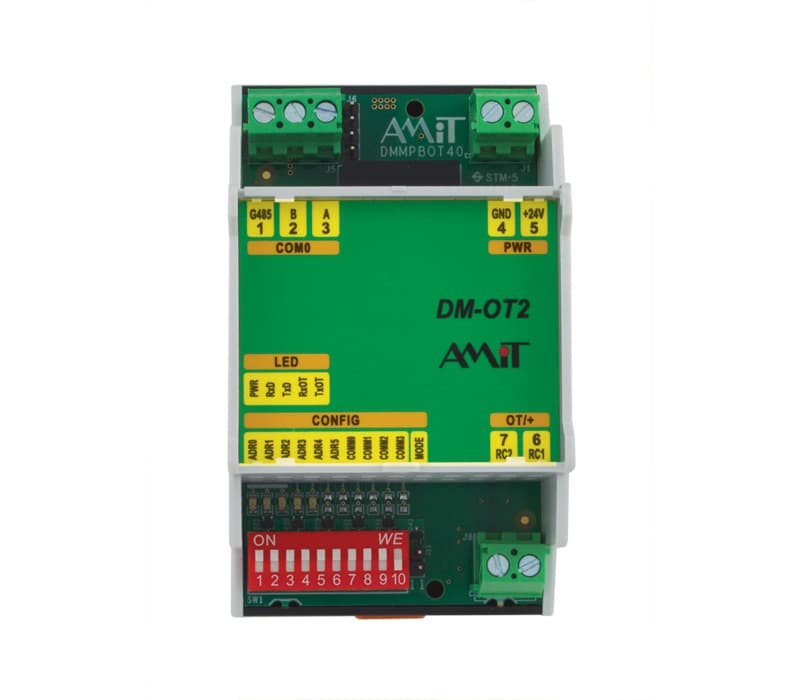
Amit DM-OT2 Modbus to OpenTherm
Bridges Modbus RTU to OpenTherm for boiler monitoring and control.
Template for the AMIT DM-OT2, a Modbus RTU to OpenTherm/plus converter used for boiler integration. It reads heating water temperatures, DHW temperature, return temperature, outdoor temperature, pressure, flow rate, and flue gas temperature. It also exposes control registers for boiler setpoint management.
- Protocol
- Modbus RTU
- Connection
- RS485, 115200 baud
- Registers
- 19, read and write
- Brand
- AMIT
- Key readings
- DHW temperature (TUV) · Heating water temperatures TV1/TV2 · Return temperature · Outdoor temperature · Pressure · Flow rate
- Available commands
- DM-OT2 register 200 · DM-OT2 register 201 · DM-OT2 register 203 · DM-OT2 register 205
- Compatible models
- DM-OT2
- Last updated
Registers (19)
15 read, 4 write
| Name | Unit | Access | Address (Hidden until you enter your email) | Function (hidden) | Type (hidden) |
|---|---|---|---|---|---|
| Teplota TUV | °C | Read | |||
| Teplota topné vody TV1_ | °C | Read | |||
| Teplota topné vody TV2 | °C | Read | |||
| Teplota vratu | °C | Read | |||
| Venkovní teplota | °C | Read | |||
| Tlak | bar | Read | |||
| Průtok | l/s | Read | |||
| Teplota spalin 118 | °C | Read | |||
| ID | Read | ||||
| Firmware | Read | ||||
| BaudRate | Read | ||||
| Parita | Read | ||||
| Adresa | Read | ||||
| Kód poslední chyby | Read | ||||
| Stavový registr | Read | ||||
| DM-OT2 200 | Write | ||||
| DM-OT2 201 | Write | ||||
| DM-OT2 203 | Write | ||||
| DM-OT2 205 | Write |
Loading registers…
Send your device list
If a device is not in the library yet, we build the template for free as soon as we have the register data.
Use cases
- Monitor boiler heating water and DHW temperatures remotely on the ModbusCloud dashboard.
- Create alerts when return temperature or system pressure deviates from normal operating range.
- Adjust heating setpoints remotely via control registers to optimize comfort and energy use.
- Track outdoor temperature trends alongside boiler output to verify weather-compensated control.
- Log flue gas temperature over time to detect early signs of heat exchanger fouling or efficiency loss.
- Verify flow rate readings to confirm proper circulation pump operation after installation.
Installation
Remove the jumper from the AMIT DM-OT2 board to enable Modbus RTU mode, and set the DIP switches to assign the desired Modbus slave address.
Wire the RS-485 A and B terminals of the DM-OT2 to the corresponding terminals on the ModbusCloud Gateway, observing correct polarity.
Connect the OpenTherm wiring from the DM-OT2 to the boiler according to the boiler manufacturer's terminal diagram.
Configure the Modbus RTU port on the ModbusCloud gateway to 115200 baud, odd parity, and 8 data bits to match the DM-OT2 settings.
Import the AMIT DM-OT2 template in the ModbusCloud platform and assign the correct slave address matching the DIP switch configuration.
Power on the system and verify that live readings for temperatures, pressure, and flow rate appear on the ModbusCloud dashboard.
Things to watch for
I see no data from the DM-OT2 after connecting. What should I check?
Verify that the jumper has been removed from the board to enable Modbus RTU mode. Also confirm that the DIP switches are set to a valid, unique Modbus address and that the RS-485 A/B wiring polarity is correct.
Why do temperature values appear as zero or nonsensical numbers?
The DM-OT2 uses float32 encoding, which means each value spans two consecutive registers. Ensure the template is configured for 32-bit float decoding with the correct byte order. A mismatch in word order will produce incorrect values.
The gateway cannot communicate at 115200 baud. Is there an alternative?
The DM-OT2 defaults to 115200 baud with odd parity. Check the device documentation to see if alternative baud rates can be configured via internal settings. If not, ensure your gateway model supports 115200 baud on its RS-485 port.
Can I control the boiler setpoint remotely through ModbusCloud?
Yes. The template maps control registers 200, 201, 203, and 205. These allow you to write setpoints and mode commands that the DM-OT2 translates to OpenTherm messages for the boiler. Always verify safe operating limits before writing values remotely.

Want to see how it works?
