








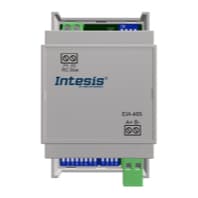
IntesisBox DK-AC-MBS-1
Controls Daikin domestic air conditioners via Modbus RTU interface
Template for the IntesisBox DK-AC-MBS-1, a Modbus RTU interface for Daikin domestic air conditioners. It reads and controls on/off state, operating mode, fan speed, temperature setpoint, vane positions, and alarm status over an EIA-485 connection.
- Protocol
- Modbus RTU
- Connection
- RS485, 9600 baud
- Registers
- 13, read and write
- Brand
- Intensis
- Key readings
- On/Off State · Mode · Fan Speed · Temperature Setpoint · Up/Down and Left/Right Vane Position · Alarm Status and Error Code
- Available commands
- On/Off · Mode and Fan Speed · Temperature Setpoint · Vane Positions
- Compatible models
- DK-AC-MBS-1
- Last updated
Registers (13)
13 read, 11 write
| Name | Unit | Access | Address (Hidden until you enter your email) | Function (hidden) | Type (hidden) |
|---|---|---|---|---|---|
| FanSpeed | °C | Read and write | |||
| Mode | °C | Read and write | |||
| UpDownVanePosition | °C | Read and write | |||
| TemperatureSetpoint | °C | Read and write | |||
| OnOff | °C | Read and write | |||
| WindowContact | °C | Read and write | |||
| ControlDisablement | °C | Read and write | |||
| RemoteControlDisablement | °C | Read and write | |||
| OperationTime | °C | Read and write | |||
| AlarmStatus | °C | Read | |||
| ErrorCode | °C | Read | |||
| LeftRightVanePosition | °C | Read and write | |||
| HumidificationValue | °C | Read and write |
Loading registers…
Send your device list
If a device is not in the library yet, we build the template for free as soon as we have the register data.
Use cases
- Monitor room temperature setpoints and on/off states across multiple Daikin units on a single dashboard.
- Create an alert when the DK-AC-MBS-1 reports an alarm status or error code so you can respond before the customer calls.
- Adjust temperature setpoints and operating modes remotely to support seasonal commissioning or tenant requests.
- Log fan speed and vane position data over time to verify that scheduled comfort profiles are being followed.
- Verify correct operation of newly installed Daikin domestic units by checking live Modbus register values from your office.
Installation
Connect the IntesisBox DK-AC-MBS-1 to the Daikin indoor unit using the supplied connector cable, following the IntesisBox wiring diagram.
Wire the RS-485 (A/B) terminals of the DK-AC-MBS-1 to the RS-485 port on your ModbusCloud Gateway, observing correct polarity.
Set the Modbus slave address on the DK-AC-MBS-1 using its DIP switches or configuration tool, and note the address for the next step.
In the ModbusCloud platform, add a new device, select the IntesisBox DK-AC-MBS-1 template, and enter the matching slave address and baud rate (9600, 8N1).
Power on both devices and verify that register values such as on/off state and temperature setpoint appear on the ModbusCloud dashboard.
Things to watch for
What baud rate and serial settings should I use?
The default communication settings for the DK-AC-MBS-1 are 9600 bps, 8 data bits, no parity, 1 stop bit (9600 8N1). Make sure the ModbusCloud gateway port is configured identically.
Why does the temperature setpoint show an incorrect value?
The setpoint register at address 4 is a uint32 value that spans two consecutive 16-bit registers. The ModbusCloud template handles this automatically, but if you have customised the register map, ensure both registers are read together in the correct byte order.
Can I use this template with Daikin commercial or VRV units?
No. The DK-AC-MBS-1 is designed exclusively for the Daikin domestic air conditioning line. Intesis offers separate interfaces for Daikin commercial and VRV systems.
The gateway reads registers but cannot control the unit. What should I check?
Confirm that the DK-AC-MBS-1 is set to allow write access and that the Modbus function code used is correct (typically FC06 or FC16 for writing). Also verify that no other master on the RS-485 bus is conflicting.
More Intensis templates
Want to see how it works?
