









Elsner P03/3-Modbus
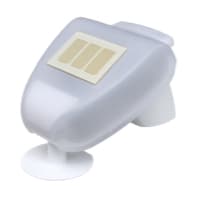
Weather station for temperature, wind speed, rain and brightness from the east, south and west.
The Elsner P03/3-Modbus is a weather station that measures temperature, wind speed, rain and brightness from the east, south and west on the roof or facade of a building. This Modbus RTU template reads all weather values, and on the GPS version the date, time and sun position, into ModbusCloud.
- Protocol
- Modbus RTU
- Connection
- RS485, 19200 baud
- Registers
- 17, read only
- Brand
- Elsner
- Key readings
- Outdoor temperature · Wind speed · Rain · Brightness south · Brightness east · Brightness west · Twilight light level · Sun azimuth and elevation
- Compatible models
- P03/3-Modbus · P03/3-Modbus-GPS
- Last updated
Registers (17)
17 read, 0 write
| Name | Unit | Access | Address (Hidden until you enter your email) | Function (hidden) | Type (hidden) |
|---|---|---|---|---|---|
| Outdoor Temperature | °C | Read | |||
| Sun Sensor South (Kilolux) | Read | ||||
| Sun Sensor West (Kilolux) | Read | ||||
| Sun Sensor East (Kilolux) | Read | ||||
| Light (Twilight) | lux | Read | |||
| Wind Speed | m/s | Read | |||
| GPS Status And Rain | Read | ||||
| Date Day | Read | ||||
| Date Month | Read | ||||
| Date Year | Read | ||||
| Time Hour | Read | ||||
| Time Minute | Read | ||||
| Time Second | Read | ||||
| Sun Azimuth | ° | Read | |||
| Sun Elevation | ° | Read | |||
| Longitude | ° | Read | |||
| Latitude | ° | Read |
Loading registers…
Send your device list
If a device is not in the library yet, we build the template for free as soon as we have the register data.
Use cases
- Show wind speed, rain and the brightness per facade of a building on one dashboard.
- Send an email alert when the wind speed rises above the limit at which awnings must be retracted.
- Keep 365 days of history of outdoor temperature and brightness to compare the heat load per facade.
- Log the rain flag next to greenhouse or roof window data to check when the windows were closed.
- Use sun azimuth and elevation from the GPS version to see which facade receives direct sun.
Installation
Connect RS485 A and B of the weather station to the RS485 port of the ModbusCloud Gateway and terminate both ends of the bus.
Set the address and baud rate with the DIP switches in the station; with all switches off it uses address 1, 19200 baud and even parity.
In ModbusCloud, add a Modbus device on the Gateway with the same address and serial settings, then import this template.
Check that the outdoor temperature and the brightness values arrive with plausible values; wait about a minute for the first wind value.
Things to watch for
The weather station does not answer on the RS485 bus. What should I check?
From the factory the station uses address 1, 19200 baud and even parity. Many tools default to no parity, so check that first. Swap A and B if nothing comes back, and switch the built-in terminator on only when the station sits at one end of the bus.
Why are date, time and sun position always zero?
Those values come from the GPS receiver, which only the P03/3-Modbus-GPS has. On the P03/3-Modbus without GPS, read temperature, brightness, wind and rain and ignore the date, time, sun position and coordinate registers.
How do I read the rain and GPS register?
One register holds two flags: the high byte shows whether the time comes from GPS and the low byte shows rain. ModbusCloud shows the combination as text, for example GPS time, rain. A value of 1 or 257 means it is raining.
The wind value is wrong right after power up. Is the sensor faulty?
No. The station needs about 60 seconds after the supply is switched on before it delivers a correct wind value. Wait a minute and check again before you look for a wiring fault.
Can several weather stations or other devices share one RS485 line?
Yes. Give every device its own address and use the same baud rate and parity on all of them. Run the bus as one line from device to device and terminate both ends.
More Elsner templates
Want to see how it works?
