








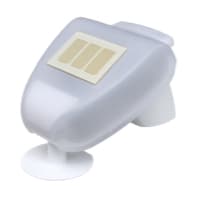
Elsner Weather Station Modbus RTU
Reads weather data from Elsner weather stations via Modbus RTU.
This template reads weather data from Elsner RS485 weather stations via Modbus RTU. It provides wind speed, outdoor temperature, directional brightness (South, West, East), light sensor values, and rain status. All registers are int16 format.
- Protocol
- Modbus RTU
- Connection
- RS485, 9600 baud
- Registers
- 7, read only
- Brand
- Elsner
- Key readings
- Wind speed · Outdoor temperature · Brightness South/West/East · Light sensor · Rain
- Compatible models
- RS485 Weather Station
- Last updated
Registers (7)
7 read, 0 write
| Name | Unit | Access | Address (Hidden until you enter your email) | Function (hidden) | Type (hidden) |
|---|---|---|---|---|---|
| Wind | km/h | Read | |||
| Outdoor Temperature | °C | Read | |||
| Brightness South | Kilolux | Read | |||
| Brightness West | Kilolux | Read | |||
| Brightness Ost | Kilolux | Read | |||
| Lightsensor | Lux | Read | |||
| Rain | Read |
Loading registers…
Send your device list
If a device is not in the library yet, we build the template for free as soon as we have the register data.
Use cases
- Monitor outdoor temperature and wind speed on a live cloud dashboard for building automation projects.
- Log directional brightness values over time to correlate solar irradiance with PV system output.
- Create an alert when wind speed exceeds a safe threshold to trigger awning or shading retraction.
- Track rain status remotely to verify weather conditions at unmanned sites.
- Compare brightness readings from South, West, and East sensors to analyse facade exposure for energy audits.
- Set up a notification when outdoor temperature drops below zero to warn of frost conditions.
Installation
Connect the Elsner RS485 weather station to the RS485 terminal of your ModbusCloud Gateway, observing correct A/B wiring polarity.
Verify that the weather station is set to 9600 baud and even parity, which are the default communication settings.
Set the Modbus slave address on the weather station to match the address configured in the ModbusCloud template (default is typically 1).
Import the Elsner Weather Station Modbus RTU template from the ModbusCloud template library into your project.
Confirm that live readings for wind speed, temperature, brightness, and rain appear on the ModbusCloud dashboard.
If using multiple RS485 devices on the same bus, ensure each device has a unique Modbus address and that proper bus termination is applied.
Things to watch for
What baud rate and parity settings does the Elsner weather station use?
The default settings are 9600 baud with even parity (parity 1). These match the template defaults, so no changes should be needed in most installations.
What is the difference between the brightness and light sensor registers?
The three directional brightness registers (South, West, East) report values in kilolux. The general light sensor register reports in lux. Make sure to account for this difference when setting up dashboards or alerts.
What does the rain register value mean?
The rain register has no unit specified in the Elsner documentation. It is most likely a boolean or status value, where a nonzero value indicates that precipitation is detected.
I am not getting any readings from the weather station. What should I check?
Verify the RS485 wiring polarity (A and B lines). Confirm the Modbus slave address matches between the device and the template. Check that baud rate and parity are set to 9600 and even on both the gateway and the weather station.




Want to see how it works?
