








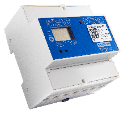
smart-me electricity meter / Modbus TCP Template
Monitors smart-me 3-phase energy meters via Modbus TCP.
This template reads 3-phase energy data from smart-me electricity meters via Modbus TCP. It covers voltage, current, power, power factor, and active/reactive energy registers across all three phases. Compatible with the smart-me Telstar 80A, Telstar CT, and Kamstrup Module.
- Protocol
- Modbus TCP
- Connection
- Ethernet, Modbus TCP
- Registers
- 30, read only
- Brand
- smart-me
- Key readings
- Voltage L1 to L3 · Current L1 to L3 · Power total and per phase · Power factor L1 to L3 · Active energy import/export totals · Reactive energy Q1 to Q4
- Compatible models
- smart-me Telstar 3-Phase Meter (80A) · smart-me Telstar CT · smart-me Kamstrup Module
- Last updated
Registers (30)
30 read, 0 write
| Name | Unit | Access | Address (Hidden until you enter your email) | Function (hidden) | Type (hidden) |
|---|---|---|---|---|---|
| Serial Number | Read | ||||
| Date Time (UTC) | <v.u> | Read | |||
| Power Total (All Phases) | mW | Read | |||
| Voltage Phase L1 | mV | Read | |||
| Current Phase L1 | mA | Read | |||
| Power Factor (cos phi) L1 | cosΦ | Read | |||
| Active Energy Import Total | Wh | Read | |||
| Reactive Energy Q1 | mVarh | Read | |||
| Current Phase L2 | mA | Read | |||
| Current Phase L3 | mA | Read | |||
| Voltage Phase L2 | mV | Read | |||
| Voltage Phase L3 | mV | Read | |||
| Power Phase L1 | mW | Read | |||
| Power Phase L2 | mW | Read | |||
| Power Phase L3 | mW | Read | |||
| Reactive Power Total (All Phases) | mVar | Read | |||
| Reactive Power Phase L1 | mVar | Read | |||
| Reactive Power Phase L2 | mVar | Read | |||
| Reactive Power Phase L3 | mVar | Read | |||
| Power Factor (cos phi) L2 | cosΦ | Read | |||
| Power Factor (cos phi) L3 | cosΦ | Read | |||
| Reactive Energy Q2 | mVarh | Read | |||
| Reactive Energy Q3 | mVarh | Read | |||
| Reactive Energy Q4 | mVarh | Read | |||
| Active Energy Import T1 | Wh | Read | |||
| Active Energy Import T2 | Wh | Read | |||
| Active Tariff | Read | ||||
| Active Energy Export T1 | Wh | Read | |||
| Active Energy Export T2 | Wh | Read | |||
| Active Energy Export Total | Wh | Read |
Loading registers…
Send your device list
If a device is not in the library yet, we build the template for free as soon as we have the register data.
Use cases
- Monitor real-time voltage, current, and power per phase on a live cloud dashboard for your customer.
- Track active energy import and export totals to verify self-consumption of a PV installation.
- Create an alert when power factor on any phase drops below a defined threshold for more than five minutes.
- Compare T1 and T2 tariff consumption over time to optimize energy cost strategies.
- Generate monthly energy reports showing total consumption and grid feed-in for billing verification.
- Detect phase imbalance by comparing per-phase power readings on a single dashboard.
Installation
Connect the smart-me meter to the local network via Ethernet or Wi-Fi and confirm that Modbus TCP is enabled in the smart-me device settings.
Note the IP address assigned to the smart-me meter and verify connectivity by pinging it from a device on the same network.
Connect your ModbusCloud Gateway to the same local network as the smart-me meter.
Import the smart-me electricity meter Modbus TCP template into your ModbusCloud project and enter the meter IP address and Modbus TCP port (default 502).
Apply scaling factors in ModbusCloud to convert milliwatts, millivolts, milliamps, and millivar-hours to standard units (divide raw values by 1000).
Verify that live readings appear on the ModbusCloud dashboard and match the values shown on the meter display or smart-me cloud portal.
Things to watch for
Why do the readings in ModbusCloud show very large numbers instead of normal values?
smart-me meters report values in milli-units. Voltages are in millivolts, currents in milliamps, and power in milliwatts. Apply a scaling factor of 0.001 (divide by 1000) in ModbusCloud to convert to volts, amps, and watts.
Which Modbus TCP port does the smart-me meter use?
The default Modbus TCP port is 502. Ensure this port is not blocked by any firewall rules on your local network.
Do I need to set a Modbus slave address for the smart-me meter?
Modbus TCP typically uses unit ID 1 by default. Check the smart-me device configuration or the official Modbus TCP wiki if your setup uses a different unit ID.
Can I use this template for single-phase smart-me meters?
This template is designed for 3-phase smart-me models (Telstar 80A, Telstar CT, Kamstrup Module). Single-phase meters may use a different register map and are not guaranteed to work with this template without modifications.
More smart-me templates
Want to see how it works?
