








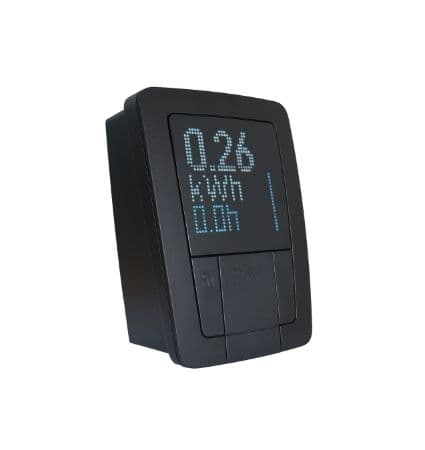
Pico smart-me EV Charger - Modbus Template
Monitors and controls smart-me Pico EV charger via Modbus TCP
Template for the smart-me Pico EV charger via Modbus TCP. Reads energy metering data including voltage, current, power, and charging status per phase. Supports writing a dynamic maximum charging current setpoint for load management.
- Protocol
- Modbus TCP
- Connection
- Ethernet, Modbus TCP
- Registers
- 34, read and write
- Brand
- smart-me
- Key readings
- Voltage L1 to L3 · Current L1 to L3 · Power total and per phase · Active energy import total · Car connected and charging status · Loadmanagement group max current
- Available commands
- Dynamic max current (station or group)
- Compatible models
- Pico · smart-me Pico
- Last updated
Registers (34)
33 read, 1 write
| Name | Unit | Access | Address (Hidden until you enter your email) | Function (hidden) | Type (hidden) |
|---|---|---|---|---|---|
| Serial Number | Read | ||||
| Date Time (UTC) | <v.u> | Read | |||
| Power Total (All Phases) | mW | Read | |||
| Is Car connected | Read | ||||
| Is charging active | Read | ||||
| Voltage Phase L1 | mV | Read | |||
| Current Phase L1 | mA | Read | |||
| Power Factor (cos phi) L1 | cosΦ | Read | |||
| Active Energy Import Total | Wh | Read | |||
| Reactive Energy Q1 | Varh | Read | |||
| Energy used in active charging | mWh | Read | |||
| Min. station charging current | mA | Read | |||
| Max. station charging current | mA | Read | |||
| Current Phase L2 | mA | Read | |||
| Current Phase L3 | mA | Read | |||
| Voltage Phase L2 | mV | Read | |||
| Voltage Phase L3 | mV | Read | |||
| Power Phase L1 | mW | Read | |||
| Power Phase L2 | mW | Read | |||
| Power Phase L3 | mW | Read | |||
| Reactive Power Total (All Phases) | mVar | Read | |||
| Reactive Power Phase L1 | mVar | Read | |||
| Reactive Power Phase L2 | mVar | Read | |||
| Reactive Power Phase L3 | mVar | Read | |||
| Power Factor (cos phi) L2 | cosΦ | Read | |||
| Power Factor (cos phi) L3 | cosΦ | Read | |||
| Reactive Energy Q2 | Varh | Read | |||
| Reactive Energy Q3 | Varh | Read | |||
| Reactive Energy Q4 | Varh | Read | |||
| Is in Loadmanagent Group | Read | ||||
| Loadmanagement group max. current | mA | Read | |||
| Active Energy Import T1 | Wh | Read | |||
| Active Energy Import T2 | Wh | Read | |||
| Dynamic max. current (single station or loadmanagment group) | mA | Write |
Loading registers…
Send your device list
If a device is not in the library yet, we build the template for free as soon as we have the register data.
Use cases
- Monitor real-time voltage, current, and power per phase on a live dashboard for each smart-me Pico charger.
- Create an alert when a car is connected but not charging to detect potential faults or authorization issues.
- Log active energy import per tariff period for accurate billing and cost allocation to tenants.
- Write a dynamic maximum charging current to implement load management across multiple charging stations.
- Track charging session status remotely to verify uptime and utilization of installed EV chargers.
- Compare per-phase power distribution to detect load imbalance across the three phases.
Installation
Connect the ModbusCloud Gateway to the same local network as the smart-me Pico charger.
Enable Modbus TCP on the smart-me Pico via its web interface or configuration tool, and note the IP address and Modbus port.
Set a unique Modbus unit ID on the charger if multiple devices share the same network segment.
Import the smart-me Pico EV Charger template in the ModbusCloud portal and assign it to the gateway.
Enter the charger IP address, port, and unit ID in the template connection settings and verify that live data appears on the dashboard.
Confirm that register scaling is correct by comparing dashboard values with the charger display or a reference meter.
Things to watch for
Why do my readings show very large numbers instead of realistic values?
Register values from the smart-me Pico are in mW, mV, mA, and mWh. Make sure the template scaling factors are applied. If you customized registers, divide by 1000 where needed to convert to standard units.
Why does active energy during charging show zero or incorrect values?
Active charging energy is stored as a uint64 value across four consecutive registers. Ensure your register configuration reads all four registers and interprets them as an unsigned 64-bit integer.
I cannot connect to the charger via Modbus TCP. What should I check?
Verify that Modbus TCP is enabled in the Pico settings. Check that the gateway and the charger are on the same subnet and that no firewall rules block the configured TCP port. Confirm the correct IP address and unit ID.
Can I control the maximum charging current for a group of chargers?
Yes. The template includes a writable register for load management group max current. Writing to this register limits the combined current for all chargers in the same group as configured on the smart-me side.
More smart-me templates
Want to see how it works?
