








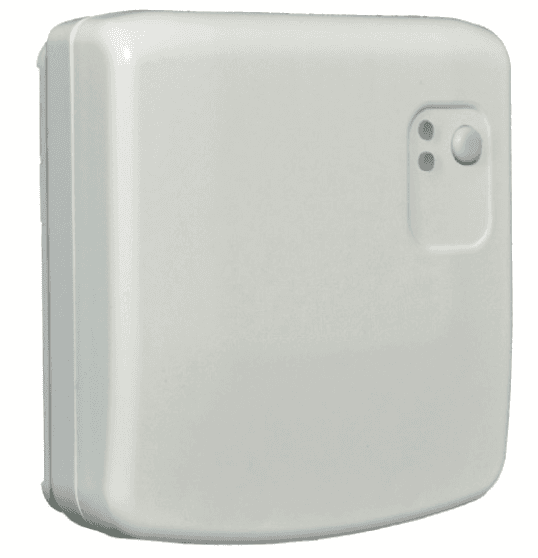
SIBER - PASARELA RS485 - RF
Bridges RS485 Modbus to wireless ventilation sensors and controllers
The Siber Pasarela RS485-RF is a Modbus RTU gateway that bridges wireless ventilation sensors and controllers to a wired RS485 bus. This template reads environmental data such as CO2, humidity, temperature, and air quality from compatible Siber wireless devices, and allows control of ventilation speed.
- Protocol
- Modbus RTU
- Connection
- RS485, 19200 baud
- Registers
- 14, read and write
- Brand
- Siber
- Key readings
- Indoor/Outdoor Temperature · Supply/Exhaust Temperature · CO2 Level · Indoor/Outdoor Humidity · Exhaust Flow Level · Air Quality
- Available commands
- Requested Ventilation Speed
- Compatible models
- DFEVOPULS4B · DFEVOCTRL · DFEVOCO2 · DFEVOHR
- Last updated
Registers (14)
14 read, 1 write
| Name | Unit | Access | Address (Hidden until you enter your email) | Function (hidden) | Type (hidden) |
|---|---|---|---|---|---|
| 41500 RW Requested system ventilation speed | Read and write | ||||
| 41025 R - CO2 level | ppm | Read | |||
| 41023 R - Air Quality | % | Read | |||
| 41021-41022 R - Exhaust Flow Level | m³/h | Read | |||
| 41018 R - Outdoor Humidiy | % | Read | |||
| 41017 R - Indoor Humidity | % | Read | |||
| 41016 R - Bypass position | % | Read | |||
| 41015 R - Defrost | Read | ||||
| 41014 R - Filter Dirty | Read | ||||
| 41011-41012 R - Supply Temperature | °C | Read | |||
| 41009-41010 R - Exhaust Temperature | °C | Read | |||
| 41007-41008 R - Outdoor Temperature | °C | Read | |||
| 41005-41006 R - Indoor Temperature | °C | Read | |||
| 41003 R - Error Code | Read |
Loading registers…
Send your device list
If a device is not in the library yet, we build the template for free as soon as we have the register data.
Use cases
- Monitor indoor CO2 levels and humidity across multiple zones from a single cloud dashboard.
- Set ventilation speed remotely based on real-time air quality readings from Siber wireless sensors.
- Create alerts when CO2 concentration exceeds a threshold to ensure adequate ventilation in occupied spaces.
- Track filter status and receive a notification when the filter dirty flag is triggered, so maintenance can be scheduled.
- Log supply and exhaust temperatures over time to verify heat recovery performance of the ventilation system.
- Review error codes and defrost status remotely to diagnose ventilation issues without an on-site visit.
Installation
Wire the Siber Pasarela RS485-RF to the ModbusCloud Gateway using a shielded two-wire RS485 cable, connecting A to A and B to B.
Set the Modbus slave address on the Pasarela to a unique value that does not conflict with other devices on the same bus.
Configure the ModbusCloud gateway serial port to 19200 baud, odd parity (1), and 8 data bits to match the Pasarela settings.
Ensure the compatible wireless devices (DFEVOPULS4B, DFEVOCTRL, DFEVOCO2, or DFEVOHR) are paired with the Pasarela according to the Siber pairing procedure.
Import the Siber Pasarela RS485-RF template in the ModbusCloud platform and assign it to the correct gateway and slave address.
Verify that live readings for temperature, CO2, humidity, and airflow appear on the ModbusCloud dashboard before completing the installation.
Things to watch for
Why am I not getting any response from the Pasarela on the Modbus bus?
Confirm that the baud rate is set to 19200 and parity is set to odd (1) on both the gateway and the Pasarela. Also verify that the RS485 A and B lines are not swapped.
Temperature and exhaust flow readings show incorrect or very large values. What is wrong?
These registers use float32 encoding across two consecutive addresses. Make sure the template is applied correctly, as manual register reads with a uint16 interpretation will produce meaningless values. Check the byte order (big-endian) matches the gateway configuration.
Can I connect multiple Pasarela devices on the same RS485 bus?
Yes, as long as each Pasarela has a unique Modbus slave address. Add a separate template instance in ModbusCloud for each device with the correct address.
The wireless sensors are paired but no data appears in the dashboard.
Verify that the wireless devices are within RF range of the Pasarela. Check the Siber pairing status indicator on the Pasarela. If sensors drop out intermittently, consider relocating the Pasarela to reduce wireless interference.
More Siber templates
Want to see how it works?
