








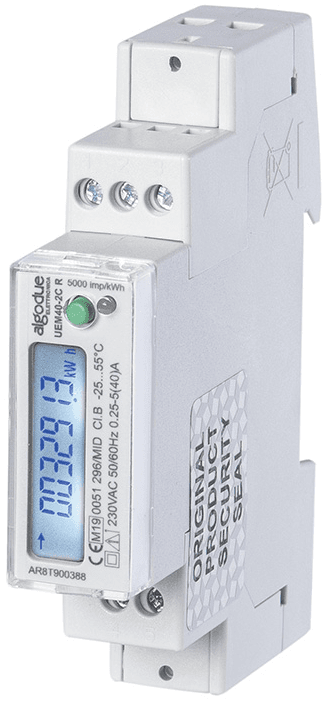
Algodue Energy Meter UEM40-2C R
Measures single-phase energy consumption and production for industrial and civilian applications.
Algodue UEM40-2C R is a single-phase 40A direct-connection energy meter with Modbus RTU communication. This template reads voltage, current, active/apparent/reactive power, energy consumption and production, frequency, and power factor via float32 registers.
- Protocol
- Modbus RTU
- Connection
- RS485
- Registers
- 11, read only
- Key readings
- Voltage · Current · Total Active Power · Total Apparent Power · Total Reactive Power · Energy Consumption/Production
- Compatible models
- UEM40-2C · UEM40-2C R
- Last updated
Registers (11)
11 read, 0 write
| Name | Unit | Access | Address (Hidden until you enter your email) | Function (hidden) | Type (hidden) |
|---|---|---|---|---|---|
| Total Active Power (P∑) | kW | Read | |||
| Energy Consumption (+kWh∑) | kWh | Read | |||
| Energy Production (-kWh∑) | kWh | Read | |||
| Frequency (F) | Hz | Read | |||
| Total Apparent Power (S∑) | VA | Read | |||
| Total Reactive Power (Q∑) | var | Read | |||
| Voltage (V∑) | V | Read | |||
| Current (A∑) | A | Read | |||
| Energy-Meter Model | Read | ||||
| Power Factor (PF∑) | Read | ||||
| Energy-Meter FW (Metrology) | Read |
Loading registers…
Send your device list
If a device is not in the library yet, we build the template for free as soon as we have the register data.
Use cases
- Monitor real-time voltage, current, and power consumption on a cloud dashboard for individual tenants.
- Track cumulative energy consumption and production to verify PV self-consumption ratios.
- Create alerts when power factor drops below a defined threshold indicating potential reactive power issues.
- Log historical energy data for MID-certified billing or energy audit documentation.
- Compare energy consumption trends across multiple single-phase circuits in a commercial building.
Installation
Wire the Algodue UEM40-2C R directly into the single-phase supply circuit, observing the 40A maximum current rating.
Connect the RS485 A and B terminals of the meter to the corresponding RS485 port on the ModbusCloud Gateway.
Set a unique Modbus RTU slave address on the meter using its front-panel configuration or internal settings menu.
Verify that the baud rate, parity, and stop bit settings on the meter match those configured on the gateway (common defaults: 9600 baud, 8N1).
Import the Algodue UEM40-2C R template in the ModbusCloud platform and assign it to the correct gateway and slave address.
Confirm that live readings for voltage, current, and power appear on the ModbusCloud dashboard before closing the installation.
Things to watch for
What baud rate and serial settings does the UEM40-2C R use by default?
Consult the Algodue manual for factory defaults, as baud rate and parity may differ between firmware versions. A common starting point is 9600 baud, 8 data bits, no parity, 1 stop bit (8N1). Ensure the gateway serial port matches these settings exactly.
Why do I see incorrect or very large values for voltage or power readings?
The UEM40-2C R uses float32 (IEEE 754) encoding across two consecutive registers. If the byte order or word order is incorrect, values will appear corrupted. Verify that the gateway is configured for big-endian (AB CD) word order, which is the standard for Algodue meters.
Can I connect multiple UEM40-2C R meters on one RS485 bus?
Yes. Assign a unique Modbus slave address to each meter before connecting them to the same RS485 bus. Add a separate template instance in ModbusCloud for each address.
Is the MID certification preserved when reading via Modbus?
MID certification applies to the meter hardware and its internal totalizer display. Modbus readout provides the same register values but the certified reference remains the meter itself. Check local regulations regarding the use of remotely read data for billing.
More Algodue Elettronica S.r.l. templates
Want to see how it works?
