








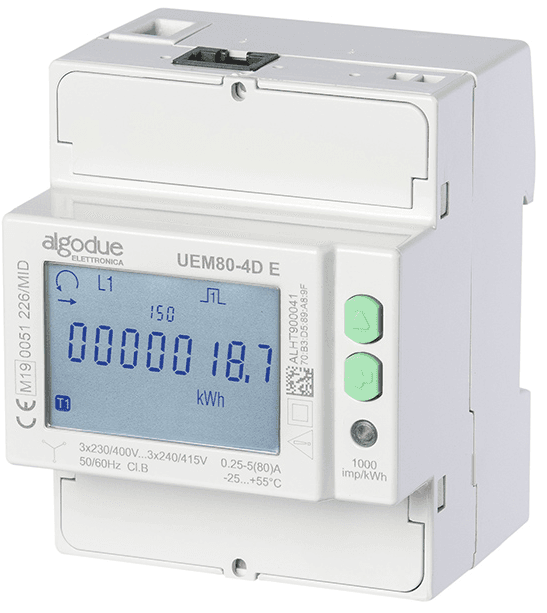
Algodue Energy Meter UEM80-4D
Measures three-phase energy consumption and production for industrial and civilian applications.
Template for the Algodue UEM80-4D three-phase energy meter (80 A direct connection). It reads voltage, current, active/reactive/apparent power, power factor, and energy counters per phase and total via Modbus TCP or Modbus RTU.
- Protocol
- Modbus TCP
- Connection
- Ethernet, Modbus TCP
- Registers
- 17, read only
- Key readings
- Voltage L1 to L3 and total · Current L1 to L3 · Total Active Power · Total Apparent Power · Total Reactive Power · Energy Consumption and Production
- Compatible models
- UEM80-4D E · UEM80-4D R
- Last updated
Registers (17)
17 read, 0 write
| Name | Unit | Access | Address (Hidden until you enter your email) | Function (hidden) | Type (hidden) |
|---|---|---|---|---|---|
| Total Active Power (P∑) | kW | Read | |||
| Energy Consumption (+kWh∑) | kWh | Read | |||
| Energy Production (-kWh∑) | kWh | Read | |||
| Frequency (F) | Hz | Read | |||
| Energy-Meter FW 2 (User) | Read | ||||
| Total Apparent Power (S∑) | VA | Read | |||
| Total Reactive Power (Q∑) | var | Read | |||
| Voltage L1 (V1) | V | Read | |||
| Voltage L2 (V2) | V | Read | |||
| Voltage L3 (V3) | V | Read | |||
| Voltage (V∑) | V | Read | |||
| Current L1 (A1) | A | Read | |||
| Current L2 (A2) | A | Read | |||
| Current L3 (A3) | A | Read | |||
| Energy-Meter Model | Read | ||||
| Power Factor (PF∑) | Read | ||||
| Energy-Meter FW (Metrology) | Read |
Loading registers…
Send your device list
If a device is not in the library yet, we build the template for free as soon as we have the register data.
Use cases
- Monitor three-phase voltage, current, and power values on a live cloud dashboard for each installation site.
- Track cumulative energy consumption and production over time to verify billing or self-consumption figures.
- Create an alert when total active power exceeds a contractual demand limit for more than five minutes.
- Compare energy usage across multiple sub-meters in a multi-tenant building using historical trend charts.
- Export logged energy data for periodic energy audit reports or cost allocation between tenants.
Installation
Mount the Algodue UEM80-4D on a DIN rail and wire the three-phase supply and neutral conductors directly through the meter terminals (max 80 A).
For the E model, connect the meter to the same Ethernet network as the ModbusCloud gateway and assign a unique IP address via the meter display menu.
For the R model, connect the RS485 A and B terminals to the Modbus gateway RS485 port, observing correct polarity and using a 120 ohm termination resistor at the end of the bus.
Set a unique Modbus slave address on the meter using its front panel buttons, and ensure the baud rate and parity settings match the gateway configuration.
In the ModbusCloud portal, add a new device, select the Algodue UEM80-4D template, enter the IP address or slave address, and confirm the connection.
Verify that live readings appear on the dashboard and check a known load to confirm that power and energy values are plausible.
Things to watch for
I see zero or incorrect values for some registers. What could be wrong?
The UEM80-4D uses float32 encoding, which requires reading two consecutive 16-bit registers per value. Make sure the gateway is configured for 32-bit float register mode with the correct byte order (big-endian). If values appear but seem wrong, try swapping the word order in the gateway settings.
What baud rate and parity should I use for the R model over RS485?
The factory default is typically 9600 baud, 8 data bits, no parity, 1 stop bit (9600 8N1). Verify the settings on the meter display and ensure the Modbus gateway serial port is configured identically.
Can I use this template for both the E and R model variants?
Yes. Both variants share the same register map. The only difference is the transport layer: Modbus TCP for the E model and Modbus RTU over RS485 for the R model. Select the appropriate connection type when adding the device in the ModbusCloud portal.
Does the meter need a firmware update to work with this template?
No specific firmware version is required. The register map has been stable across production firmware releases. If you encounter missing registers, check the Algodue documentation for your hardware revision.
More Algodue Elettronica S.r.l. templates
Want to see how it works?
