








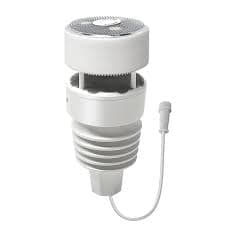
Ecowitt WN90LP Modbus
Integrates Ecowitt WN90LP wired Modbus weather station via RTU to TCP gateway.
Template for the Ecowitt WN90LP wired Modbus weather station. Reads temperature, humidity, wind speed and direction, rainfall, light intensity, UV index, and absolute pressure via Modbus TCP using an RTU to TCP gateway.
- Protocol
- Modbus TCP
- Connection
- Ethernet, Modbus TCP
- Registers
- 10, read only
- Brand
- Ecowitt
- Key readings
- Temperature · Humidity · Wind Speed and Gust · Wind Direction · Rainfall and Rain Counter · Light, UVI, ABS Pressure
- Compatible models
- WN90LP
- Last updated
Registers (10)
10 read, 0 write
| Name | Unit | Access | Address (Hidden until you enter your email) | Function (hidden) | Type (hidden) |
|---|---|---|---|---|---|
| Humidity | % | Read | |||
| Light | Lux | Read | |||
| Temperatur | °C | Read | |||
| Wind Speed | m/s | Read | |||
| Wind Gust | m/s | Read | |||
| Wind Direction | °C | Read | |||
| Rainfall | mm | Read | |||
| ABS Pressure | hPa | Read | |||
| RainCounter | mm | Read | |||
| UVI | Read |
Loading registers…
Send your device list
If a device is not in the library yet, we build the template for free as soon as we have the register data.
Use cases
- Monitor outdoor temperature and humidity on a live cloud dashboard for building management.
- Log wind speed and gust data over time to assess rooftop conditions for solar panel installations.
- Create an alert when UV index exceeds a defined threshold to notify facility managers.
- Track cumulative rainfall using the rain counter to support irrigation or drainage planning.
- Combine light intensity readings with solar inverter data to evaluate PV system performance ratios.
- Set up notifications when barometric pressure drops sharply, indicating approaching storm conditions.
Installation
Mount the Ecowitt WN90LP outdoors according to the manufacturer's installation guide and run the RS485 wiring to your equipment cabinet.
Connect the RS485 A and B lines from the WN90LP to an RTU to TCP gateway, ensuring correct polarity.
Configure the RTU to TCP gateway with serial parameters: 9600 baud, 8 data bits, no parity, 1 stop bit.
Verify the WN90LP Modbus address is set to 144 decimal (0x90 hex), which is the factory default.
Connect the ModbusCloud Gateway to the same IP network as the RTU to TCP gateway.
Import the Ecowitt WN90LP template in the ModbusCloud platform and assign the correct IP address and port of the RTU to TCP gateway.
Things to watch for
Why am I not receiving any data from the WN90LP?
Confirm that the RTU to TCP gateway is configured with the correct serial parameters: 9600 baud, 8 data bits, no parity, 1 stop bit. Also verify the Modbus slave address is set to 144 decimal (0x90 hex).
Can I connect the WN90LP directly to the ModbusCloud gateway via TCP?
No. The WN90LP uses Modbus RTU over RS485. You need an RTU to TCP gateway to convert the serial communication to Modbus TCP before the ModbusCloud gateway can poll it.
What if I have multiple Modbus RTU devices on the same RS485 bus?
Ensure each device has a unique Modbus address. The WN90LP defaults to address 144. Check your other devices do not share this address and verify proper RS485 bus termination.
Are the temperature and pressure values raw or scaled?
The template handles register scaling automatically. Values displayed on the ModbusCloud dashboard are in standard units and do not require additional manual conversion.





Want to see how it works?
