








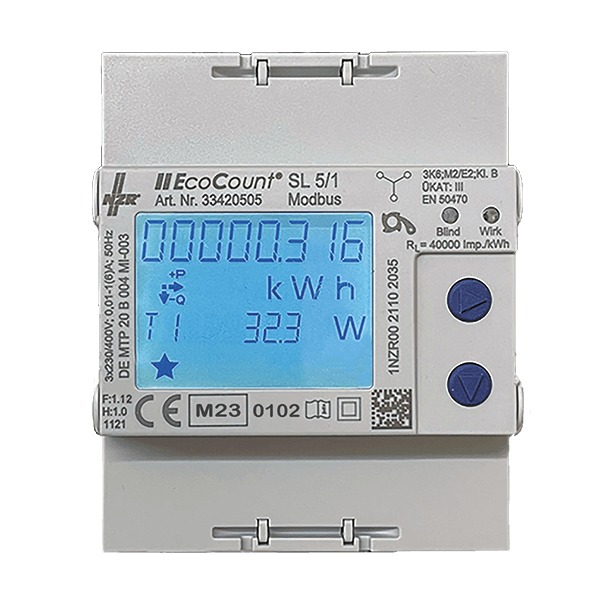
NZR EcoCount SL
Reads energy metering data from NZR EcoCount SL meters.
This template reads energy metering data from NZR EcoCount SL meters via Modbus TCP. It captures import and export energy totals, per-phase voltage, current, power, power factor, frequency, and temperature. A reset command for the T0 energy counter is also supported.
- Protocol
- Modbus TCP
- Connection
- Ethernet, Modbus TCP
- Registers
- 45, read and write
- Brand
- NZR
- Key readings
- Total Import/Export Energy (T0, T1, T2) · Voltage L1 to L3 · Current L1 to L3 and N · Power L1 to L3 (active, reactive, apparent) · Frequency and Temperature · Total Power Factor
- Available commands
- Reset T0
- Compatible models
- EcoCount SL 85 Modbus Import (33420518) · EcoCount SL 5/1 Modbus Import (33420505) · EcoCount SL 85 Modbus Import+Export (43420518) · EcoCount SL 5/1 Modbus Import+Export (43420505)
- Last updated
Registers (45)
44 read, 1 write
| Name | Unit | Access | Address (Hidden until you enter your email) | Function (hidden) | Type (hidden) |
|---|---|---|---|---|---|
| Total Import +A T1 kWh | kWh | Read | |||
| Total Import +A T1 Wh | Wh | Read | |||
| Total Import +A T2 kWh | kWh | Read | |||
| Total Import +A T2 Wh | Wh | Read | |||
| Total Export -A T1 kWh | kWh | Read | |||
| Total Export -A T1 Wh | Wh | Read | |||
| Total Export -A T2 kWh | kWh | Read | |||
| Total Export -A T2 Wh | Wh | Read | |||
| Total Import +R T1 kvarh | kvarh | Read | |||
| Total Import +R T1 varh | varh | Read | |||
| Total Import +R T2 kvarh | kvarh | Read | |||
| Total Import +R T2 varh | varh | Read | |||
| Total Export -R T1 kvarh | kvarh | Read | |||
| Total Export -R T1 varh | varh | Read | |||
| Total Export -R T2 kvarh | kvarh | Read | |||
| Total Export -R T2 varh | varh | Read | |||
| Total active Power | kW | Read | |||
| Total reactive Power | var | Read | |||
| Total apparent Power | VA | Read | |||
| Frequency | Hz | Read | |||
| Total Powerfactor | Read | ||||
| Power L1 | kW | Read | |||
| VAr L1 | var | Read | |||
| VA L1 | VA | Read | |||
| Voltage L1 | V | Read | |||
| Current L1 | A | Read | |||
| Powerfactor L1 | Read | ||||
| Power L2 | kW | Read | |||
| VAr L2 | var | Read | |||
| VA L2 | VA | Read | |||
| Voltage L2 | V | Read | |||
| Current L2 | A | Read | |||
| Powerfactor L2 | Read | ||||
| Power L3 | kW | Read | |||
| VAr L3 | var | Read | |||
| VA L3 | VA | Read | |||
| Voltage L3 | V | Read | |||
| Current L3 | A | Read | |||
| Powerfactor L3 | Read | ||||
| Total Import +A T0 kWh | kWh | Read | |||
| Total Import +A T0 Wh | Wh | Read | |||
| Current N | A | Read | |||
| Temperature | °C | Read | |||
| Serialnumber | Read | ||||
| Reset T0 | Write |
Loading registers…
Send your device list
If a device is not in the library yet, we build the template for free as soon as we have the register data.
Use cases
- Monitor total import and export energy consumption on a live cloud dashboard for each customer site.
- Create an alert when phase voltage drops below or exceeds acceptable limits for more than five minutes.
- Log per-phase power and current data over time to identify load imbalances across the three phases.
- Track energy usage across tariff registers T0, T1, and T2 to verify utility billing accuracy.
- Reset the T0 energy counter remotely after commissioning or tenant changeover without a site visit.
Installation
Wire the NZR EcoCount SL to the electrical circuit according to the model type: direct-connect for 85 A variants or via current transformers for 5/1 A variants.
Connect the meter to the same TCP/IP network as the ModbusCloud Gateway using a suitable Ethernet or Modbus TCP gateway connection.
Verify or set the Modbus device address (default: 1) and baud rate (default: 19200) on the NZR EcoCount SL using the meter front panel or configuration tool.
In the ModbusCloud portal, add a new device and import the NZR EcoCount SL template from the template library.
Set the correct Modbus TCP address and unit ID in the ModbusCloud device configuration to match the meter settings.
Confirm that live readings for voltage, current, and energy appear on the ModbusCloud dashboard before completing the installation.
Things to watch for
I see zero values on export energy registers. Is the template configured incorrectly?
If you are using an import-only model (article 33420518 or 33420505), export registers are not populated by the meter. This is expected behavior. Only Import+Export models (43420518, 43420505) return export data.
What is the default Modbus address and baud rate for the NZR EcoCount SL?
The default device address is 1 and the default baud rate is 19200. Verify these settings on the meter display or configuration interface before connecting.
Energy values seem duplicated in the register list. Which ones should I use?
The meter provides energy totals in both kWh and Wh as uint32 register pairs. Use whichever unit fits your reporting needs. The kWh registers are convenient for dashboard display, while Wh registers offer higher resolution.
Can I reset the energy counter remotely?
Yes. The template includes a write command to reset the T0 counter. Use this function from the ModbusCloud portal during commissioning or when you need to clear accumulated energy data.






Want to see how it works?
