





Peacefair PZEM-014 / PZEM-016
Single-phase AC measuring module for voltage, current, power and energy on RS485.
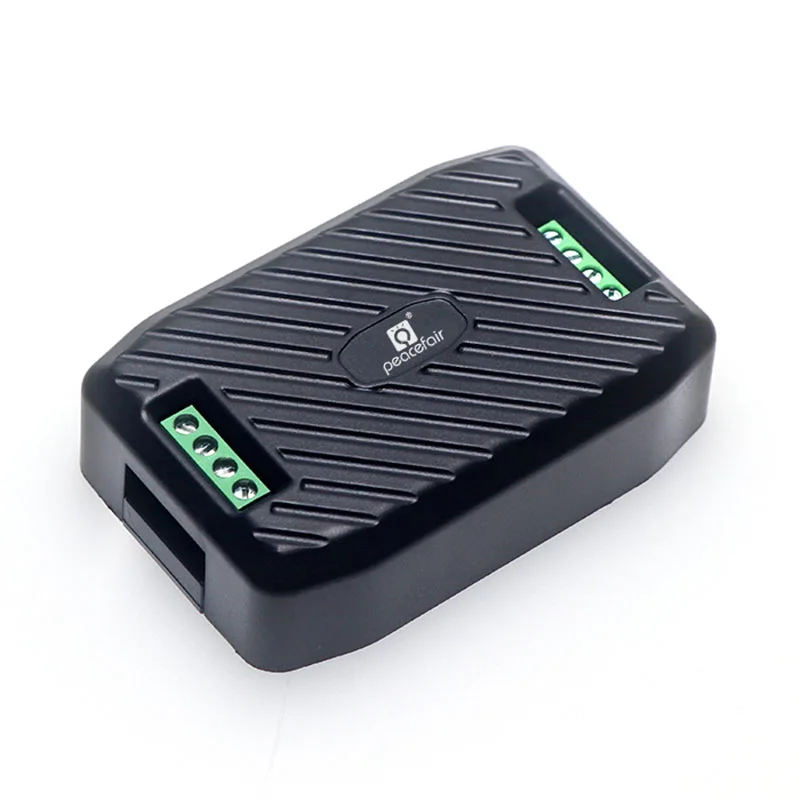
The Peacefair PZEM-014 and PZEM-016 are single-phase AC measuring modules without a display that measure voltage, current, power and energy of a circuit or appliance. This Modbus RTU template reads all measured values and the alarm status, and lets you set the power alarm threshold and the address from ModbusCloud.
- Protocol
- Modbus RTU
- Connection
- RS485, 9600 baud
- Registers
- 9, read and write
- Brand
- Peacefair
- Key readings
- Voltage · Current · Active power · Active energy · Frequency · Power factor
- Available commands
- Power alarm threshold · Modbus address
- Compatible models
- PZEM-014 · PZEM-016
- Last updated
Registers (9)
9 read, 2 write
| Name | Unit | Access | Address (Hidden until you enter your email) | Function (hidden) | Type (hidden) |
|---|---|---|---|---|---|
| Voltage | V | Read | 0 | FC04 | uint16 |
| Current | A | Read | 1 | FC04 | uint32 |
| Active Power | W | Read | 3 | FC04 | uint32 |
| Active Energy | Wh | Read | 5 | FC04 | uint32 |
| Frequency | Hz | Read | 7 | FC04 | uint16 |
| Power Factor | Read | ||||
| Power Alarm Status | Read | ||||
| Power Alarm Threshold | W | Read and write | |||
| Modbus Address | Read and write |
Loading registers…
Send your device list
If a device is not in the library yet, we build the template for free as soon as we have the register data.
Use cases
- Show voltage, current and power of a single circuit on a ModbusCloud dashboard.
- Track the energy counter per appliance for monthly consumption reports.
- Get an alert when the power alarm status reports that the threshold is exceeded.
- Set the power alarm threshold remotely when the connected load changes.
- Compare power factor over time to spot motors or drivers that degrade.
Installation
Wire the voltage input to the circuit and, for the PZEM-016, clamp the current transformer around one conductor. The PZEM-014 carries the load current through its own terminals.
Connect RS485 A and B to the RS485 port of the ModbusCloud Gateway and terminate the bus at both ends.
Give each module a unique address before you connect several on one bus; the default address is 1.
In ModbusCloud, add a Modbus device (RTU) with that address, 9600 baud, no parity, 1 stop bit, and import this template.
Check that Voltage and Frequency show plausible values.
Things to watch for
Several modules on one bus all answer at once. What now?
New modules share the same address. Connect them one at a time, write a new value to Modbus Address on each, and only then put them together on the bus. Every module needs its own address from 1 to 247.
Why are current and power far too large?
Current, power and energy are 32-bit values with the low word first. If the word order is swapped you get huge numbers. This template already reads them low word first; check that you did not change the word order on the device in ModbusCloud.
What happens when I write Modbus Address?
The module answers on the new address immediately, so ModbusCloud loses the connection until you change the address of the device there too. Write the power alarm threshold in watts; it only changes the alarm status register and does not switch anything.
The module does not answer at all.
The serial settings are fixed at 9600 baud, 8 data bits, no parity, 1 stop bit. Check A and B, the termination, and that the module has mains voltage on its measuring input, because the voltage input also powers the measuring side.
More Peacefair templates
Want to see how it works?