








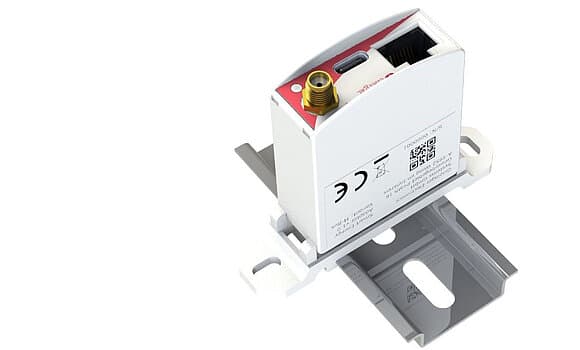
SMA SmartMeterAdapter ÖsterreichsEnergie
Reads power meter data via Smart Meter Adapter over WLAN
This template reads real-time power and cumulative energy data from the Österreichs Energie Smart Meter Adapter over Modbus TCP via WLAN. It captures net power, total energy imported, and total energy exported from compatible smart meters such as those provided by Salzburg AG.
- Protocol
- Modbus TCP
- Connection
- Ethernet, Modbus TCP
- Registers
- 3, read only
- Brand
- SMA Adapter
- Key readings
- Total energy exported · Total energy imported · Net power
- Compatible models
- Smart Meter Adapter
- Last updated
Registers (3)
3 read, 0 write
| Name | Unit | Access | Address (Hidden until you enter your email) | Function (hidden) | Type (hidden) |
|---|---|---|---|---|---|
| TotWhExp1 | Wh | Read | |||
| TotWhImp1 | Wh | Read | |||
| WattNetz1 | W | Read |
Loading registers…
Send your device list
If a device is not in the library yet, we build the template for free as soon as we have the register data.
Use cases
- Monitor net power consumption and feed-in on a live cloud dashboard for residential PV customers.
- Track cumulative energy import and export over time to verify utility billing accuracy.
- Create an alert when net power exceeds a defined threshold, indicating unexpected high consumption.
- Generate monthly energy reports for customers showing grid import versus solar export.
- Compare energy export trends across multiple sites equipped with the Smart Meter Adapter.
Installation
Ensure the Smart Meter Adapter is connected to your local WLAN network and has a static IP address assigned.
Connect the ModbusCloud Gateway to the same network as the Smart Meter Adapter.
In the ModbusCloud portal, add a new Modbus TCP device and enter the IP address and port of the Smart Meter Adapter.
Import the SMA SmartMeterAdapter Österreichs Energie template from the ModbusCloud template library.
Verify that live values for net power, total energy imported, and total energy exported appear on the dashboard.
If readings show zero or no connection, confirm the adapter is powered on and reachable by pinging its IP address from the gateway network.
Things to watch for
What Modbus TCP port does the Smart Meter Adapter use?
The adapter typically uses the default Modbus TCP port 502. Confirm in the adapter's configuration interface if your unit uses a different port.
Do I need RS-485 wiring for this adapter?
No. The Smart Meter Adapter communicates over WLAN using Modbus TCP. No RS-485 cabling is required between the gateway and the adapter.
What register data type is used?
All registers in this template are uint16. No special byte-order or data-type adjustments are needed in the ModbusCloud device configuration.
Where can I purchase the Smart Meter Adapter?
The adapter is available from Salzburg AG. Contact your local energy provider to confirm availability and compatibility with your installed smart meter.




Want to see how it works?
