








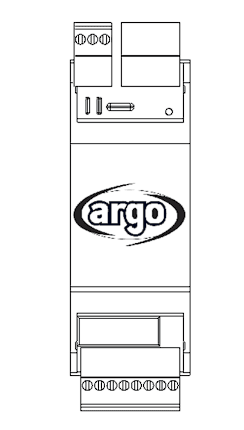
Argo iMODBUS
Interfaces argoclima iM family HVAC systems via Modbus RTU for monitoring and remote management.
The Argo iMODBUS is a Modbus RTU interface for argoclima iM family HVAC systems. This template reads operating parameters including on/off status, temperatures, water flow, power consumption, and setpoints across 14 read-only registers.
- Protocol
- Modbus RTU
- Connection
- RS485, 115200 baud
- Registers
- 14, read only
- Brand
- argoclima
- Key readings
- On/Off Status · Operating Mode · Setpoint · Power Consumption · Supply and Return Water Temp · ACS Water Inlet/Outlet Temp
- Compatible models
- Argo iMODBUS
- Last updated
Registers (14)
14 read, 0 write
| Name | Unit | Access | Address (Hidden until you enter your email) | Function (hidden) | Type (hidden) |
|---|---|---|---|---|---|
| 133 - On_Off | Read | ||||
| 154 - Mode | Read | ||||
| 198 - Setpoint | °C | Read | |||
| 43 - Power Consumption | kW | Read | |||
| 114 - Return Water Temp | °C | Read | |||
| 281 - ACS Water Inlet Temperature | °C | Read | |||
| 292 - ACS Water Outlet Temperature | °C | Read | |||
| 288 - ACS Water flow | l/min | Read | |||
| 194 - Maximum climatic curve setpoint | °C | Read | |||
| 195 - Minimum climatic curve setpoint | °C | Read | |||
| 196 - Ambient temperature below which setpoint is maximum | °C | Read | |||
| 197 - Ambient temperature below which setpoint is minimum | °C | Read | |||
| 121 - Water Flow | m³/h | Read | |||
| 115 - Supply Water Temperature | °C | Read |
Loading registers…
Send your device list
If a device is not in the library yet, we build the template for free as soon as we have the register data.
Use cases
- Monitor supply and return water temperatures on a live dashboard to verify heating or cooling performance.
- Track power consumption of argoclima iM systems over time and generate energy reports for customers.
- Create an alert when ACS water outlet temperature drops below the expected threshold for more than 15 minutes.
- Log climatic curve setpoints alongside ambient temperature readings to validate system tuning remotely.
- Compare water flow rates across multiple argoclima iM installations from a single cloud overview.
- Detect operating mode changes and on/off events to analyse daily runtime patterns for maintenance planning.
Installation
Connect the Argo iMODBUS interface to the argoclima iM unit following the manufacturer wiring instructions, then wire the RS-485 A, B, and GND terminals to your Modbus gateway.
Set the Modbus slave address on the iMODBUS interface to a unique value that does not conflict with other devices on the same bus.
Configure the Modbus gateway serial port to 115200 baud, matching the default baud rate of the iMODBUS interface.
Ensure proper RS-485 bus termination at both ends of the cable run, especially given the high baud rate of 115200.
Import the Argo iMODBUS template in the ModbusCloud portal and assign it to the correct gateway and slave address.
Verify that all 14 registers return valid data on the ModbusCloud dashboard before finalizing the installation.
Things to watch for
Why am I getting communication timeouts with the Argo iMODBUS?
The iMODBUS runs at 115200 baud, which is unusually high for HVAC devices. Confirm your Modbus gateway supports this baud rate. Also check RS-485 wiring for correct polarity and proper termination resistors at both cable ends.
Can I change setpoints or switch the unit on/off through this template?
No. All 14 registers on the iMODBUS interface are read-only. The device filters incoming write requests to prevent system malfunctions. Control must be done locally or through the argoclima native controller.
What is the difference between the two water flow registers?
Register address 288 reports ACS water flow in litres per minute, while register address 121 reports water flow in cubic metres per hour. Both values represent flow measurements but in different units for flexibility in reporting.
Do I need to enable Modbus on the argoclima iM unit separately?
The iMODBUS is a standalone interface module that connects to the iM system. Refer to the argoclima installation manual for the iMODBUS to ensure it is properly linked to the iM unit before attempting Modbus communication.




Want to see how it works?
