








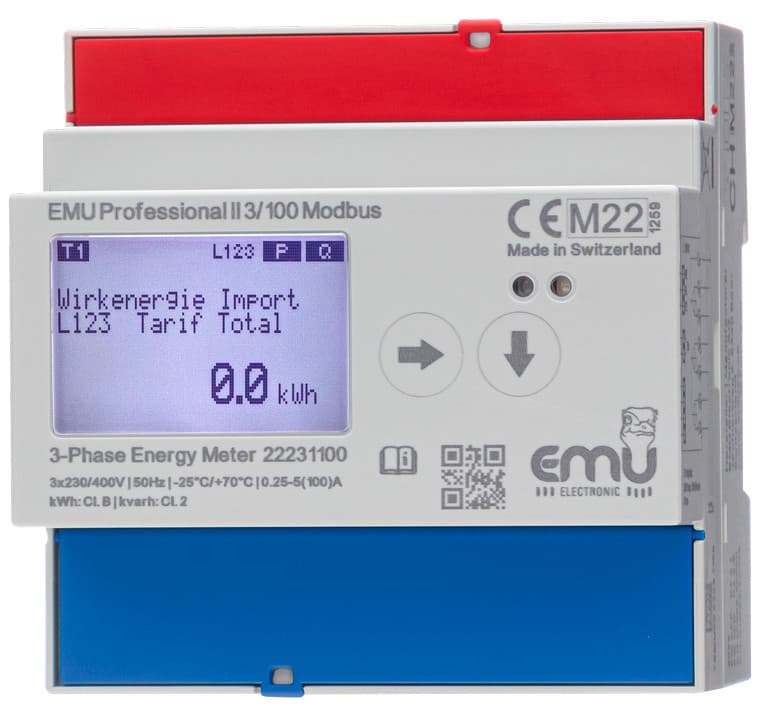
EMU Professional II Modbus RTU
Reads energy, power, voltage, current, and power factor from a 3-phase MID-certified meter.
The EMU Professional II is a MID B+D certified 3-phase DIN rail energy meter with an RS 485 Modbus RTU interface. This template reads active and reactive energy (import/export with tariff registers), per-phase voltage, current, active power, power factor, and frequency. It supports both the 3/100 and 3/5 Modbus variants.
- Protocol
- Modbus RTU
- Connection
- RS485, 19200 baud
- Registers
- 27, read only
- Brand
- EMU
- Key readings
- Active Energy Import/Export L123 (Total, T1, T2) · Reactive Energy Import/Export L123 (Total, T1, T2) · Active Power L1 to L3 and Total · Current L1 to L3 and Total · Voltage L1-N to L3-N · Power Factor L1 to L3, Frequency
- Compatible models
- EMU Professional II 3/100 Modbus · EMU Professional II 3/5 Modbus
- Last updated
Registers (27)
27 read, 0 write
| Name | Unit | Access | Address (Hidden until you enter your email) | Function (hidden) | Type (hidden) |
|---|---|---|---|---|---|
| Active Energy Import L123 Total | kWh | Read | |||
| Active Energy Import L123 T1 | kWh | Read | |||
| Active Energy Import L123 T2 | kWh | Read | |||
| Active Energy Export L123 Total | kWh | Read | |||
| Active Energy Export L123 T1 | kWh | Read | |||
| Active Energy Export L123 T2 | kWh | Read | |||
| Reactive Energy Import L123 Total | kvarh | Read | |||
| Reactive Energy Import L123 T1 | kvarh | Read | |||
| Reactive Energy Import L123 T2 | kvarh | Read | |||
| Reactive Energy Export L123 Total | kvarh | Read | |||
| Reactive Energy Export L123 T1 | kvarh | Read | |||
| Reactive Energy Export L123 T2 | kvarh | Read | |||
| Active Power L123 | W | Read | |||
| Active Power L1 | W | Read | |||
| Active Power L2 | W | Read | |||
| Active Power L3 | W | Read | |||
| Current L123 | A | Read | |||
| Current L1 | A | Read | |||
| Current L2 | A | Read | |||
| Current L3 | A | Read | |||
| Voltage L1N | V | Read | |||
| Voltage L2N | V | Read | |||
| Voltage L3N | V | Read | |||
| Power Factor L1 | Cos | Read | |||
| Power Factor L2 | Cos | Read | |||
| Power Factor L3 | Cos | Read | |||
| Frequency | Hz | Read |
Loading registers…
Send your device list
If a device is not in the library yet, we build the template for free as soon as we have the register data.
Use cases
- Monitor per-phase voltage, current, and active power in real time on a cloud dashboard for multi-tenant buildings.
- Track active energy import and export totals to verify solar self-consumption and grid feed-in.
- Create alerts when power factor on any phase drops below a defined threshold to avoid utility penalties.
- Generate monthly energy reports based on MID-certified readings for tenant billing or ISO 50001 audits.
- Compare tariff register T1 and T2 consumption to optimize time-of-use energy purchasing strategies.
Installation
Wire the RS 485 A and B terminals of the EMU Professional II to the corresponding terminals on the ModbusCloud Gateway, observing correct polarity and using a twisted pair cable.
Set the Modbus slave address on the EMU Professional II using its front-panel configuration menu and note the address for gateway setup.
Confirm the communication settings on the meter: baud rate 19200, 8 data bits, even parity (1), 1 stop bit.
In the ModbusCloud platform, add a new Modbus RTU device on the gateway and select the EMU Professional II Modbus RTU template from the library.
Enter the slave address you configured on the meter and verify that live values for voltage, current, and energy appear on the dashboard.
Things to watch for
I see zero values for instantaneous readings but energy registers work. What is wrong?
Instantaneous registers (power, voltage, current, power factor, frequency) use float32 encoding starting at register 8999. Make sure your gateway is configured to read these as 32-bit floating point values, not as integer registers.
Which baud rate and parity settings should I use?
The EMU Professional II defaults to 19200 baud with even parity (parity setting 1) and 1 stop bit. These settings must match on both the meter and the ModbusCloud gateway.
Can I connect multiple EMU Professional II meters on the same RS 485 bus?
Yes. Assign each meter a unique Modbus slave address via its front-panel menu. Then add a separate device entry in ModbusCloud for each address, all using the same template.
What is the difference between the 3/100 and 3/5 models in terms of the template?
Both models use the same Modbus register map, so the same template works for either variant. The 3/100 model measures current directly up to 100 A, while the 3/5 model requires external current transformers.
Want to see how it works?
