








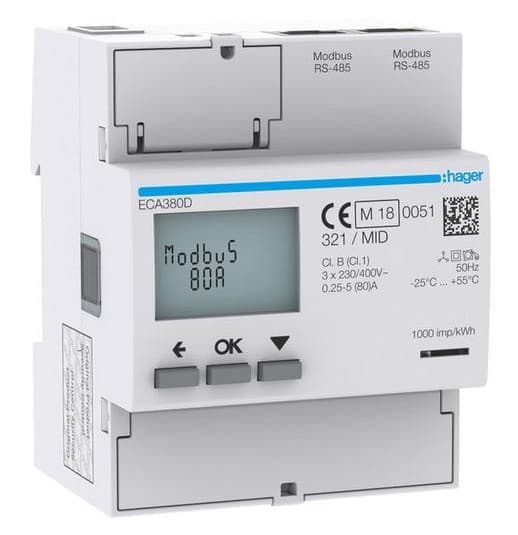
Hager ECA380D Three-phase energy meter
Monitors three-phase energy consumption and power quality via Modbus RTU.
Template for the Hager ECA380D three-phase energy meter via Modbus RTU. Reads voltage, current, power, energy (in and out), frequency, and power factor across all three phases. Designed for direct metering up to 80A with MID certification.
- Protocol
- Modbus RTU
- Connection
- RS485, 19200 baud
- Registers
- 25, read only
- Brand
- Hager
- Key readings
- Voltage L1 to L3 and line-to-line · Current L1 to L3 and N · Power L1 to L3 and total · Energy In and Out per phase and total · Frequency · Power factor (IEC and IEEE)
- Compatible models
- Hager ECA380D
- Last updated
Registers (25)
25 read, 0 write
| Name | Unit | Access | Address (Hidden until you enter your email) | Function (hidden) | Type (hidden) |
|---|---|---|---|---|---|
| Voltage L1 | V | Read | |||
| Voltage L2 | V | Read | |||
| Voltage L3 | V | Read | |||
| Voltage L1-L2 | V | Read | |||
| Voltage L2-L3 | V | Read | |||
| Voltage L3-L1 | V | Read | |||
| Current L1 | A | Read | |||
| Current L2 | A | Read | |||
| Current L3 | A | Read | |||
| Current N | A | Read | |||
| Power L1 | W | Read | |||
| Power L2 | W | Read | |||
| Power L3 | W | Read | |||
| Power | W | Read | |||
| Energy In L1 | kWh | Read | |||
| Energy In L2 | kWh | Read | |||
| Energy In L3 | kWh | Read | |||
| Energy In | kWh | Read | |||
| Energy Out L1 | kWh | Read | |||
| Energy Out L2 | kWh | Read | |||
| Energy Out L3 | kWh | Read | |||
| Energy Out | kWh | Read | |||
| Frequency | Hz | Read | |||
| Power factor IEC | cosΦ | Read | |||
| Power factor IEEE | cosΦ | Read |
Loading registers…
Send your device list
If a device is not in the library yet, we build the template for free as soon as we have the register data.
Use cases
- Monitor three-phase voltage, current, and power on a live cloud dashboard for each customer site.
- Track total energy import and export to verify solar self-consumption and grid feed-in.
- Create an alert when power factor drops below a defined threshold, indicating potential reactive power issues.
- Detect phase imbalance by comparing per-phase current and voltage readings over time.
- Generate monthly energy reports for MID-compliant billing or tenant sub-metering.
- Log frequency deviations to identify grid stability issues at remote locations.
Installation
Wire the RS-485 A and B terminals of the Hager ECA380D to the corresponding terminals on your ModbusCloud Gateway.
Set the Modbus slave address on the Hager ECA380D using the front panel buttons, and note the address for gateway configuration.
Confirm that the meter is configured for 19200 baud and even parity (these are the default communication settings for this device).
Import the Hager ECA380D template from the ModbusCloud template library into your project.
Assign the correct Modbus slave address in the ModbusCloud device settings to match the address configured on the meter.
Verify that live readings for voltage, current, and power appear on the ModbusCloud dashboard after the first polling cycle.
Things to watch for
I see zero values for current and power registers. What is wrong?
Current and power registers are 32-bit values spanning two consecutive Modbus registers. Make sure your gateway is configured for 32-bit register reads with the correct byte and word order. The template expects uint32 for current and int32 for power.
What baud rate and parity settings should I use?
The Hager ECA380D defaults to 19200 baud with even parity (8E1). These settings must match on both the meter and the ModbusCloud gateway. A mismatch will cause communication timeouts.
Energy registers do not update or show unexpected values. How do I fix this?
Energy registers are located at higher address ranges starting at 45160 and 45440. Verify that your gateway supports this address range and that the register offset mapping in the template matches your firmware version.
Can I use this template for the Hager ECA300 or other AGARDIO meters?
This template is built specifically for the Hager ECA380D. Other AGARDIO models may use different register maps or data types. Using the wrong template can result in incorrect readings.


Want to see how it works?
