








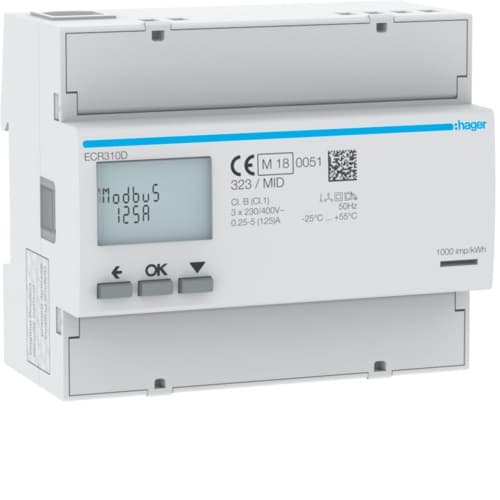
Hager ECR310D Three-phase energy meter
Monitors three-phase energy consumption and production via Modbus RTU.
Template for the Hager ECR310D three-phase energy meter. Reads active and reactive energy (consumed and produced), active power per phase, apparent power, and power factor over Modbus RTU. All 11 registers are read-only.
- Protocol
- Modbus TCP
- Connection
- Ethernet, Modbus TCP
- Registers
- 11, read only
- Brand
- Hager
- Key readings
- Active energy consumed · Active energy produced · Reactive energy consumed · Reactive energy produced · Active Power (total, L1, L2, L3) · Apparent power · Power factor
- Compatible models
- ECR310D
- Last updated
Registers (11)
11 read, 0 write
| Name | Unit | Access | Address (Hidden until you enter your email) | Function (hidden) | Type (hidden) |
|---|---|---|---|---|---|
| Active Power | KW | Read | |||
| Active energy consumed | kWh | Read | |||
| Active energy produced | kWh | Read | |||
| Reactive Power | kvar | Read | |||
| Reactive energy consumed | kvarh | Read | |||
| Reactive energy produced | kvarh | Read | |||
| Active Power L1 | kW | Read | |||
| Active Power L2 | kW | Read | |||
| Active Power L3 | kW | Read | |||
| Apparent power | KvA | Read | |||
| Power factor | Read |
Loading registers…
Send your device list
If a device is not in the library yet, we build the template for free as soon as we have the register data.
Use cases
- Monitor total active energy consumption and production on a live cloud dashboard for your customer.
- Track per-phase active power to detect load imbalances across L1, L2, and L3.
- Create an alert when the power factor drops below a defined threshold for more than 10 minutes.
- Log reactive energy values over time to advise customers on power factor correction.
- Compare consumed and produced energy counters to verify solar PV self-consumption ratios.
- Export historical apparent power data for energy audit reports.
Installation
Wire the Hager ECR310D to the ModbusCloud Gateway using a shielded RS-485 twisted pair cable, connecting A, B, and GND terminals.
Set the Modbus RTU slave address on the ECR310D using the meter's front panel buttons, and note the address for gateway configuration.
Verify the baud rate and parity settings on the meter match the gateway configuration (check the Hager documentation for factory defaults).
Power on the gateway, open the ModbusCloud platform, and import the Hager ECR310D template from the template library.
Assign the correct Modbus slave address in the gateway configuration so it matches the address set on the physical meter.
Confirm that all 11 registers return valid data on the ModbusCloud dashboard before closing the distribution board.
Things to watch for
What baud rate and parity settings does the ECR310D use by default?
Check the Hager ECR310D installation manual for factory default communication settings. Common defaults for Hager meters are 9600 baud, 8 data bits, 1 stop bit, and no parity, but this can vary by firmware version. Make sure the gateway serial port matches exactly.
Why do I see zero or incorrect values for active power registers?
Active power and reactive power registers are int32 (two consecutive 16-bit registers). Ensure the gateway is configured to read 32-bit integers with the correct byte order. A wrong word swap will produce zero or wildly incorrect values.
Can I use this template over Modbus TCP instead of RTU?
The ECR310D communicates natively over Modbus RTU via RS-485. If your gateway supports RTU-to-TCP bridging, the template will still work because the register map is identical. The gateway handles the protocol conversion automatically.
Register addresses start at 45073. Do I need to subtract an offset?
Some Modbus implementations use a one-based addressing convention while others use zero-based. If your readings are empty, try subtracting 1 from each register address in the gateway configuration. The template is pre-configured with the correct offsets for ModbusCloud gateways.



Want to see how it works?
