









Hager ECR180D
Single-phase 80 A MID energy meter that counts import and export on up to 8 tariffs.
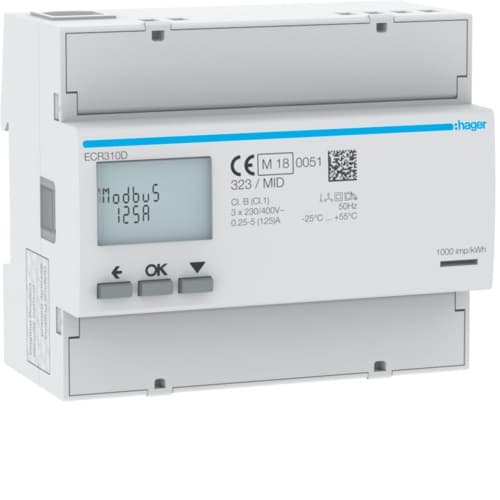
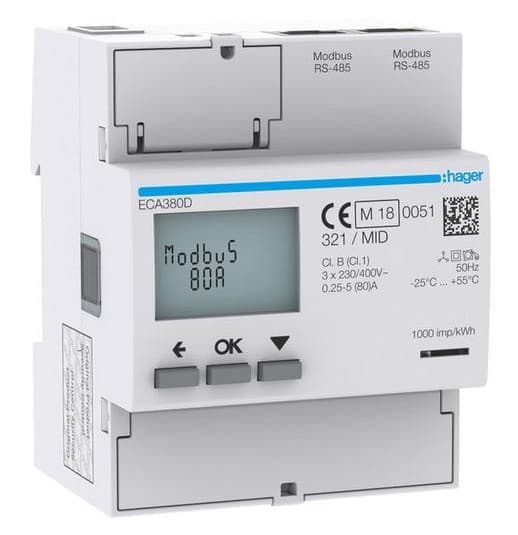
The Hager ECR180D is a single-phase MID energy meter for direct connection up to 80 A that counts imported and exported energy in distribution boards. This Modbus RTU template reads energy per tariff, power, voltage, current and power factor and lets you select the tariff and reset partial counters from ModbusCloud.
- Protocol
- Modbus RTU
- Connection
- RS485, 19200 baud
- Registers
- 98, read and write
- Brand
- Hager
- Key readings
- Imported energy · Exported energy · Active power · Voltage · Current · Power factor · Frequency
- Available commands
- Active tariff · Partial counter reset · Modbus address and speed
- Compatible models
- ECR180D · ECA180D
- Last updated
Registers (98)
97 read, 4 write
| Name | Unit | Access | Address (Hidden until you enter your email) | Function (hidden) | Type (hidden) |
|---|---|---|---|---|---|
| Voltage | V | Read | |||
| Current | A | Read | |||
| Active Power | kW | Read | |||
| Reactive Power | kvar | Read | |||
| Apparent Power | kVA | Read | |||
| Frequency | Hz | Read | |||
| Power Factor IEC | Read | ||||
| Power Factor IEEE | Read | ||||
| Active Power L1 | kW | Read | |||
| Reactive Power L1 | kvar | Read | |||
| Apparent Power L1 | kVA | Read | |||
| Power Factor L1 IEC | Read | ||||
| Power Factor L1 IEEE | Read | ||||
| Imported Active Energy | kWh | Read | |||
| Exported Active Energy | kWh | Read | |||
| Imported Reactive Energy | kvarh | Read | |||
| Exported Reactive Energy | kvarh | Read | |||
| Partial Imported Active Energy | kWh | Read | |||
| Partial Exported Active Energy | kWh | Read | |||
| Imported Active Energy Wh | Wh | Read | |||
| Exported Active Energy Wh | Wh | Read | |||
| Imported Active Energy T1 | kWh | Read | |||
| Imported Active Energy T2 | kWh | Read | |||
| Imported Active Energy T3 | kWh | Read | |||
| Imported Active Energy T4 | kWh | Read | |||
| Imported Active Energy T5 | kWh | Read | |||
| Imported Active Energy T6 | kWh | Read | |||
| Imported Active Energy T7 | kWh | Read | |||
| Imported Active Energy T8 | kWh | Read | |||
| Exported Active Energy T1 | kWh | Read | |||
| Exported Active Energy T2 | kWh | Read | |||
| Exported Active Energy T3 | kWh | Read | |||
| Exported Active Energy T4 | kWh | Read | |||
| Exported Active Energy T5 | kWh | Read | |||
| Exported Active Energy T6 | kWh | Read | |||
| Exported Active Energy T7 | kWh | Read | |||
| Exported Active Energy T8 | kWh | Read | |||
| Imported Reactive Energy T1 | kvarh | Read | |||
| Imported Reactive Energy T2 | kvarh | Read | |||
| Imported Reactive Energy T3 | kvarh | Read | |||
| Imported Reactive Energy T4 | kvarh | Read | |||
| Imported Reactive Energy T5 | kvarh | Read | |||
| Imported Reactive Energy T6 | kvarh | Read | |||
| Imported Reactive Energy T7 | kvarh | Read | |||
| Imported Reactive Energy T8 | kvarh | Read | |||
| Exported Reactive Energy T1 | kvarh | Read | |||
| Exported Reactive Energy T2 | kvarh | Read | |||
| Exported Reactive Energy T3 | kvarh | Read | |||
| Exported Reactive Energy T4 | kvarh | Read | |||
| Exported Reactive Energy T5 | kvarh | Read | |||
| Exported Reactive Energy T6 | kvarh | Read | |||
| Exported Reactive Energy T7 | kvarh | Read | |||
| Exported Reactive Energy T8 | kvarh | Read | |||
| Partial Imported Active Energy T1 | kWh | Read | |||
| Partial Imported Active Energy T2 | kWh | Read | |||
| Partial Imported Active Energy T3 | kWh | Read | |||
| Partial Imported Active Energy T4 | kWh | Read | |||
| Partial Imported Active Energy T5 | kWh | Read | |||
| Partial Imported Active Energy T6 | kWh | Read | |||
| Partial Imported Active Energy T7 | kWh | Read | |||
| Partial Imported Active Energy T8 | kWh | Read | |||
| Partial Exported Active Energy T1 | kWh | Read | |||
| Partial Exported Active Energy T2 | kWh | Read | |||
| Partial Exported Active Energy T3 | kWh | Read | |||
| Partial Exported Active Energy T4 | kWh | Read | |||
| Partial Exported Active Energy T5 | kWh | Read | |||
| Partial Exported Active Energy T6 | kWh | Read | |||
| Partial Exported Active Energy T7 | kWh | Read | |||
| Partial Exported Active Energy T8 | kWh | Read | |||
| Active Tariff | Read | ||||
| Set Tariff | Read and write | ||||
| Tariff Mode | Read | ||||
| Physical Input Tariff | Read | ||||
| Number of Tariffs | Read | ||||
| Reset Partial Energies | Write | ||||
| Network Type | Read | ||||
| MID Certified | Read | ||||
| Overflow Value | Read | ||||
| Overflow Events Imported Active | Read | ||||
| Overflow Events Imported Reactive | Read | ||||
| Overflow Events Exported Active | Read | ||||
| Overflow Events Exported Reactive | Read | ||||
| Modbus Address | Read and write | ||||
| Baud Rate and Parity | Read and write | ||||
| Switch-on Count | Read | ||||
| Button Push Count | Read | ||||
| Vendor Name | Read | ||||
| Product Code | Read | ||||
| Firmware Version | Read | ||||
| Vendor URL | Read | ||||
| Product Name | Read | ||||
| Model Name | Read | ||||
| User Application Name | Read | ||||
| Hardware Version | Read | ||||
| Serial Number | Read | ||||
| Production Site Code | Read | ||||
| Production Day of Year | Read | ||||
| Production Year | Read |
Loading registers…
Send your device list
If a device is not in the library yet, we build the template for free as soon as we have the register data.
Use cases
- Track energy per apartment or tenant on a ModbusCloud dashboard and export it as CSV for billing.
- Compare imported and exported energy on a circuit with PV to see how much is used on site.
- Switch the meter to a different tariff from a ModbusCloud automation based on the energy price.
- Set an alert on active power to spot a heat pump or charger that keeps running.
- Reset the partial counter of a tariff at the start of a period and read its consumption at the end.
Installation
Wire RS485 A and B from the meter to the ModbusCloud Gateway and terminate both bus ends with 120 ohm.
Set the Modbus address, baud rate and parity on the meter with the push buttons, for example address 1, 19200 baud, 8E1.
If you want to switch tariffs over Modbus, set the tariff mode on the meter keypad to Modbus.
In ModbusCloud, add a Modbus device with the same address and settings and import the Hager ECR180D template.
Check that the voltage shows around 230 V and that the imported energy matches the display.
Things to watch for
The meter does not respond. What should I check?
Check A and B, the termination at both bus ends, and that address, baud rate, parity and stop bits in ModbusCloud match the values set on the meter. The meter has no fixed factory values, so read them from its display menu. Every meter on the bus needs its own address.
Why do the Wh energy registers return an error?
The energy counters in Wh are only available on newer firmware. On older meters those two registers answer with an exception; use the counters in kWh instead, which every firmware provides.
Why do some readings show a very large number?
The meter returns 65535 or 4294967295 for values it does not have, and the power factor reads 1 when no power flows. The template only holds registers that a single-phase meter fills, so a very large value usually means the register was added by hand.
How do I change the tariff or reset a partial counter by writing?
Writing the tariff only works when the tariff mode on the keypad is set to Modbus; write 1 to 8. To reset partial counters, write a bit pattern where bit 0 is tariff 1 and bit 7 is tariff 8. A reset cannot be undone, and the total partial counters drop by the same amount.



Want to see how it works?
