








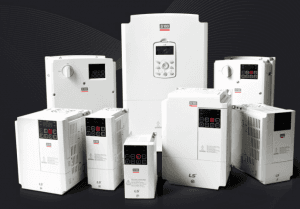
LSLV-S100
Controls speed and torque of 3-phase motors via a variable speed drive.
Template for the LS ELECTRIC LSLV-S100 AC variable speed drive over Modbus RTU. Read operation status and write frequency setpoints and drive commands directly from the ModbusCloud platform.
- Protocol
- Modbus RTU
- Connection
- RS485, 9600 baud
- Registers
- 3, read and write
- Brand
- LS ELECTRIC
- Key readings
- Operation status
- Available commands
- Frequency · Drive command
- Compatible models
- LSLV-S100
- Last updated
Registers (3)
1 read, 2 write
| Name | Unit | Access | Address (Hidden until you enter your email) | Function (hidden) | Type (hidden) |
|---|---|---|---|---|---|
| Operation status | Read | ||||
| frequency | Write | ||||
| drive comand | Write |
Loading registers…
Send your device list
If a device is not in the library yet, we build the template for free as soon as we have the register data.
Use cases
- Monitor the real-time operation status of an LSLV-S100 drive on a cloud dashboard from any location.
- Adjust the motor frequency setpoint remotely to optimize airflow in an HVAC ventilation system.
- Send drive start and stop commands from the ModbusCloud platform to control pump or fan operation.
- Create alerts when the drive enters a fault state so a technician can respond without delay.
- Log operating frequency over time to analyze energy consumption and identify optimization opportunities.
- Verify correct motor speed after a remote setpoint change without visiting the site.
Installation
Wire the RS-485 A and B terminals of the ModbusCloud Gateway to the corresponding RS-485 communication terminals on the LSLV-S100 drive.
On the LSLV-S100 keypad or parameter group, set the Modbus slave address, baud rate to 9600, data bits to 8, and parity to match the gateway configuration.
Enable Modbus RTU communication on the drive by setting the appropriate communication source parameter so the drive accepts commands over the serial bus.
In the ModbusCloud platform, add a new device and import the LSLV-S100 template, then assign the correct Modbus slave address.
Verify the connection by checking that the operation status register returns a valid value on the ModbusCloud dashboard.
Things to watch for
The gateway cannot communicate with the LSLV-S100. What should I check?
Verify that the RS-485 wiring is correct, with A connected to A and B to B. Confirm the slave address, baud rate (9600), data bits, and parity settings match between the drive and the gateway. Also ensure no other device on the bus shares the same slave address.
I can read status but cannot write frequency or drive commands. Why?
The LSLV-S100 must be configured to accept commands via Modbus rather than from the local keypad. Check the drive's frequency command source and run command source parameters, and set them to the communication option.
What RS-485 termination is needed on the bus?
If the LSLV-S100 is the last device on the RS-485 bus, enable or install a 120 ohm termination resistor at the drive end. A matching termination resistor should also be present at the gateway end of the bus.
The frequency value displayed in ModbusCloud seems incorrect or scaled wrong. How do I fix this?
LS ELECTRIC drives typically represent frequency in units of 0.01 Hz in the Modbus register. Ensure the template scaling factor is set to divide the raw register value by 100 to display the correct frequency in Hz.




Want to see how it works?
