








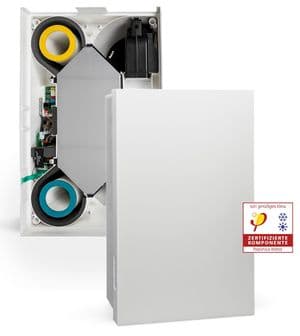
Meltem M-WRG Modbus
Monitors and controls decentralized home ventilation with heat recovery via Modbus RTU.
Template for Meltem M-WRG decentralized ventilation units with heat recovery via Modbus RTU. Reads temperatures, humidity, CO2, VOC, airflow levels, filter status, and operating hours. Allows control of ventilation mode and individual fan settings.
- Protocol
- Modbus RTU
- Connection
- RS485, 19200 baud
- Registers
- 20, read and write
- Key readings
- Exhaust/outdoor/extract/supply air temperature · Extract and supply air humidity · CO2 extract air · VOC supply air · Ventilation level extract/supply air · Filter change indicator and operating hours
- Available commands
- Ventilation mode · Supply air fan · Exhaust air fan · Write command
- Compatible models
- M-WRG-II P-M (-F) · M-WRG-II P-M (-FC) · M-WRG-II E-M (-F) · M-WRG-II E-M (-FC) · M-WRG-II E-M · M-WRG-II P-M · M-WRG-S M · M-WRG-S M-F · M-WRG-S M-FC
- Last updated
Registers (20)
16 read, 4 write
| Name | Unit | Access | Address (Hidden until you enter your email) | Function (hidden) | Type (hidden) |
|---|---|---|---|---|---|
| Exhaust air temperature | °C | Read | |||
| Outdoor air temperature | °C | Read | |||
| Extract air temperature | °C | Read | |||
| Supply air temperature | °C | Read | |||
| Humidity, extract air | % | Read | |||
| Humidity, supply air | % | Read | |||
| Ventilation level for extract air | m³/h | Read | |||
| Ventilation level for supply air | m³/h | Read | |||
| Air filter change indicator | Read | ||||
| Time until air filter change | — | Read | |||
| Ventilation unit operating hours | h | Read | |||
| Fan motors operating hours | h | Read | |||
| Error message id | Read | ||||
| Frost protection active | Read | ||||
| CO2, extract air | ppm | Read | |||
| VOC, supply air | % | Read | |||
| Ventilation mode | Write | ||||
| Supply air fan | Write | ||||
| Write Command | Write | ||||
| Exhaust air fan | Write |
Loading registers…
Send your device list
If a device is not in the library yet, we build the template for free as soon as we have the register data.
Use cases
- Monitor indoor air quality by tracking CO2 and VOC levels on a live cloud dashboard for residential clients.
- Create an alert when the filter change indicator activates so maintenance can be scheduled proactively.
- Log extract and supply air temperatures over time to verify heat recovery efficiency across seasons.
- Remotely adjust ventilation mode and fan speeds to respond to occupant comfort feedback without a site visit.
- Track cumulative operating hours to plan preventive maintenance intervals for multiple installed units.
- Set up threshold alerts for humidity levels to detect potential condensation or mould risk in the building.
Installation
Enable Modbus RTU on the Meltem M-WRG unit and note the configured slave address as shown in the unit settings.
Wire the RS-485 A and B terminals from the Meltem M-WRG unit to the corresponding terminals on the ModbusCloud Gateway.
Configure the gateway serial port to 19200 baud, even parity, and 8 data bits to match the Meltem default settings.
Import the Meltem M-WRG Modbus template from the ModbusCloud template library and assign the correct slave address.
Verify communication by checking that temperature and humidity readings appear on the ModbusCloud dashboard.
Test control functions by changing the ventilation mode or fan settings from the dashboard and confirming the unit responds.
Things to watch for
Why do temperature values appear as zero or incorrect numbers?
Temperature registers use float32 encoding, occupying two consecutive Modbus registers. Ensure the gateway is configured to read these registers as float32 rather than uint16. Incorrect byte or word order will produce wrong values.
What baud rate and parity settings does the Meltem M-WRG require?
The default communication settings are 19200 baud with even parity (1). These must match exactly on the Modbus gateway, otherwise the unit will not respond.
How do I find or change the Modbus slave address of the unit?
The slave address is configured in the Meltem unit settings menu. Consult the M-WRG installation manual for the exact procedure. Each unit on the same RS-485 bus must have a unique address.
Control commands do not seem to take effect on the unit. What is wrong?
The Meltem M-WRG requires a write command register to be triggered after setting fan or mode values. Make sure the write command is sent after updating the desired control registers.






Want to see how it works?
