








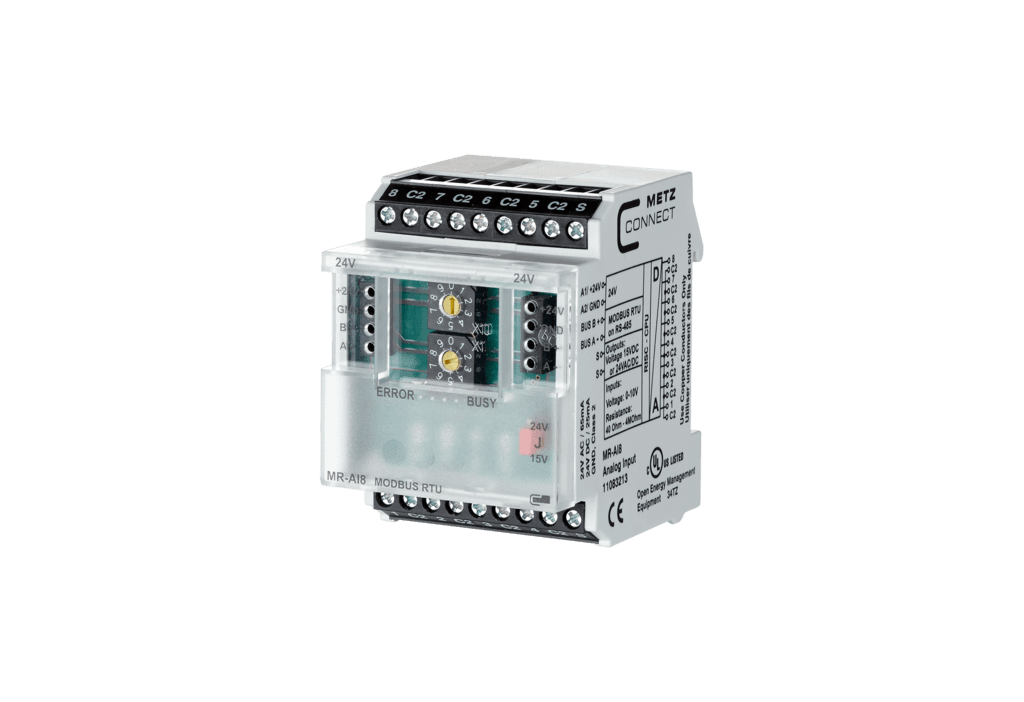
Metz Connect MR-AI8 Modbus RTU
Reads 8 configurable resistance or voltage inputs via Modbus RTU
The Metz Connect MR-AI8 is a Modbus RTU I/O module with 8 individually configurable analog inputs for measuring resistances and voltages. This template reads all 8 input values and allows configuration of each input's sensor type via writable registers.
- Protocol
- Modbus RTU
- Connection
- RS485, 9600 baud
- Registers
- 16, read and write
- Brand
- Metz Connect
- Key readings
- Input 1 to 8 values
- Available commands
- Configuration Input 1 to 8
- Compatible models
- MR-AI8 · MR-F-AI8
- Last updated
Registers (16)
8 read, 8 write
| Name | Unit | Access | Address (Hidden until you enter your email) | Function (hidden) | Type (hidden) |
|---|---|---|---|---|---|
| Input 1 | °C | Read | |||
| Input 2 | °C | Read | |||
| Input 3 | °C | Read | |||
| Input 4 | °C | Read | |||
| Input 5 | °C | Read | |||
| Input 6 | °C | Read | |||
| Input 7 | °C | Read | |||
| Input 8 | °C | Read | |||
| Configuration Input 1 | V | Write | |||
| Configuration Input 2 | V | Write | |||
| Configuration Input 3 | V | Write | |||
| Configuration Input 4 | V | Write | |||
| Configuration Input 5 | V | Write | |||
| Configuration Input 6 | V | Write | |||
| Configuration Input 7 | V | Write | |||
| Configuration Input 8 | V | Write |
Loading registers…
Send your device list
If a device is not in the library yet, we build the template for free as soon as we have the register data.
Use cases
- Monitor up to 8 temperature sensor readings from a distribution cabinet on a live cloud dashboard.
- Configure each input channel remotely for the correct sensor type without visiting the site.
- Create alerts when a measured valve position or temperature reading exceeds a defined threshold.
- Log historical resistance and voltage measurements for HVAC system diagnostics and reporting.
- Track multiple passive temperature sensors across different zones in a building from one module.
Installation
Mount the Metz Connect MR-AI8 on a DIN TH35 rail inside the electrical distribution cabinet per IEC 60715.
Wire the resistance or voltage sensors to the 8 analog input terminals according to the MR-AI8 wiring diagram.
Set the Modbus address and baud rate (default 9600) using the two rotary switches on the front of the module, or configure them via the Mbus configuration tool.
Connect the RS-485 Modbus RTU bus wires (A, B, GND) from the MR-AI8 to the ModbusCloud Gateway.
Import the Metz Connect MR-AI8 template in the ModbusCloud platform and assign the correct Modbus slave address.
Verify that all 8 input values appear on the dashboard and configure each input's sensor type using the writable configuration registers if needed.
Things to watch for
Why are all input values reading zero?
Check that the correct sensor type has been written to each configuration register (addresses 16 to 23). If the input is not configured for the connected sensor, the module may return zero. Use the Mbus configuration tool or the writable template registers to set the correct type.
What baud rate should I use?
The default baud rate is 9600. Make sure the ModbusCloud gateway serial port is also set to 9600 baud with matching parity settings. Baud rate and parity can be adjusted via the front panel rotary switches or software.
What is the difference between the MR-AI8 and MR-F-AI8?
Both models are compatible with this template and share the same register map. The MR-F-AI8 is a variant within the same product family. Consult the Metz Connect documentation for specific hardware differences.
How are the register addresses structured?
Read registers for the 8 input values use int16 format at even addresses: 0, 2, 4, 6, 8, 10, 12, and 14. Configuration registers use uint16 at addresses 16 through 23, one per input channel.
More Metz Connect templates
Want to see how it works?
