








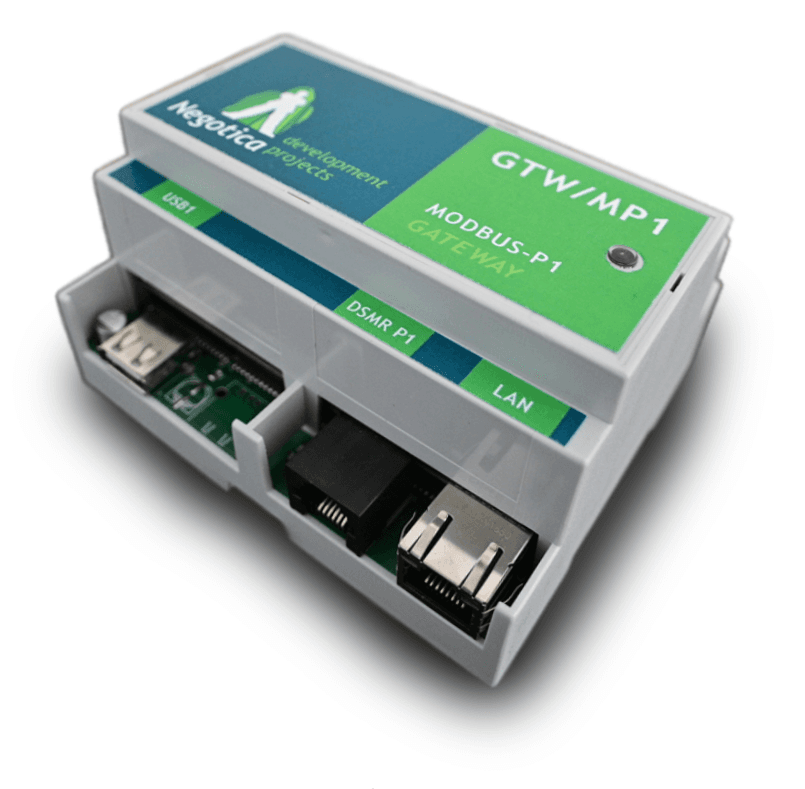
Modbus P1 Gateway
Reads smart meter data via the Negotica Modbus P1 Gateway.
The Negotica Modbus P1 Gateway reads data from P1 smart meters commonly used in Belgium, The Netherlands, and Luxembourg. This template exposes electricity, gas, water, and heat meter readings over Modbus RTU at 115200 baud. All registers use float32 format and update every 1 or 10 seconds depending on the smart meter version.
- Protocol
- Modbus RTU
- Connection
- RS485, 115200 baud
- Registers
- 61, read only
- Brand
- Negotica
- Key readings
- Electricity delivered/received (Tariff 1 and 2) · Actual power delivered/received · Instantaneous voltage L1 to L3 · Instantaneous current L1 to L3 · Gas meter reading · Water and heat/cold meter readings
- Compatible models
- Negotica Modbus P1 Gateway
- Last updated
Registers (61)
61 read, 0 write
| Name | Unit | Access | Address (Hidden until you enter your email) | Function (hidden) | Type (hidden) |
|---|---|---|---|---|---|
| 000. Version information for P1 output | Read | ||||
| 002. Meter Reading electricity delivered to client (Tariff 1) in 0,001 kWh | kWh | Read | |||
| 004. Meter Reading electricity delivered to client (Tariff 2) in 0,001 kWh | kWh | Read | |||
| 006. Meter Reading electricity delivered by client (Tariff 1) in 0,001 kWh | kWh | Read | |||
| 008. Meter Reading electricity delivered by client (Tariff 2) in 0,001 kWh | kWh | Read | |||
| 010. Tariff indicator electricity. | Read | ||||
| 012. Actual electricity power delivered (+P) in 1 Watt resolution | kW | Read | |||
| 014. Actual electricity power received (-P) in 1 Watt resolution | kW | Read | |||
| 016. Number of power failures in any phase | count | Read | |||
| 018. Number of long power failures in any phase | count | Read | |||
| 020. Number of voltage sags in phase L1 | count | Read | |||
| 022. Number of voltage sags in phase L2 | count | Read | |||
| 024. Number of voltage sags in phase L3 | count | Read | |||
| 026. Number of voltage swells in phase L1 | count | Read | |||
| 028. Number of voltage swells in phase L2 | count | Read | |||
| 030. Number of voltage swells in phase L3 | count | Read | |||
| 032. Instantaneous voltage L1 in V resolution | V | Read | |||
| 034. Instantaneous voltage L2 in V resolution | V | Read | |||
| 036. Instantaneous voltage L3 in V resolution | V | Read | |||
| 038. Instantaneous current L1 in A resolution. | A | Read | |||
| 040. Instantaneous current L2 in A resolution. | A | Read | |||
| 042. Instantaneous current L3 in A resolution. | A | Read | |||
| 044. Instantaneous active power L1 (+P) in W resolution | kW | Read | |||
| 046. Instantaneous active power L2 (+P) in W resolution | kW | Read | |||
| 048. Instantaneous active power L3 (+P) in W resolution | kW | Read | |||
| 050. Instantaneous active power L1 (-P) in W resolution | kW | Read | |||
| 052. Instantaneous active power L2 (-P) in W resolution | kW | Read | |||
| 054. Instantaneous active power L3 (-P) in W resolution | kW | Read | |||
| 056. The actual threshold Electricity in A | A | Read | |||
| 058. Actual switch position Electricity (in/out) | Read | ||||
| 060. Actual switch position Electricity (in/out) | Read | ||||
| 062. Text message codes: numeric 8 digits | Read | ||||
| 064. Device-Type slave meter 1 (probably gas) | Read | ||||
| 066. Last meter reading slave meter 1 (probably gas) | m³ | Read | |||
| 068. Last meter reading slave meter 1 (probably gas) | m³ | Read | |||
| 070. Valve position (on/off/released) slave meter 1 (probably gas) | Read | ||||
| 072. Device-Type slave meter 2 | Read | ||||
| 074. Last meter reading slave meter 2 | m³ | Read | |||
| 076. Last meter reading slave meter 2 | m³ | Read | |||
| 078. Valve position (on/off/released) slave meter 2 | Read | ||||
| 080. Device-Type slave meter 3 | Read | ||||
| 082. Last meter reading slave meter 3 | m³ | Read | |||
| 084. Last meter reading slave meter 3 | m³ | Read | |||
| 086. Valve position (on/off/released) slave meter 3 | Read | ||||
| 088. Device-Type slave meter 4 | Read | ||||
| 090. Last meter reading slave meter 4 | m³ | Read | |||
| 092. Last meter reading slave meter 4 | m³ | Read | |||
| 094. Valve position (on/off/released) slave meter 4 | Read | ||||
| 096. Last Meter reading Gas in 0,001 m3 | m³ | Read | |||
| 098. Last Meter reading Gas in 0,001 m3 temperature compensated | m³ | Read | |||
| 100. Valve position Gas (on/off/released) | Read | ||||
| 102. Last meter reading Heat in 0,01 GJ | GJ | Read | |||
| 104. Last meter reading Cold in 0,01 GJ | GJ | Read | |||
| 106. Last meter reading Water in 0,001 m3 | m³ | Read | |||
| 108. Last value of not temperature corrected gas volume in m3 slave meter 1 (BE) | m³ | Read | |||
| 110. Last value of not temperature corrected gas volume in m3 slave meter 2 (BE) | m³ | Read | |||
| 112. Last value of not temperature corrected gas volume in m3 slave meter 3 (BE) | m³ | Read | |||
| 114. Last value of not temperature corrected gas volume in m3 slave meter 4 (BE) | m³ | Read | |||
| 116. Version information (BE) | Read | ||||
| 118. Breaker state (BE) | Read | ||||
| 120. Fuse supervision threshold (L1) (BE) | A | Read |
Loading registers…
Send your device list
If a device is not in the library yet, we build the template for free as soon as we have the register data.
Use cases
- Monitor real-time electricity consumption and feed-in power on a live cloud dashboard for residential customers.
- Log cumulative gas and electricity readings over time to generate monthly energy reports.
- Create an alert when instantaneous voltage on any phase drops below a configurable threshold.
- Track Tariff 1 and Tariff 2 electricity totals to help customers optimize their energy contract.
- Compare delivered and received power to evaluate the self-consumption ratio of a solar installation.
- Monitor water and heat meter readings alongside electricity data for a complete utility overview.
Installation
Connect the Negotica Modbus P1 Gateway to the P1 port on the smart meter using the supplied RJ12 cable.
Wire the RS-485 connection from the gateway to the ModbusCloud Gateway, ensuring correct A, B, and GND terminal mapping.
Set the Modbus RTU baud rate on the ModbusCloud gateway to 115200 to match the Negotica device default.
Configure the Modbus slave address on the Negotica gateway and ensure it does not conflict with other devices on the same bus.
Import the Negotica Modbus P1 Gateway template from the ModbusCloud library and assign the correct slave address.
Remove any unused register objects from the template to reduce polling load and avoid "nan" readings from unsupported meter data.
Things to watch for
Why do some registers return "nan" instead of a value?
The Negotica gateway publishes registers for all possible smart meter versions. If your meter does not support a specific data object, the register returns "nan". Delete these unused objects from the template to improve polling performance.
What baud rate should I use for Modbus RTU?
The default baud rate is 115200. Make sure both the Negotica gateway and the ModbusCloud gateway are configured to the same baud rate, parity, and stop bit settings.
How often do the register values update?
This depends on the smart meter version. DSMR 5.0 meters typically push new data every 1 second. Older meter versions update every 10 seconds.
Do I need to change the register byte order?
For Modbus RTU the default byte order in the template should work correctly. If you use Modbus TCP, check and verify the "Order of Registers" property on every sensor object, as it may need to be adjusted.






Want to see how it works?
