








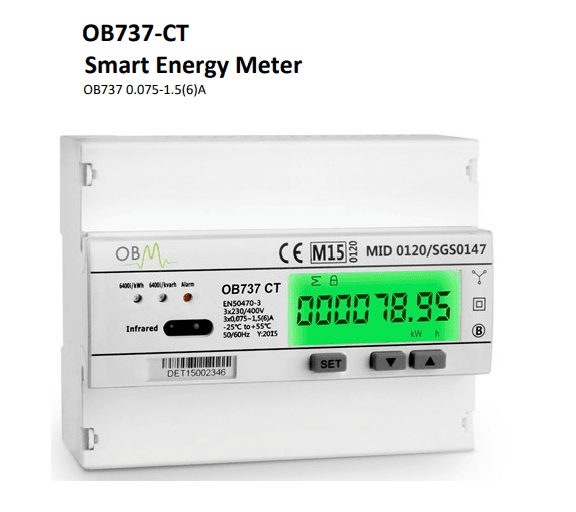
OB737-CT Energy Meter
Monitors three-phase energy consumption via CT clamps over Modbus RTU.
Template for the OBM OB737-CT, a 3-phase CT energy meter communicating over Modbus RTU at 9600 baud. It reads voltage, current, active/reactive/apparent power, power factor, frequency, and bidirectional import/export energy registers. No writable control registers are included.
- Protocol
- Modbus RTU
- Connection
- RS485, 9600 baud
- Registers
- 35, read only
- Brand
- OBM
- Key readings
- Voltage L1 to L3 · Current L1 to L3 and Neutral · Active Power L1 to L3 and Total · Reactive and Apparent Power · Power Factor L1 to L3 and Total · Import/Export Active and Reactive Energy
- Compatible models
- OB737-CT
- Last updated
Registers (35)
35 read, 0 write
| Name | Unit | Access | Address (Hidden until you enter your email) | Function (hidden) | Type (hidden) |
|---|---|---|---|---|---|
| Voltage L1 | V | Read | |||
| Voltage L2 | V | Read | |||
| Voltage L3 | V | Read | |||
| Frequency | Hz | Read | |||
| Current L1 | A | Read | |||
| Current L2 | A | Read | |||
| Current L3 | A | Read | |||
| Current Neutral | A | Read | |||
| Current Total | A | Read | |||
| Power L1 | kW | Read | |||
| Power L2 | kW | Read | |||
| Power L3 | kW | Read | |||
| Power Total | kW | Read | |||
| Apparent Power | kVA | Read | |||
| Apparent Power L2 | kVA | Read | |||
| Apparent Power L3 | kVA | Read | |||
| Apparent Power Total | kVA | Read | |||
| Reactive Power L1 | kvar | Read | |||
| Reactive Power L2 | kvar | Read | |||
| Reactive Power L3 | kvar | Read | |||
| Reactive Power Total | kvar | Read | |||
| Power Factor L1 | Read | ||||
| Power Factor L2 | Read | ||||
| Power Factor L3 | Read | ||||
| Power Factor Total | Read | ||||
| Import Active Energy | kWh | Read | |||
| Import Reactive Energy | kWh | Read | |||
| Export Active Energy | kWh | Read | |||
| Export Reactive Energy | kWh | Read | |||
| Total Energy | kWh | Read | |||
| Import Active Energy | kWh | Read | |||
| Export Active Energy | kWh | Read | |||
| Total Active Energy | kWh | Read | |||
| Import Reactive Energy | Kvarh | Read | |||
| Export Reactive Energy | Kvarh | Read |
Loading registers…
Send your device list
If a device is not in the library yet, we build the template for free as soon as we have the register data.
Use cases
- Monitor three-phase voltage, current, and power consumption on a live cloud dashboard for commercial buildings.
- Track import and export active energy to verify correct billing for sites with on-site generation.
- Create an alert when power factor on any phase drops below a defined threshold for more than five minutes.
- Compare monthly energy consumption trends using the cumulative energy registers in cloud reports.
- Verify CT ratio configuration by cross-checking real-time current readings against a reference clamp meter.
- Log maximum demand values remotely to support capacity planning and utility contract negotiations.
Installation
Wire the RS485 A and B terminals of the OB737-CT to the corresponding terminals on the ModbusCloud Gateway, observing correct polarity.
Set the Modbus slave address on the meter using the front panel buttons, ensuring it does not conflict with other devices on the same RS485 bus.
Confirm the baud rate is 9600, stop bits is 1, and parity is set to None or Even, matching the gateway port configuration.
Configure the CT ratio on the meter to match the rating of the installed current transformers before commissioning.
Import the OBM OB737-CT template in the ModbusCloud portal and assign it to the correct gateway and Modbus address.
Verify live readings in the ModbusCloud dashboard by comparing displayed voltage and current values against a known reference.
Things to watch for
Why do voltage and current readings show zero or incorrect values after connecting the meter?
The CT ratio on the meter must be programmed to match the installed current transformers. If the ratio is left at the factory default and does not match your CTs, readings will be wrong. Use the front panel buttons to set the correct ratio.
What parity setting should I use on the gateway?
The OB737-CT supports both None and Even parity. Make sure the parity setting on the ModbusCloud gateway port matches what is configured on the meter. The default is typically None.
Why do I see two sets of energy registers with different values?
The meter exposes energy data at address ranges 352/358 and 2048/2304. These likely represent resettable and cumulative totals. Choose the address range that fits your use case, or read both to compare.
How should I handle the float32 register format?
All registers are float32, each spanning two consecutive 16-bit Modbus registers. The ModbusCloud template already configures the correct data type and register pairing. If you build custom registers, ensure you select float32 and the correct byte order.






Want to see how it works?
