








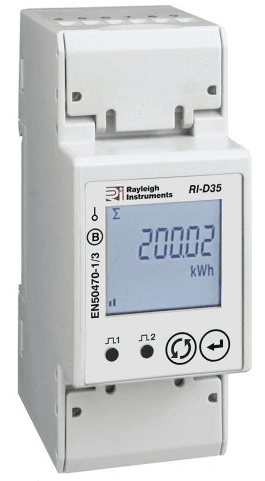
Rayleigh - RI-D35-100-C
Monitors single-phase energy consumption via MID-approved DIN rail meter.
This template connects to the Rayleigh RI-D35-100-C, a single-phase MID-approved DIN rail energy meter, via Modbus RTU. It reads voltage, current, active/reactive/apparent power, power factor, frequency, and import/export energy totals. No writable registers are included.
- Protocol
- Modbus RTU
- Connection
- RS485, 9600 baud
- Registers
- 17, read only
- Brand
- Rayleigh
- Key readings
- Total Active Energy · Import/Export Active Energy · Voltage L-N · Current · Active/Reactive/Apparent Power · Power Factor
- Compatible models
- RI-D35-100-C
- Last updated
Registers (17)
17 read, 0 write
| Name | Unit | Access | Address (Hidden until you enter your email) | Function (hidden) | Type (hidden) |
|---|---|---|---|---|---|
| Total Active Energy | Wh | Read | |||
| Voltage L-N | V | Read | |||
| Import Active Energy | Wh | Read | |||
| Export Active Energy | Wh | Read | |||
| Total Reactive Energy | varh | Read | |||
| Import Reactive Energy | varh | Read | |||
| Export Reactive Energy | varh | Read | |||
| Apparent Energy | Read | ||||
| Active Power | W | Read | |||
| Reactive Power | var | Read | |||
| Apparent Power | VA | Read | |||
| Current | A | Read | |||
| Power Factor | Read | ||||
| Frequency | Hz | Read | |||
| Max Demand Active Power | W | Read | |||
| Max Demand Reactive Power | var | Read | |||
| Max Demand Apparent Power | VA | Read |
Loading registers…
Send your device list
If a device is not in the library yet, we build the template for free as soon as we have the register data.
Use cases
- Monitor single-phase energy consumption in real time on a cloud dashboard for tenant sub-metering.
- Track import and export active energy to verify solar PV self-consumption and grid feed-in.
- Create an alert when power factor drops below a defined threshold to flag potential wiring issues.
- Log historical kWh data for MID-compliant billing reports in multi-tenant buildings.
- Compare maximum demand values across multiple metering points to identify peak load contributors.
Installation
Mount the Rayleigh RI-D35-100-C on a DIN rail and wire the phase, neutral, and load connections according to the meter's installation manual.
Connect the RS-485 A and B terminals of the meter to the corresponding terminals on the ModbusCloud Gateway.
Set the Modbus slave address on the meter using its front-panel buttons, and confirm the baud rate is 9600 with 8N1 framing.
Power on the gateway and import the Rayleigh RI-D35-100-C template from the ModbusCloud template library.
Assign the correct Modbus slave address in the template configuration to match the address set on the meter.
Verify live readings on the ModbusCloud dashboard by comparing voltage and current values with the meter's LCD display.
Things to watch for
Why am I reading zero or incorrect values for energy registers?
All registers on the RI-D35-100-C are float32 values, each spanning two Modbus addresses. Make sure the gateway is configured to read 32-bit floats with the correct byte order (big-endian). A wrong byte order will produce zero or nonsensical values.
What baud rate and serial settings should I use?
The default communication settings are 9600 baud, 8 data bits, no parity, 1 stop bit (8N1). If you have changed these on the meter, ensure the gateway's serial port matches exactly.
Can I use this template for other RI-D35-100 variants?
The register map is likely identical across the RI-D35-100 series, but this template is validated for the RI-D35-100-C. Compare the Modbus register table in your variant's datasheet before applying the template.
How do I set or change the Modbus slave address on the meter?
Use the front-panel buttons on the RI-D35-100-C to navigate to the communication settings menu. Set a unique slave address that does not conflict with other devices on the same RS-485 bus.






Want to see how it works?
