








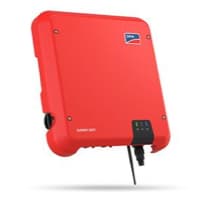
SMA Sunny Boy
Reads SMA Sunny Boy inverter values via Modbus TCP.
This template reads AC and DC electrical parameters, energy yield, and temperature data from SMA Sunny Boy inverters via Modbus TCP. All registers are read-only, covering grid voltage, frequency, power, daily yield, total yield, DC voltage, current, and power.
- Protocol
- Modbus TCP
- Connection
- Ethernet, Modbus TCP
- Registers
- 12, read only
- Brand
- SMA
- Key readings
- Grid Voltage L1 · Grid Frequency · AC Power · Daily Yield · Total Yield · DC Voltage, Current, Power
- Compatible models
- SMA Sunny Boy
- Last updated
Registers (12)
12 read, 0 write
| Name | Unit | Access | Address (Hidden until you enter your email) | Function (hidden) | Type (hidden) |
|---|---|---|---|---|---|
| Inverter Type | Read | ||||
| GridVoltageL1 | V | Read | |||
| GridFrequentie | Hz | Read | |||
| Power | W | Read | |||
| DailyYield | kWh | Read | |||
| TotalYield | kWh | Read | |||
| TotalYield Wh | Wh | Read | |||
| DC Current | A | Read | |||
| DC Voltage | V | Read | |||
| DC Power | W | Read | |||
| Heat sink temperature | °C | Read | |||
| Internal temperature | °C | Read |
Loading registers…
Send your device list
If a device is not in the library yet, we build the template for free as soon as we have the register data.
Use cases
- Monitor real-time AC power output and grid voltage on a live cloud dashboard for residential PV customers.
- Track daily and total energy yield remotely to verify system performance against design estimates.
- Create an alert when AC power drops to zero during daylight hours to detect potential inverter faults.
- Generate monthly yield reports for multiple SMA Sunny Boy installations from a single platform.
- Compare DC voltage and current readings across string inverters to identify panel degradation or shading issues.
Installation
Connect the ModbusCloud Gateway to the same local network as the SMA Sunny Boy inverter via Ethernet.
Enable Modbus TCP on the SMA Sunny Boy through the inverter's web interface or SMA Sunny Portal, and note the configured IP address and Modbus unit ID.
Log in to the ModbusCloud platform, add a new device, and import the SMA Sunny Boy template from the template library.
Enter the inverter's IP address and Modbus unit ID in the device configuration on ModbusCloud.
Verify the connection by checking that Grid Voltage L1 and AC Power values appear on the live data view.
Optionally confirm the connected model by reading the Inverter Type register at address 30053.
Things to watch for
Modbus TCP connection fails. What should I check?
Make sure Modbus TCP is explicitly enabled on the SMA Sunny Boy. This setting is often disabled by default. You can enable it via the inverter's web interface. Also verify that the gateway and inverter are on the same subnet and that no firewall is blocking TCP port 502.
All register values show as 0 or NaN. Why?
The SMA Sunny Boy uses uint32 and int32 registers, which each span two Modbus words. Confirm that your gateway is configured to read 32-bit registers with the correct byte order (Big Endian, also called AB CD word order). An incorrect word swap will produce invalid values.
Which Total Yield register should I use?
The template includes two total yield registers. Address 30529 returns the value in Wh for higher precision, while address 30531 returns it in kWh. Choose the one that best matches your reporting or dashboard requirements.
Does this template work with SMA Sunny Boy models that have Wi-Fi only?
Modbus TCP requires an Ethernet connection. If your Sunny Boy model only has Wi-Fi, you will need to confirm it supports Modbus TCP over its wireless interface or use an Ethernet adapter if available. Most current Sunny Boy models include an Ethernet port.


Knowledge base articles for this device
Want to see how it works?
