








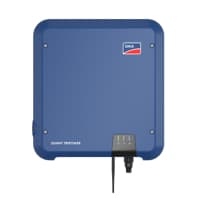
SMA Sunny Tripower
Reads energy and power values from SMA Sunny Tripower inverters via Modbus TCP.
This template reads energy and power data from SMA Sunny Tripower inverters via Modbus TCP. It provides AC energy totals, daily yield, active power, DC power inputs, exported energy, and device status information. No control registers are included.
- Protocol
- Modbus TCP
- Connection
- Ethernet, Modbus TCP
- Registers
- 10, read only
- Brand
- SMA
- Key readings
- Device status and recommended action · Total AC energy (kWh) · Daily AC energy (kWh) · Active power all line conductors (kW) · Exported energy (kWh) · DC power input 1 and 2 (kW)
- Compatible models
- SMA Sunny Tripower
- Last updated
Registers (10)
10 read, 0 write
| Name | Unit | Access | Address (Hidden until you enter your email) | Function (hidden) | Type (hidden) |
|---|---|---|---|---|---|
| I_Status_Of_The_Device | Read | ||||
| I_Recommended_Action | Read | ||||
| I_Status_Message | Read | ||||
| I_Status_Description | Read | ||||
| I_Total_AC_Energy_All_Line_Conductors_kWh | kWh | Read | |||
| I_Daily_AC_Energy_All_Line_Conductors_kWh | kWh | Read | |||
| I_Active_Power_All_Line_Conductors | kW | Read | |||
| I_Metervalue_Energy_Export | kWh | Read | |||
| I_DC_Power_Input_1 | kW | Read | |||
| I_DC_Power_Input_2 | kW | Read |
Loading registers…
Send your device list
If a device is not in the library yet, we build the template for free as soon as we have the register data.
Use cases
- Monitor real-time AC power output and daily energy yield on a centralized cloud dashboard.
- Track exported energy over time to verify grid feed-in performance for your customer.
- Set up an alert when device status indicates a fault or recommended action is reported.
- Compare DC power input from string 1 and string 2 to detect panel shading or string imbalance.
- Generate monthly energy production reports across multiple SMA Sunny Tripower sites.
- Verify total AC energy readings remotely without visiting the installation site.
Installation
Enable Modbus TCP on the SMA Sunny Tripower inverter through its web interface or display menu.
Connect the inverter to the same local network as the ModbusCloud Gateway using an Ethernet cable.
Note the inverter's IP address and Modbus unit ID, and configure these in the ModbusCloud gateway settings.
Import the SMA Sunny Tripower template from the ModbusCloud template library and assign it to the gateway.
Verify that register values appear correctly on the ModbusCloud dashboard, checking that 32-bit reads are aligned starting at register 30201.
Things to watch for
Modbus TCP is not responding on the SMA Sunny Tripower. What should I check?
Modbus TCP must be explicitly enabled in the inverter's communication settings. Access the inverter's web interface, navigate to the communication or protocol section, and confirm that Modbus TCP is activated. Also verify that the correct TCP port (default 502) is open.
I see unexpected or very large values in the dashboard. Why?
All registers in this template are 32-bit (uint32 or int32), requiring two consecutive register reads. If the byte order or word order is incorrect in the gateway configuration, values will appear garbled. Confirm that the word order matches SMA's convention (typically big-endian).
Can I monitor multiple SMA Sunny Tripower inverters with one gateway?
Yes. Assign a unique Modbus unit ID to each inverter and create a separate device instance in ModbusCloud for each one, all using the same template. Ensure all inverters are reachable on the local network from the gateway.
Does this template support writing setpoints or controlling the inverter?
No. This template is read-only and does not include any writable registers. It is designed purely for monitoring energy production and device status.



Knowledge base articles for this device

Want to see how it works?
