








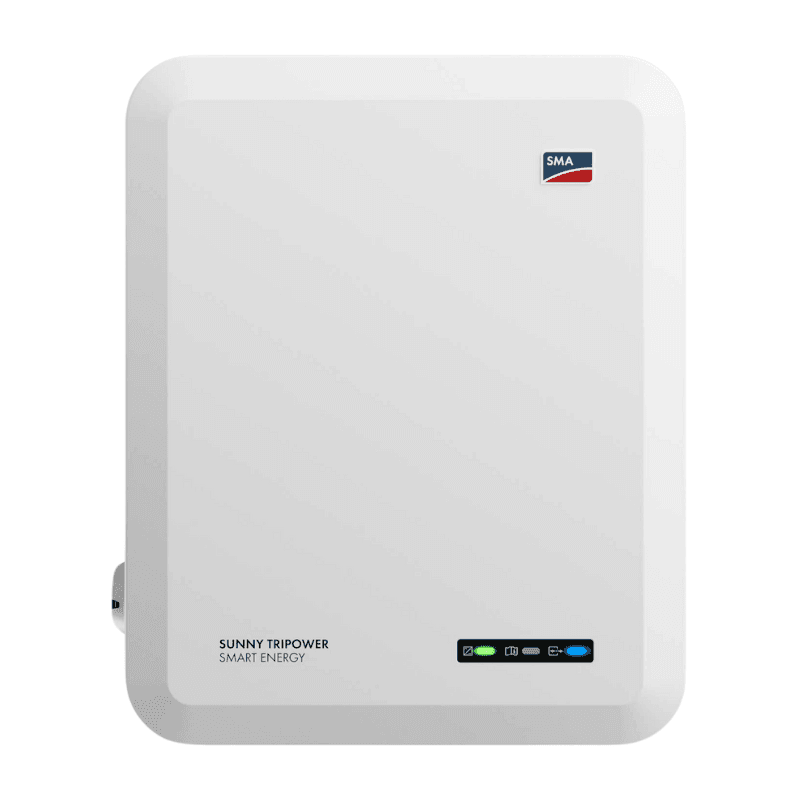
SMA Tripower Hybrid
Monitors SMA Tripower Hybrid inverter PV generation, battery, and grid data via Modbus TCP
This template reads energy data from SMA Sunny Tripower Hybrid inverters via Modbus TCP. It captures PV generation (PV1 and PV2), battery state of charge, charge and discharge power, and grid import and export values. No write or control registers are included.
- Protocol
- Modbus TCP
- Connection
- Ethernet, Modbus TCP
- Registers
- 7, read only
- Brand
- SMA
- Key readings
- Battery state of charge (SOC) · Grid feed-in power · Grid import power · Battery charge power · Battery discharge power · PV generation (PV1 and PV2)
- Compatible models
- STP10.0-3SE-40 · STP8.0-3SE-40 · STP6.0-3SE-40 · STP5.0-3SE-40
- Last updated
Registers (7)
7 read, 0 write
| Name | Unit | Access | Address (Hidden until you enter your email) | Function (hidden) | Type (hidden) |
|---|---|---|---|---|---|
| Batterieladezustand | % | Read | |||
| Einspeisung | kW | Read | |||
| Bezug | kW | Read | |||
| Batterieladung | kW | Read | |||
| PV1 | kW | Read | |||
| Batterieentladung | kW | Read | |||
| PV2 | kW | Read |
Loading registers…
Send your device list
If a device is not in the library yet, we build the template for free as soon as we have the register data.
Use cases
- Monitor real-time PV generation across PV1 and PV2 trackers on a cloud dashboard for your customer.
- Track battery state of charge over time to evaluate storage utilisation and cycling patterns.
- Create an alert when grid import power exceeds a defined threshold for more than five minutes.
- Compare grid feed-in and grid import values to calculate net energy balance on a daily or monthly basis.
- Log battery charge and discharge power to verify correct battery sizing after installation.
- Generate automated energy reports for residential customers showing self-consumption ratios.
Installation
Enable Modbus TCP on the SMA Tripower Hybrid inverter via the local web interface or SMA Sunny Portal, and note the IP address assigned to the inverter.
Connect the ModbusCloud Gateway to the same local network as the inverter using an Ethernet cable.
In the ModbusCloud platform, add a new Modbus TCP device and enter the inverter IP address along with the default Modbus TCP port (502).
Import the SMA Tripower Hybrid template from the ModbusCloud template library and assign it to the newly created device.
Verify that register values appear correctly on the dashboard, paying attention to correct uint32 and int32 data types for battery, PV, and grid registers.
If multiple inverters are installed, repeat the device setup for each unit using its unique IP address.
Things to watch for
Modbus TCP connection fails. What should I check?
Confirm that Modbus TCP is enabled in the inverter settings. Check that the gateway and inverter are on the same subnet. Verify the correct IP address and that port 502 is not blocked by a firewall or router.
Grid import and export values seem incorrect or negative. Why?
Grid import (register 30865) and grid export (register 30867) use signed int32 data types. Ensure your register configuration is set to int32, not uint32. Swapping the data type will produce incorrect large values.
PV and battery power values show zero even though the system is running. What is wrong?
These registers use uint32 (two consecutive 16-bit registers). Verify that the register byte order matches the SMA default (big-endian, high word first). Also check that the Modbus unit ID is correct, typically 3 for SMA inverters.
Does this template work with older SMA Tripower models outside the SE-40 range?
This template is validated for the STP5.0-3SE-40 through STP10.0-3SE-40 models. Older Tripower models may use different register maps. Check the SMA Modbus documentation for your specific model before using this template.


Knowledge base articles for this device

Want to see how it works?
