








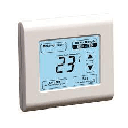
SMT-131
Controls temperature, ventilation, and operating modes via Modbus thermostat.
The Smart Temp Australia SMT-131 is a Modbus RTU thermostat for HVAC control. This template reads actual temperature, setpoint, and operating status, and allows writing setpoint and operating status to manage heating, cooling, and ventilation modes remotely.
- Protocol
- Modbus RTU
- Connection
- RS485, 19200 baud
- Registers
- 3, read and write
- Brand
- Smart Temp Australia
- Key readings
- Actual Temperature · Setpoint · Operating Status
- Available commands
- Setpoint · Operating Status
- Compatible models
- SMT-131
- Last updated
Registers (3)
3 read, 2 write
| Name | Unit | Access | Address (Hidden until you enter your email) | Function (hidden) | Type (hidden) |
|---|---|---|---|---|---|
| Actual Temp | Read | ||||
| Setpoint | Read and write | ||||
| Operating Status | Read and write |
Loading registers…
Send your device list
If a device is not in the library yet, we build the template for free as soon as we have the register data.
Use cases
- Monitor actual room temperature and setpoint on a live dashboard across multiple HVAC zones.
- Remotely adjust the temperature setpoint for a customer site without a truck roll.
- Create an alert when actual temperature deviates more than 2 degrees from the setpoint for over 15 minutes.
- Switch operating status between heating, cooling, and ventilation modes from the ModbusCloud platform.
- Log temperature trends over time to identify inefficient heating or cooling patterns in commercial buildings.
- Group multiple SMT-131 thermostats on one dashboard for centralized multi-zone climate management.
Installation
Wire the SMT-131 to the ModbusCloud Gateway using a twisted-pair RS-485 cable, connecting A, B, and GND terminals.
Set the Modbus slave address on the SMT-131 to a unique value that does not conflict with other devices on the same bus.
Confirm the baud rate on the SMT-131 is set to 19200 to match the template default.
Import the SMT-131 template in the ModbusCloud platform and assign it to the corresponding gateway and slave address.
Verify communication by checking that actual temperature, setpoint, and operating status values appear on the dashboard.
Test write functionality by changing the setpoint or operating status from the platform and confirming the thermostat responds.
Things to watch for
The gateway cannot communicate with the SMT-131. What should I check?
Verify that the RS-485 wiring is correct, with A, B, and GND connected properly. Confirm the baud rate is set to 19200 on both the thermostat and the gateway. Ensure the Modbus slave address matches the address configured in the template.
Temperature values appear incorrect or unrealistically high. What is wrong?
All registers are uint16. Make sure the template is not interpreting the value as a signed integer or applying an incorrect scaling factor. Check the SMT-131 documentation for the decimal point position of temperature values.
I can read values but writing the setpoint does not work. Why?
Confirm that the setpoint register at address 8 is being written with a Modbus function code that supports single or multiple register writes. Also verify that the thermostat is not in a locked mode that prevents remote setpoint changes.
Can I use multiple SMT-131 thermostats on the same RS-485 bus?
Yes. Assign each SMT-131 a unique Modbus slave address. Create a separate template instance in ModbusCloud for each thermostat, matching the correct address.




Want to see how it works?
