On this page
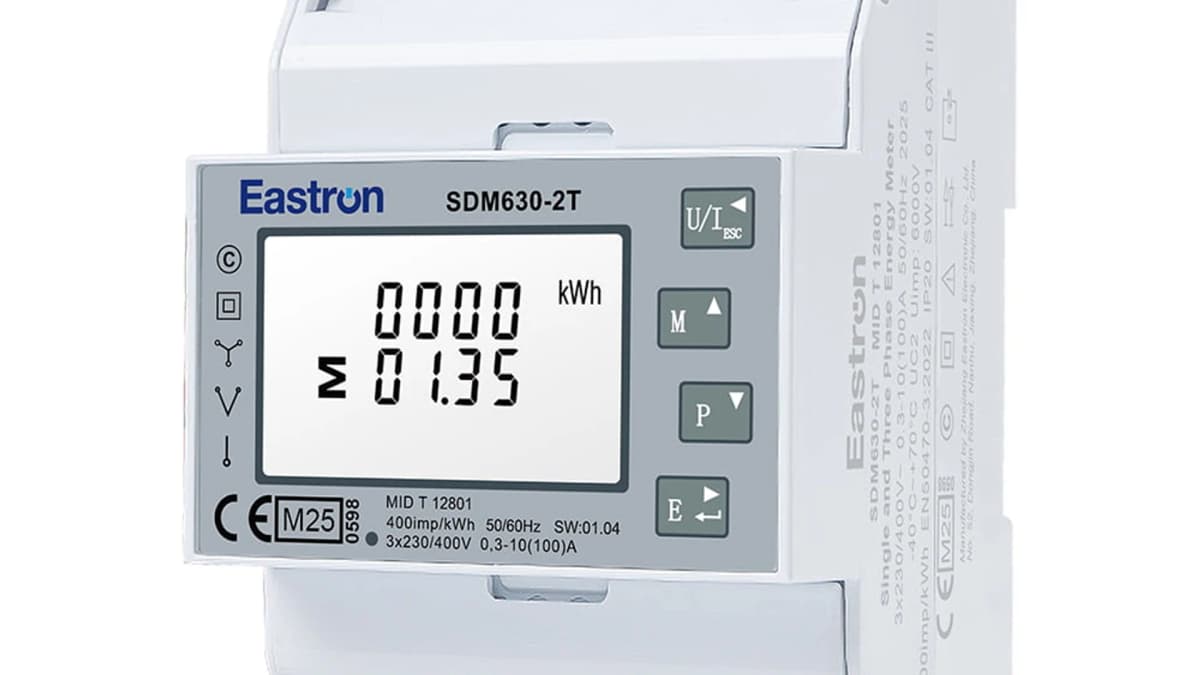
The Eastron SDM630 is the most widely deployed 3-phase energy meter in the European prosumer and installer market. With ~100 Modbus registers, MID certification, and a direct 100A connection, it offers more functionality than virtually any competitor under €130. Despite its popularity, no single web resource combines the complete register map with wiring guidance, working code examples, and regulatory context - the official Eastron PDF is login-gated and poorly indexed, while top-ranking community pages show deliberately incomplete register tables.
This guide gives you the complete register reference, correct RS485 wiring, working Home Assistant and ESPHome integrations, and the regulatory framework around MID certification.
The ModbusCloud Gateway reads out an Eastron SDM630 through a ready-made Eastron SDM630 template, with no register programming required.
Variants: V1, V2, V3 and MCT
The SDM630 exists in three main generations plus the MCT (CT-operated) series:
| Feature | V1/V2 | V3 | MCT |
|---|---|---|---|
| Max current | 100A direct | 100A direct | CT (1A/5A secondary) |
| Accuracy | Class A/B (IEC 1) | Class B/C (up to 0.5%) | Class 0.5S/1 |
| Display | Standard LCD | Touch + white backlit | Standard LCD |
| Net kWh register | V2 only (0x018C) | Yes | Model-dependent |
| DIN width | 4 modules (72mm) | 4 modules | 7 modules |
| MID certificate | 0120/SGS0151 | 0120/SGS0151 Issue 5 | 0120/SGS0142 |
Practical advice: For new installations, always buy V2 or later. The Net kWh register (import minus export) is essential for solar PV monitoring. V3 adds higher accuracy class but is functionally equivalent for monitoring purposes.
Modbus communication settings
| Parameter | Default | Options |
|---|---|---|
| Baud rate | 9600 | 2400, 4800, 9600, 19200, 38400 |
| Parity | None | None, Even, Odd |
| Stop bits | 1 | 1 or 2 (2 only with None) |
| Data bits | 8 | 8 (fixed) |
| Slave address | 1 | 1-247 |
| Protocol | Modbus RTU | RTU only (no ASCII) |
| Function codes | FC03, FC04, FC08, FC16 | FC06 NOT supported |
All measurement data uses IEEE 754 Float32 encoding (2 registers per value), default byte order Big Endian, Most Significant Register First (ABCD). Maximum 80 registers (40 parameters) per request.
Key Modbus registers
Voltage (FC04, Input Registers)
| Address | Name | Type | Unit | R/RW | Description |
|---|---|---|---|---|---|
| 0 (0x0000) | L1 line-to-neutral | FLOAT32 | V | R | Phase 1 line-to-neutral voltage |
| 2 (0x0002) | L2 line-to-neutral | FLOAT32 | V | R | Phase 2 line-to-neutral voltage |
| 4 (0x0004) | L3 line-to-neutral | FLOAT32 | V | R | Phase 3 line-to-neutral voltage |
| 42 (0x002A) | Average L-N voltage | FLOAT32 | V | R | Average across L1/L2/L3 to N |
| 200 (0x00C8) | L1-L2 voltage | FLOAT32 | V | R | Line-to-line L1 to L2 |
| 202 (0x00CA) | L2-L3 voltage | FLOAT32 | V | R | Line-to-line L2 to L3 |
| 204 (0x00CC) | L3-L1 voltage | FLOAT32 | V | R | Line-to-line L3 to L1 |
Current
| Address | Name | Type | Unit | R/RW | Description |
|---|---|---|---|---|---|
| 6 (0x0006) | L1 current | FLOAT32 | A | R | Phase 1 instantaneous current |
| 8 (0x0008) | L2 current | FLOAT32 | A | R | Phase 2 instantaneous current |
| 10 (0x000A) | L3 current | FLOAT32 | A | R | Phase 3 instantaneous current |
| 46 (0x002E) | Average current | FLOAT32 | A | R | Average of the three phases |
| 224 (0x00E0) | Neutral current | FLOAT32 | A | R | Current through the N conductor |
Power (active, apparent, reactive)
| Address | Name | Type | Unit | R/RW | Description |
|---|---|---|---|---|---|
| 12 (0x000C) | L1 active power | FLOAT32 | W | R | Positive=import, negative=export |
| 14 (0x000E) | L2 active power | FLOAT32 | W | R | Positive=import, negative=export |
| 16 (0x0010) | L3 active power | FLOAT32 | W | R | Positive=import, negative=export |
| 52 (0x0034) | Total system power | FLOAT32 | W | R | Sum all phases (bidirectional) |
| 56 (0x0038) | Total apparent power | FLOAT32 | VA | R | Total system VA |
| 60 (0x003C) | Total reactive power | FLOAT32 | VAr | R | Total system VAr |
| 62 (0x003E) | Total power factor | FLOAT32 | - | R | System cos φ |
| 70 (0x0046) | Frequency | FLOAT32 | Hz | R | Mains frequency (~50/60 Hz) |
Energy (key registers for monitoring)
| Address | Name | Type | Unit | R/RW | Description |
|---|---|---|---|---|---|
| 72 (0x0048) | Total import kWh | FLOAT32 | kWh | R | Consumed energy (increments only) |
| 74 (0x004A) | Total export kWh | FLOAT32 | kWh | R | Energy fed back to grid |
| 76 (0x004C) | Total import kVArh | FLOAT32 | kVArh | R | Reactive energy consumed |
| 78 (0x004E) | Total export kVArh | FLOAT32 | kVArh | R | Reactive energy exported |
| 342 (0x0156) | Total kWh (import+export) | FLOAT32 | kWh | R | Sum of both directions |
| 396 (0x018C) | Net kWh (V2+ only) | FLOAT32 | kWh | R | Import MINUS export = net consumption |
| 346 (0x015A) | L1 import kWh | FLOAT32 | kWh | R | Phase 1 import |
| 348 (0x015C) | L2 import kWh | FLOAT32 | kWh | R | Phase 2 import |
| 350 (0x015E) | L3 import kWh | FLOAT32 | kWh | R | Phase 3 import |
| 352 (0x0160) | L1 export kWh | FLOAT32 | kWh | R | Phase 1 export |
Configuration registers (FC03/FC16, Holding Registers)
| Address | Name | Type | Unit | R/RW | Description |
|---|---|---|---|---|---|
| 10 (0x000A) | System type | FLOAT32 | - | RW | 1=1P2W, 2=3P3W, 3=3P4W (password protected) |
| 18 (0x0012) | Parity/stop | FLOAT32 | - | RW | 0=1stop/none, 1=1stop/even, 2=1stop/odd |
| 20 (0x0014) | Modbus address | FLOAT32 | - | RW | 1-247 (default 1) |
| 24 (0x0018) | Password | FLOAT32 | - | RW | Default 0000 (Modbus) / 1000 (display) |
| 28 (0x001C) | Baud rate | FLOAT32 | - | RW | 0=2400, 1=4800, 2=9600, 3=19200, 4=38400 |
Eastron SDM630 is in the library
Connect the ModbusCloud Gateway and start a scan in the portal. The gateway recognises the Eastron SDM630 using the template from the library.
15 registers preconfigured · 12,036x downloaded
RS485 wiring
The SDM630 has terminals labelled A (+), B (−) and GND on the communication side, plus load terminals for the actual power measurement.
- 1
Cable selection
Use Belden 9841 or equivalent shielded twisted-pair with 120Ω characteristic impedance. Do NOT use Cat5/Cat6 - the impedance is wrong and you'll get CRC errors. Comm terminals accept 0.5-1.5 mm² with 6-7 mm strip, M2.5 screws at 0.4 Nm.
- 2
Load connection
Connect L1/L2/L3 and N to the input side of the meter (facing the main breaker). The output side feeds your distribution board. For PV monitoring: install the SDM630 immediately after the main breaker, before the split to house load and inverter. Load terminal torque: 3-3.5 Nm.
- 3
RS485 wiring
A terminal to A terminal of your gateway, B to B. Connect cable shield to GND on one side only (usually at the gateway). Maximum 2 wires per terminal - this enforces daisy-chain topology, not a star.
- 4
Install termination resistors
120Ω resistor (¼W minimum) at both ends of the bus. The SDM630 does NOT have built-in termination - add one manually between A and B at the last device on the line. Many gateways have a DIP switch for this.
- 5
Test communication
Defaults: 9600 baud, 8N1, address 1. For Growatt inverters: set address to 2 (Growatt expects this). Test with a USB-RS485 adapter (FTDI chipset, NOT CH340) and free software like QModMaster before integrating.
Home Assistant integration
The following YAML works with an RS485-to-Ethernet gateway:
modbus:
  - name: sdm630
    type: rtuovertcp
    host: 192.168.1.50
    port: 502
    sensors:
      - name: "L1 voltage"
        address: 0
        input_type: input
        data_type: float32
        unit_of_measurement: V
        precision: 1
      - name: "Total power"
        address: 52
        input_type: input
        data_type: float32
        unit_of_measurement: W
      - name: "Total import"
        address: 72
        input_type: input
        data_type: float32
        unit_of_measurement: kWh
        device_class: energy
        state_class: total_increasing
      - name: "Total export"
        address: 74
        input_type: input
        data_type: float32
        unit_of_measurement: kWh
        device_class: energy
        state_class: total_increasing
For GUI-based setup without YAML: install the custom HACS integration partach/ha_sdm630 - it offers preset profiles (basic / basic-plus / full) for quick setup.
ESPHome integration
Use an ESP32 with a MAX3485 RS485 transceiver (3.3V logic, preferred over MAX485):
uart:
  rx_pin: GPIO16
  tx_pin: GPIO17
  baud_rate: 9600

sensor:
  - platform: sdm_meter
    phase_a:
      voltage:
        name: "SDM630 L1 voltage"
      current:
        name: "SDM630 L1 current"
      active_power:
        name: "SDM630 L1 power"
    frequency:
      name: "SDM630 frequency"
    import_active_energy:
      name: "SDM630 total import"
    export_active_energy:
      name: "SDM630 total export"
    update_interval: 10s
    address: 1
Set logger: baud_rate: 0 when using hardware UART, otherwise serial logging will interfere with RS485 communication.
Python (Raspberry Pi)
import sdm_modbus

device = sdm_modbus.SDM630(device="/dev/ttyUSB0", baud=9600)
data = device.read_all(sdm_modbus.registerType.INPUT)

print(f"L1: {data['voltage_l1']:.1f} V")
print(f"Import: {data['total_import_active_energy']:.2f} kWh")
print(f"Export: {data['total_export_active_energy']:.2f} kWh")
The sdm_modbus library (PyPI) is purpose-built for Eastron meters. For manual access, minimalmodbus works too: instrument.read_float(0, functioncode=4) reads register 0.
Solar inverter compatibility
| Brand | SDM630 supported? | Address | Notes |
|---|---|---|---|
| Growatt | Yes (official) | 2 | Growatt expects address 2 for Eastron |
| SolaX | Yes (official) | 1 | Eastron makes a "GROWATT-SOLAX" firmware variant |
| KACO | Yes (rebadged) | 1 | Sold as "KACO Smart Meter" |
| Deye | Yes | 1 or 2 | Check inverter documentation |
| GoodWe | Yes | Model-dependent | Supported as external meter |
| SMA | No | - | Uses proprietary Speedwire protocol |
| Fronius | No | - | Requires Fronius Smart Meter |
| Huawei | No | - | Uses DTSU666 with proprietary protocol |
| KOSTAL | Not officially | - | Recommends their own KSEM meter |
MID certification and regulations
MID is legally required when billing energy to third parties (tenants, employees, charging customers) in most EU countries. The SDM630 holds MID certificate 0120/SGS0151 covering Module B+D.
Netherlands
Under the Metrologiewet, MID meters are mandatory for tenant billing. Since January 2026, MID is also required for ERE certificates at EV charging stations. For own-use monitoring (solar PV, energy optimization), MID is NOT required - use the cheaper non-MID variant.
Germany
MessEG §37 requires calibrated/MID meters for any commercial transaction including tenant billing, EEG feed-in metering, and EV charging. Electronic meters have an 8-year Eichfrist (calibration validity). Violations carry fines up to €50,000. For public EV charging, MID alone is insufficient - full Eichrechtskonformität is required (stricter than other EU countries).
International standards
The MID accuracy certification covers only active energy (kWh) - not reactive energy, apparent energy, THD, or other parameters. Class B (equivalent to IEC Class 1) means ±1% maximum error at reference conditions across 5%-120% of rated current.
Top 10 mistakes with SDM630 RS485
- A/B swapped - Swap them. Won't damage anything.
- GND not carried through between devices on long busses
- Star wiring instead of daisy-chain (causes reflections)
- Wrong parity - some gateways default to Even, SDM630 defaults to None
- Cat5/Cat6 cable instead of 120Ω twisted-pair
- Missing termination on long busses or high baud rates
- Odd start address or count - float32 registers must be on even addresses
- CH340 USB-RS485 adapter - use FTDI-based instead
- Two masters on the same bus - e.g. inverter AND home automation both wanting to read. Doesn't work with standard RS485.
- Logger interference with ESPHome on hardware UART without
logger: baud_rate: 0
SDM630 vs alternatives
| Meter | Max A | Price (MID) | Key differentiator |
|---|---|---|---|
| Eastron SDM630 | 100A direct | €95-130 | Best value, ~100 registers, massive community |
| ABB B23 Silver | 65A | €80-150 | Native Victron support, 4 tariffs |
| Carlo Gavazzi EM340 | 65A | €80-120 | Compact (3 modules), popular with SolarEdge |
| Eastron SDM72D-M | 100A direct | €55-70 | Cheaper BUT not phase-balanced |
| Schneider PM5110 | CT only | €250-450 | Industrial power quality |
| Janitza UMG 96RM | CT only | €400-1200 | Professional PQ analysis |
Warning about SDM72D-M: It does not count phase-balanced energy ("nicht saldierend"). When L1 exports while L3 imports simultaneously, the SDM72D records both as separate flows. For PV installations with single-phase inverters, this gives wrong numbers - use SDM630 V2+.
Frequently asked questions
What are the default Modbus settings for the SDM630?
9600 baud, no parity, 1 stop bit, 8 data bits, slave address 1 (V3 sometimes defaults to 2). The Modbus password defaults to 0000 while the display password defaults to 1000.
Which Modbus function codes does the SDM630 support?
FC03 (read holding), FC04 (read input), FC08 (diagnostics), FC16 (write multiple). FC06 (write single) is NOT officially supported - use FC16 to write single registers by writing 2 registers at a time (float32 encoding).
How do I read the SDM630 with a Raspberry Pi?
Connect a USB-RS485 adapter (FTDI-based preferred) and use the sdm_modbus library on PyPI. Example: device = sdm_modbus.SDM630(device='/dev/ttyUSB0', baud=9600); data = device.read_all(sdm_modbus.registerType.INPUT).
What's the difference between V1, V2, and V3?
V2 adds three critical registers over V1: Net kWh (0x018C), Net kVArh (0x018E) and a sign-inverted system PF (0x00FE). V3 upgrades the accuracy class to Class C (0.5%) and modernizes the display with touch keypads. For new installations, always buy V2 or later.
Can I reset the energy counter?
No. Energy counters (kWh) cannot be reset from the front panel on standard versions. On MID versions they are non-resettable by design - this is a certification requirement. Only maximum demand values can be cleared via the CLR menu function.
What USB-to-RS485 adapter works best?
FTDI-based adapters are strongly preferred. CH340-based adapters are cheap but cause intermittent timing issues and echo problems, especially on Linux. Look for adapters with the FT232 or FT4232 chip.
Why am I getting CRC errors or no response?
Check in this order: 1) A/B polarity (try swapping), 2) baud rate and parity match on both sides, 3) correct slave address, 4) 120Ω termination at both ends, 5) no competing master on the bus, 6) cable impedance (must be 120Ω twisted pair, not Cat5), 7) GND shield connection.
Can I use SDM630 with Fronius, SMA or Huawei inverters?
No. These three brands use proprietary meter protocols and will not accept a generic Modbus meter. Fronius requires the Fronius Smart Meter, SMA uses Speedwire, Huawei uses the DTSU666. For Growatt, SolaX, Deye, KACO and GoodWe, the SDM630 works as the official external meter.
Conclusion
The Eastron SDM630 is the default choice for 3-phase Modbus energy monitoring in Europe - and for good reason. ~100 registers, MID certification, 100A direct connection, and a vast ecosystem with native support in Home Assistant, ESPHome, Tasmota, EVCC, SmartEVSE, and virtually every non-proprietary solar inverter.
With the register tables, wiring instructions, and code examples in this guide, you can have a complete energy monitoring setup running in an afternoon. Whether you're tracking a solar installation, billing tenants, or optimizing self-consumption before net metering changes kick in - the SDM630 delivers the data.