









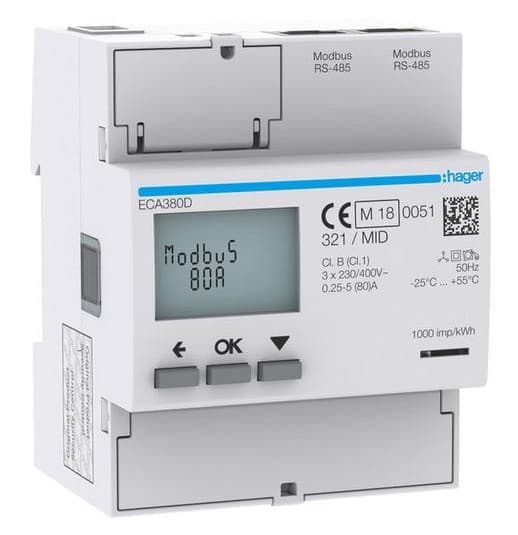
Hager ECA180D One-phase energy meter
Monitors single-phase energy consumption via Modbus RTU
Template for the Hager ECA180D single-phase energy meter over Modbus RTU. It reads voltage, current, power, energy (in and out), frequency, and power factor. Ideal for monitoring individual circuits or single-phase loads in residential and commercial installations.
- Protocol
- Modbus RTU
- Connection
- RS485, 19200 baud
- Registers
- 8, read only
- Brand
- Hager
- Key readings
- Voltage · Current · Power · Energy In · Energy Out · Frequency · Power factor (IEC and IEEE)
- Compatible models
- ECA180D
- Last updated
Registers (8)
8 read, 0 write
| Name | Unit | Access | Address (Hidden until you enter your email) | Function (hidden) | Type (hidden) |
|---|---|---|---|---|---|
| Voltage | V | Read | |||
| Current | A | Read | |||
| Power | W | Read | |||
| Energy In | kWh | Read | |||
| Energy Out | kWh | Read | |||
| Frequency | Hz | Read | |||
| Power factor IEC | cosΦ | Read | |||
| Power factor IEEE | cosΦ | Read |
Loading registers…
Send your device list
If a device is not in the library yet, we build the template for free as soon as we have the register data.
Use cases
- Monitor real-time voltage, current, and power of a single-phase circuit on a cloud dashboard.
- Track imported and exported energy over time to verify billing or self-consumption figures.
- Create an alert when power factor drops below a threshold, indicating potential reactive power issues.
- Compare energy consumption across multiple tenant circuits using one template per meter.
- Log frequency readings to detect grid instability events at remote or rural sites.
Installation
Mount the Hager ECA180D on a DIN rail and wire the load conductors through the meter according to the wiring diagram in the Hager manual.
Connect the RS-485 A and B terminals of the meter to the corresponding terminals on the ModbusCloud Gateway, using twisted-pair cable with proper termination.
Set the Modbus slave address on the ECA180D using its front buttons or DIP switches, ensuring each meter on the bus has a unique address.
Confirm that the meter baud rate is set to 19200 with odd parity (8E1), matching the template defaults.
Import the Hager ECA180D template in the ModbusCloud platform and assign the correct slave address to start receiving data.
Verify readings on the ModbusCloud dashboard by comparing displayed voltage and current values with a reference measurement at the meter.
Things to watch for
Why am I getting no response from the ECA180D?
Check that the baud rate is set to 19200 and parity to odd (8E1) on both the meter and the gateway. Also verify the RS-485 wiring polarity (A and B are not swapped) and that the slave address matches the template configuration.
Some register values show zero or unexpected numbers. What could be wrong?
The ECA180D uses a mix of 16-bit and 32-bit registers starting at high addresses (45056 and above). Make sure the template is correctly imported without manual register edits. If you modified registers, verify the data type (uint16 vs uint32 or int32) for each parameter.
Can I connect multiple ECA180D meters on one RS-485 bus?
Yes. Assign a unique Modbus slave address to each meter and add a separate template instance per device in ModbusCloud. Use proper bus termination on the first and last device.
Does the meter need a firmware update to support Modbus?
Modbus RTU is a standard feature on the ECA180D. No firmware update is required. Ensure Modbus communication is enabled in the meter settings if it was previously disabled.



Want to see how it works?
