









Hager ECR380D
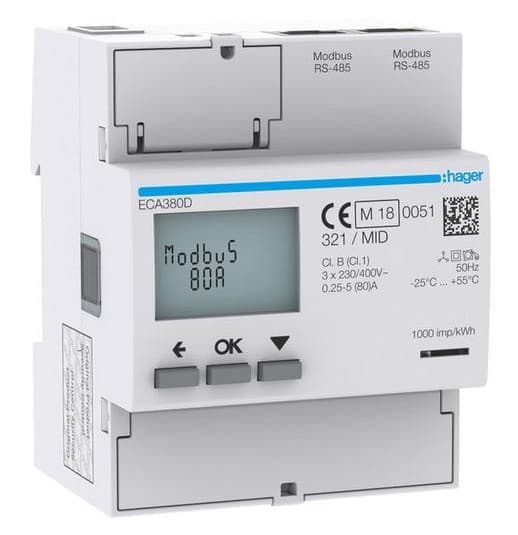
The Hager ECR380D is a three-phase, direct-connection energy meter rated at 80 A, MID-certified, and designed for commercial and industrial grid metering on DIN rail. This Modbus RTU template reads per-phase voltages (L1, L2, L3) and line-to-line voltages, per-phase currents, total and per-phase active and reactive power, power factor in both IEC and IEEE conventions, grid frequency, and cumulative imported and exported active and reactive energy broken down by phase. Connecting the ECR380D to your ModbusCloud Gateway gives installers a continuous, structured record of consumption and production without manual meter reads.
- Protocol
- Modbus RTU
- Connection
- RS485
- Registers
- 61, read only
- Brand
- Hager
- Last updated
Registers (61)
61 read, 0 write
| Name | Unit | Access | Address (Hidden until you enter your email) | Function (hidden) | Type (hidden) |
|---|---|---|---|---|---|
| vendor_name | Read | ||||
| product_code | Read | ||||
| sw_version | Read | ||||
| vendor_url | Read | ||||
| product_name | Read | ||||
| model_name | Read | ||||
| application_name | Read | ||||
| hw_version | Read | ||||
| production_code_serial_number | Read | ||||
| production_site_code | Read | ||||
| production_day_of_year | Read | ||||
| production_year | Read | ||||
| voltage_l1 | V | Read | |||
| voltage_l2 | V | Read | |||
| voltage_l3 | V | Read | |||
| v_l1_l2 | V | Read | |||
| v_l2_l3 | V | Read | |||
| v_l3_l1 | V | Read | |||
| frequency | Hz | Read | |||
| current_l1 | A | Read | |||
| current_l2 | A | Read | |||
| current_l3 | A | Read | |||
| i_neutral | A | Read | |||
| active_power | W | Read | |||
| reactive_power | var | Read | |||
| s_sum | VA | Read | |||
| pf_sum_iec | Read | ||||
| pf_sum_ieee | Read | ||||
| active_power_l1 | W | Read | |||
| active_power_l2 | W | Read | |||
| active_power_l3 | W | Read | |||
| reactive_power_l1 | W | Read | |||
| reactive_power_l2 | W | Read | |||
| reactive_power_l3 | W | Read | |||
| s_l1 | VA | Read | |||
| s_l2 | VA | Read | |||
| s_l3 | VA | Read | |||
| pf_l1_iec | Read | ||||
| pf_l2_iec | Read | ||||
| pf_l3_iec | Read | ||||
| pf_l1_ieee | Read | ||||
| pf_l2_ieee | Read | ||||
| pf_l3_ieee | Read | ||||
| active_consumption_energy | Wh | Read | |||
| er_plus_sum | varh | Read | |||
| active_production_energy | Wh | Read | |||
| er_minus_sum | varh | Read | |||
| ea_plus_detailed_sum | Wh | Read | |||
| ea_minus_detailed_sum | Wh | Read | |||
| active_consumption_energy_l1 | Wh | Read | |||
| active_consumption_energy_l2 | Wh | Read | |||
| active_consumption_energy_l3 | Wh | Read | |||
| active_production_energy_l1 | Wh | Read | |||
| active_production_energy_l2 | Wh | Read | |||
| active_production_energy_l3 | Wh | Read | |||
| er_plus_l1 | varh | Read | |||
| er_plus_l2 | varh | Read | |||
| er_plus_l3 | varh | Read | |||
| er_minus_l1 | varh | Read | |||
| er_minus_l2 | varh | Read | |||
| er_minus_l3 | varh | Read |
Loading registers…
Send your device list
If a device is not in the library yet, we build the template for free as soon as we have the register data.
Use cases
- Monitor total and per-phase active power to detect unbalanced loads across L1, L2, and L3 in real time.
- Track cumulative imported and exported active energy per phase to verify billing accuracy against the utility invoice.
- Alert on sustained reactive power deviations to identify capacitor bank failure or uncorrected power factor issues.
- Compare per-phase current readings over time to spot gradual load growth before circuits approach the 80 A rating.
- Report hourly energy consumption and production totals from the ECR380D for tenant sub-metering or carbon reporting.
Installation
Connect the ECR380D to your RS-485 bus using a 3-wire cable (A, B, and GND); fit 120-ohm termination resistors at both physical ends of the RS-485 segment.
Set the meter's Modbus unit ID, baud rate, and parity via the front-panel buttons or the communication configuration menu; note the chosen unit ID for portal entry.
In the ModbusCloud portal, add your ModbusCloud Gateway, then import the Hager ECR380D template and assign the matching unit ID you configured on the meter.
Verify the connection by checking live readings for voltage_l1 and frequency in the portal; values outside the expected range indicate a wiring or addressing issue.
Things to watch for
Why do 32-bit register values look scrambled or incorrect?
The ECR380D uses 0-based hexadecimal addressing, and 32-bit registers are stored as two consecutive 16-bit words. If the word order does not match your master's expectation, all uint32 and int32 values will appear wrong. Confirm that your Modbus master reads the high word first (big-endian word order) and swap if the values are implausible.
The Gateway connects but returns exception code 02 on measurement registers. Why?
The ECR380D Modbus table uses 0-based addresses: the measurement block starts at decimal 45056, which is hex B000. If your configuration uses 1-based Modbus reference notation (e.g. register 45056 interpreted as address 5055), you will receive an ILLEGAL DATA ADDRESS exception. Use the raw decimal address 45056 as configured in this template.
No response at all from the meter over RS-485. What should I check?
First confirm the A/B polarity is consistent across all devices on the bus. Then verify that 120-ohm termination resistors are installed at both ends of the RS-485 segment, not in the middle. Also check that baud rate and parity on the ECR380D match the Gateway settings exactly, as a mismatch produces silence rather than an error response.
Active energy reads a value but power reads zero. Is the meter faulty?
This usually indicates a phase sequence wiring error. The ECR380D will display blinking L1/L2/L3 icons if the cabling sequence is wrong. Swap two phase voltage wires (L1 and L2, or L2 and L3) to correct the sequence. If the display shows ERROR N02 or ERROR N03, the meter has a hardware fault and must be replaced.


Want to see how it works?
