








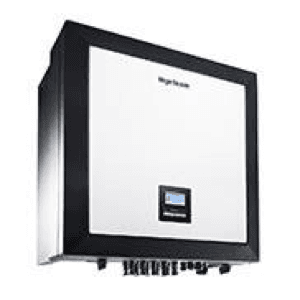
Ingeteam Ingecon 3Play
Monitors and controls Ingeteam 3-phase PV inverters via Modbus.
This template connects to Ingeteam Ingecon 3Play three-phase PV inverters via Modbus RTU. It reads AC and DC electrical values, PV string currents, energy totals, and self-consumption data. It also enables active power limitation and start/stop control.
- Protocol
- Modbus RTU
- Connection
- RS485, 9600 baud
- Registers
- 45, read and write
- Brand
- Ingeteam
- Key readings
- AC Voltage L1 to L3 · AC Current L1 to L3 · Active/Reactive/Apparent Power · Daily and Total Energy · PV String Currents 1 to 10 · Self-Consumption Ratio
- Available commands
- Pac Limitation · Start/Stop
- Compatible models
- Ingecon 3Play
- Last updated
Registers (45)
43 read, 2 write
| Name | Unit | Access | Address (Hidden until you enter your email) | Function (hidden) | Type (hidden) |
|---|---|---|---|---|---|
| Vac 1 | Volt x10 | Read | |||
| Iac 1 | Amp x100 | Read | |||
| Total Energy | kWh | Read | |||
| Total Operation Hours | h | Read | |||
| Total Number of Connections | count | Read | |||
| Alarm Code 1 | Read | ||||
| Alarm Code 2 | Read | ||||
| Alarm Code 3 | Read | ||||
| Alarm Code 4 | Read | ||||
| Warming | Read | ||||
| Fac | Hertz x100 | Read | |||
| Apparent Power (S) | VA div10 | Read | |||
| Reactive Power (Q) | VAr div10 | Read | |||
| Active Power (P) | W div10 | Read | |||
| CosPhi | x1000 | Read | |||
| Ipv 1 | Amp x100 | Read | |||
| Ipv 2 | Amp x100 | Read | |||
| Vpv 1 | Volt | Read | |||
| Vpv 2 | Volt | Read | |||
| Ppv | W div10 | Read | |||
| Ppv 1 | W div10 | Read | |||
| Ppv 2 | W div10 | Read | |||
| Riso | kOhm | Read | |||
| Wattmeter (Self-Consumption) | W | Read | |||
| Power Reduction Rate | % | Read | |||
| Power Reduction Reason | Read | ||||
| Daily Energy | kWh x100 | Read | |||
| Self-Consumption Ratio | % | Read | |||
| Iac 2 | Amp x100 | Read | |||
| Iac 3 | Amp x100 | Read | |||
| Vac 2 | Volt x10 | Read | |||
| Vac 3 | Volt x10 | Read | |||
| Ipv String 1 | Amp x10 | Read | |||
| Ipv String 2 | Amp x10 | Read | |||
| Ipv String 3 | Amp x10 | Read | |||
| Ipv String 4 | Amp x10 | Read | |||
| Ipv String 5 | Amp x10 | Read | |||
| Ipv String 6 | Amp x10 | Read | |||
| Ipv String 7 | Amp x10 | Read | |||
| Ipv String 8 | Amp x10 | Read | |||
| Ipv String 9 | Amp x10 | Read | |||
| Ipv String 10 | Amp x10 | Read | |||
| Warming String Kit | Read | ||||
| Pac Limitation | Write | ||||
| Stop(5) - Start(6) | Write |
Loading registers…
Send your device list
If a device is not in the library yet, we build the template for free as soon as we have the register data.
Use cases
- Monitor real-time AC power output and PV string currents on a cloud dashboard for each installation.
- Create alerts when alarm codes appear or when daily energy production drops below an expected threshold.
- Track self-consumption ratio over time to advise customers on battery storage upgrades.
- Remotely limit active power output for grid compliance or feed-in management requirements.
- Compare string-level currents across seasons to detect panel degradation or shading issues.
- Use start/stop control to safely shut down the inverter remotely before scheduled maintenance.
Installation
Connect the ModbusCloud Gateway to the RS-485 Modbus RTU port on the Ingeteam Ingecon 3Play using a twisted-pair cable with correct A/B polarity.
Set the baud rate on both the gateway and the inverter to 9600, with matching parity and stop bit settings.
Assign a unique Modbus slave address on the inverter and note it for configuration in the ModbusCloud portal.
Log in to the ModbusCloud portal, add your gateway, and import the Ingeteam Ingecon 3Play template from the template library.
Verify that live readings such as AC voltage and active power appear correctly on the dashboard, confirming communication is established.
If using the control features, test the start/stop and Pac limitation commands in a safe operating condition before relying on them remotely.
Things to watch for
Why do my voltage or current readings look incorrect or too high?
The Ingecon 3Play uses different scaling factors per register type. Voltages are scaled x10, currents x100 or x10 depending on AC or PV source, and power values require division by 10. The template applies these factors automatically, but if you see unexpected values, confirm you are using the correct template version.
Can I use both Pac Limitation and Start/Stop even though they share the same register address?
Yes. Both functions use address 1000 but with different data widths. Pac Limitation is written as a uint32 and Start/Stop as a uint16. The template distinguishes between them, so avoid writing to this address manually outside the template.
What baud rate and serial settings should I use?
The default baud rate is 9600. Ensure both the gateway and the inverter use the same parity (typically 8N1) and stop bit configuration. A mismatch will cause communication timeouts.
How many PV string current inputs does this template support?
The template reads up to 10 PV string currents. If your inverter model has fewer string inputs, unused string registers will return zero or not respond. This does not affect other readings.
Want to see how it works?
