








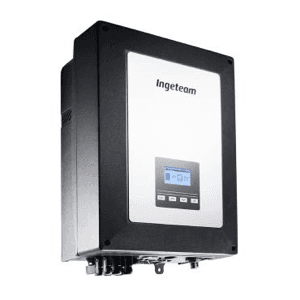
Ingeteam Ingecon 1Play HF
Controls and monitors Ingecon 1Play HF solar inverter via Modbus
This template connects to the Ingeteam Ingecon 1Play HF solar inverter via Modbus RTU at 9600 baud. It reads AC and DC electrical parameters, energy totals, alarm codes, and self-consumption data. It also allows power limitation and start/stop control through writable registers.
- Protocol
- Modbus RTU
- Connection
- RS485, 9600 baud
- Registers
- 26, read and write
- Brand
- Ingeteam
- Key readings
- AC Voltage and Current · Active, Reactive and Apparent Power · PV Voltage, Current and Power · Total and Daily Energy · CosPhi and Self-Consumption Ratio · Alarm Codes 1 to 4
- Available commands
- Pac Limitation · Stop/Start
- Compatible models
- Ingecon 1Play HF
- Last updated
Registers (26)
24 read, 2 write
| Name | Unit | Access | Address (Hidden until you enter your email) | Function (hidden) | Type (hidden) |
|---|---|---|---|---|---|
| Vac | Volt x10 | Read | |||
| Iac | Amp x100 | Read | |||
| Total Energy | kWh | Read | |||
| Total Operation Hours | h | Read | |||
| Total Number of Connections | Read | ||||
| Alarm Code 1 | Read | ||||
| Alarm Code 2 | Read | ||||
| Alarm Code 3 | Read | ||||
| Alarm Code 4 | Read | ||||
| Warming | Read | ||||
| Fac | Hertz x100 | Read | |||
| Apparent Power (S) | VA | Read | |||
| Reactive Power (Q) | var | Read | |||
| Active Power (P) | W | Read | |||
| CosPhi | x1000 | Read | |||
| Ipv | Amp x100 | Read | |||
| Vpv | Volt | Read | |||
| Ppv | W | Read | |||
| Riso | kOhm | Read | |||
| Wattmeter (Self-Consumption) | W | Read | |||
| Power Reduction Rate | % | Read | |||
| Power Reduction Reason | Read | ||||
| Daily Energy | kWh x100 | Read | |||
| Self-Consumption Ratio | % | Read | |||
| Pac Limitation | Write | ||||
| Stop(5) - Start(6) | Write |
Loading registers…
Send your device list
If a device is not in the library yet, we build the template for free as soon as we have the register data.
Use cases
- Monitor real-time PV production and AC output power on a live dashboard for residential solar customers.
- Set up alerts when alarm codes are triggered to detect inverter faults before the customer notices.
- Limit active power output remotely to comply with grid feed-in restrictions imposed by the local utility.
- Track daily and total energy production to generate periodic performance reports for end customers.
- Use the stop/start control to remotely shut down the inverter during maintenance or grid emergencies.
- Compare self-consumption ratio trends over time to advise customers on battery storage investments.
Installation
Connect the ModbusCloud Gateway to the RS-485 terminals on the Ingeteam Ingecon 1Play HF inverter, observing correct A/B polarity.
Set the inverter's Modbus slave address to a unique value on the bus using the inverter's configuration menu.
Confirm the baud rate on both the inverter and the gateway is set to 9600, with matching parity and stop bit settings.
Enable the Modbus RTU communication interface in the inverter's settings if it is not active by default.
Import the Ingecon 1Play HF template in the ModbusCloud platform and assign the correct slave address.
Verify data is flowing by checking live AC voltage and PV power readings on the ModbusCloud dashboard.
Things to watch for
Why do my AC voltage or current readings look wrong?
The template applies scaling factors internally. AC voltage is scaled by 10, AC current and frequency by 100, and CosPhi by 1000. If you read raw register values outside the template, you must apply these factors manually.
Can I use both Pac Limitation and Stop/Start at the same time?
Both writable registers are mapped to address 1000 but differ in data type. Pac Limitation is uint32 and Stop/Start is uint16. Ensure your write commands use the correct data type and register offset for each function.
The gateway cannot communicate with the inverter. What should I check?
Verify RS-485 wiring polarity (A/B), confirm the baud rate is 9600 on both sides, and ensure parity and stop bits match. Also check that the Modbus slave address in the template matches the address configured on the inverter.
Does the daily energy counter reset automatically?
Yes, the daily energy register resets at the start of each day on the inverter side. The value is scaled by 100, which the template handles automatically.
Want to see how it works?
