








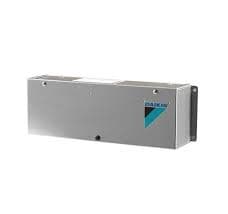
Daikin AC EKMBDXA 7 Zones
Controls and monitors Daikin VRV air conditioning across 7 zones via Modbus
Template for the Daikin EKMBDXA Modbus RTU interface module, used to monitor and control up to 7 VRV air conditioning zones. Reads zone temperatures, setpoints, operation modes, and on/off states. Allows writing setpoints, modes, and on/off commands per zone.
- Protocol
- Modbus RTU
- Connection
- RS485, 9600 baud
- Registers
- 42, read and write
- Brand
- Daikin
- Key readings
- Temperature Zone 1 to 7 · Temperature Set Point Zone 1 to 7 · Operation Mode Zone 1 to 7 · ON/OFF Zone 1 to 7 · Indoor Unit Capability Zone 1 and 7
- Available commands
- ON/OFF Zone 1 to 7 · Operation Mode Zone 1 to 3 · Temperature Set Point Zone 1 to 7
- Compatible models
- EKMBDXA
- Last updated
Registers (42)
33 read, 21 write
| Name | Unit | Access | Address (Hidden until you enter your email) | Function (hidden) | Type (hidden) |
|---|---|---|---|---|---|
| Temperature Zone 1 | °C | Read and write | |||
| Temperature Zone 2 | °C | Read and write | |||
| Temperature Zone 3 | °C | Read and write | |||
| Temperature Zone 4 | °C | Read | |||
| Temperature Zone 5 | °C | Read | |||
| Temperature Zone 6 (Master) | °C | Read | |||
| Temperature Set Point Zone 1 | °C | Read and write | |||
| Temperature Set Point Zone 2 | °C | Read and write | |||
| Temperature Set Point Zone 3 | °C | Read and write | |||
| Temperature Set Point Zone 4 | °C | Read | |||
| Temperature Set Point Zone 5 | °C | Read | |||
| Temperature Set Point Zone 6 (Master) | °C | Read | |||
| Operation Mode Zone 1 | Read and write | ||||
| Operation Mode Zone 2 | Read and write | ||||
| Operation Mode Zone 3 | Read and write | ||||
| Operation Mode Zone 4 | Read | ||||
| Operation Mode Zone 5 | Read | ||||
| Operation Mode Zone 6 (Master) | Read | ||||
| ON_OFF Zone 1 | Read and write | ||||
| ON_OFF Zone 2 | Read and write | ||||
| ON_OFF Zone 3 | Read and write | ||||
| ON_OFF Zone 4 | Read | ||||
| ON_OFF Zone 5 | Read | ||||
| ON_OFF Zone 6 (Master) | Read | ||||
| FFR_Test_Modbus_Adr 0001 | Read | ||||
| FFR_Test_Modbus_Adr_0002 | Read | ||||
| FFR_Test_Modbus_Adr_0003 | Read | ||||
| ON_OFF Zone 7 | Read | ||||
| Operation Mode Zone 7 | Read | ||||
| Temperature Set Point Zone 7 | °C | Read | |||
| Temperature Zone 7 | °C | Read | |||
| Indoor Unit Capability Zone 1 | Read | ||||
| Indoor Unit Capability Zone 7 | Read | ||||
| Temperature Set Point Zone 1 | °C | Write | |||
| Temperature Set Point Zone 3 | °C | Write | |||
| Temperature Set Point Zone 5 | °C | Write | |||
| ON_OFF Zone 1 | Write | ||||
| ON_OFF Zone 3 | Write | ||||
| ON_OFF Zone 5 | Write | ||||
| ON_OFF Zone 7 | Write | ||||
| Temperature Set Point Zone 7 | °C | Write | |||
| Operation Mode Zone 1 | Write |
Loading registers…
Send your device list
If a device is not in the library yet, we build the template for free as soon as we have the register data.
Use cases
- Monitor live room temperatures and setpoints across all 7 VRV zones on a single cloud dashboard.
- Create alerts when a zone temperature deviates from its setpoint by more than 2 degrees for over 15 minutes.
- Remotely switch individual zones on or off to reduce energy consumption outside office hours.
- Log operation mode changes per zone to verify scheduled heating and cooling programs are running correctly.
- Adjust temperature setpoints for multiple zones from one interface during seasonal commissioning.
- Compare indoor unit capability values between Zone 1 and Zone 7 to detect capacity imbalances.
Installation
Wire the Daikin EKMBDXA module to the VRV indoor units via the Daikin communication bus and verify that zone data is available on the module.
Connect the RS-485 A and B terminals of the EKMBDXA to the corresponding terminals on the ModbusCloud Gateway, observing correct polarity.
Set the Modbus RTU slave address on the EKMBDXA module to match the address configured in the ModbusCloud template (default is typically 1).
Confirm the baud rate is set to 9600, 8 data bits, no parity, 1 stop bit on both the EKMBDXA and the gateway.
Import the Daikin EKMBDXA 7 Zones template in the ModbusCloud portal and assign it to the gateway connection.
Verify that zone temperatures and on/off states appear on the dashboard, then test a setpoint write command on one zone to confirm bidirectional communication.
Things to watch for
Why do I see duplicate values for the same zone parameter?
The EKMBDXA exposes certain registers at two different addresses. For example, ON/OFF Zone 1 exists at address 2003 and 2006. The template maps the correct address for each function. You can ignore the duplicate if both show the same value.
What baud rate and serial settings should I use?
Use 9600 baud, 8 data bits, no parity, and 1 stop bit (9600 8N1). These settings must match on both the EKMBDXA module and the ModbusCloud gateway.
Zone 6 is labeled as Master in the register list. What does this mean?
In the EKMBDXA register map, Zone 6 carries a Master designation in certain read registers. This typically indicates it acts as the reference zone for system-level decisions. Functionally, it is still read and controlled like any other zone.
I only have 4 zones connected. Will the template still work?
Yes. Unused zones will return default or zero values. You can hide those zones in the ModbusCloud dashboard to keep the interface clean.




Want to see how it works?
