








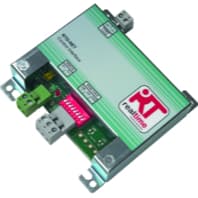
Daikin RTD-NET Module
Controls and monitors Daikin HVAC units via RTD-NET Modbus interface.
This ModbusCloud template provides Modbus RTU control and monitoring of Daikin Sky Air, VRV, VAM, and VKM HVAC units through the Daikin RTD-NET Module. It reads return air temperature, unit operation mode, fault state and fault code, filter alarm, and thermo on and defrost status. Writes include setpoint temperature, fan speed, on/off, and mode/louvre.
- Protocol
- Modbus RTU
- Connection
- RS485, 9600 baud
- Registers
- 15, read and write
- Brand
- Daikin
- Key readings
- RC Operation Mode · Return Air Temperature · Return Air Min/Max · Is Fault / Fault Code · Filter Alarm · Thermo On / Defrost
- Available commands
- Setpoint · Fanspeed · ON/OFF · Mode / Louvre
- Compatible models
- RTD-NET Module
- Last updated
Registers (15)
10 read, 5 write
| Name | Unit | Access | Address (Hidden until you enter your email) | Function (hidden) | Type (hidden) |
|---|---|---|---|---|---|
| RC Operation Mode | Read | ||||
| Unit Count | count | Read | |||
| Is Fault | Read | ||||
| Fault Code | Read | ||||
| Return Air | °C | Read | |||
| Filter Alarm | Read | ||||
| Return Air Min | °C | Read | |||
| Return Air Max | °C | Read | |||
| Thermo On | Read | ||||
| Defrost | Read | ||||
| Setpoint | °C | Write | |||
| Fanspeed | °C | Write | |||
| ON_OFF | Write | ||||
| Louvre | Write | ||||
| Mode | Write |
Loading registers…
Send your device list
If a device is not in the library yet, we build the template for free as soon as we have the register data.
Use cases
- Schedule Daikin HVAC units to pre-cool or pre-heat a space before a meeting, based on room calendar data pushed into a ModbusCloud automation.
- Alert facilities when a unit reports a fault or filter alarm, including the fault code for faster dispatch.
- Monitor return air temperature across a fleet of indoor units to spot zoning or balancing problems.
- Remotely turn off HVAC units outside business hours without someone walking to each thermostat.
- Log runtime via Thermo On status to build a compressor duty cycle report for preventive maintenance.
Installation
Install the Daikin RTD-NET Module and connect it to the Daikin indoor unit bus per the Daikin installation manual.
Wire the RTD-NET RS485 terminals to the ModbusCloud gateway RS485 channel.
Configure RTD-NET settings: baudrate 9600, slave address per unit (4 is a common default for the first indoor unit).
In ModbusCloud, add a Modbus RTU device matching the RTD-NET settings and import the Daikin RTD-NET Module template.
For multi-unit installs, create one ModbusCloud device per indoor unit slave ID and import the same template.
Things to watch for
Fan speed register unit says Celsius. Is the template wrong?
No, that is a Daikin documentation error. Fan speed register (address 2) is actually a speed index, not a temperature. The template correctly labels it as a fan speed.
How many indoor units can I address on one RTD-NET?
RTD-NET supports up to sixteen indoor units in most configurations. Each unit gets a unique Modbus slave address. Check the RTD-NET installation manual for the exact address assignment for your Daikin model.




Want to see how it works?
