









Daikin HomeHub air2air (SG Ready)
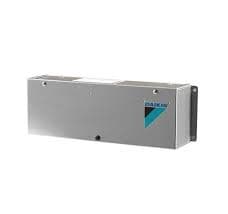
The Daikin HomeHub (EKRHH) is a gateway accessory that connects Daikin air-to-air heat pumps to building automation and Smart Grid systems. This template targets use case 4: Modbus TCP communication for residential air-to-air units, including the HomeHub air2air (SG Ready) and Altherma 4 (SG Ready). It reads the active Smart Grid operating mode via register 1000 and writes both the SG mode setpoint and the maximum power limit for demand control. Use it with ModbusCloud to monitor and remotely command SG states across up to five indoor units from a single portal connection.
- Protocol
- Modbus TCP
- Connection
- Ethernet, Modbus TCP
- Registers
- 3, read and write
- Brand
- Daikin
- Compatible models
- HomeHub air2air (SG Ready) · Altherma 4 (SG Ready)
- Last updated
Registers (3)
1 read, 2 write
| Name | Unit | Access | Address (Hidden until you enter your email) | Function (hidden) | Type (hidden) |
|---|---|---|---|---|---|
| getmode | Read | ||||
| setmode | Write | ||||
| setmaxpower | W | Write |
Loading registers…
Send your device list
If a device is not in the library yet, we build the template for free as soon as we have the register data.
Use cases
- Monitor the active Smart Grid mode to verify grid-balancing commands are received and applied correctly.
- Track mode transitions over time to audit how often the unit enters or exits SG states during peak tariff periods.
- Alert on unexpected mode values to detect misconfigured SG signals or loss of communication from the energy utility.
- Write the SG mode setpoint from a load-management schedule to shift air-conditioning demand away from grid stress periods.
- Verify that the maximum power limit setpoint takes effect by comparing commanded values against observed unit behaviour in the portal.
Installation
In the Daikin ONECTA app, add the HomeHub to your installation, select use case 4 (Modbus TCP/IP for air-to-air heat pump), and set the Modbus protocol to TCP/IP with no encryption on port 502.
Connect the Daikin HomeHub to the same LAN as the ModbusCloud Gateway using a standard Ethernet cable, ensuring both devices can reach each other on the local network.
In the ModbusCloud portal, add a new device, import the Daikin HomeHub air2air (SG Ready) template, set the unit ID to the Modbus slave address configured in ONECTA, and enter the HomeHub IP address and port 502.
Perform a spot-check by reading register 1000 (getmode) in the portal live data view and confirm the returned value matches the current operating state shown on the ONECTA app.
Things to watch for
Register 1000 always returns zero. Is the HomeHub communicating?
Zero is a valid SG mode value meaning no Smart Grid intervention is active. Confirm the HomeHub is online in ONECTA and that use case 4 is selected. If the register is truly unresponsive, verify the unit ID matches the Modbus slave address set in the ONECTA app and that no firewall is blocking TCP port 502.
The gateway connects but register values never update after the first read.
The Daikin HomeHub Modbus implementation is change-based: the device only propagates a new value when a change is detected. If the operating mode has not changed since the last poll, the register will hold the previous value. Implement periodic refresh writes or increase polling frequency to keep the portal view current.
Why does writing the SG mode setpoint have no visible effect on the unit?
Writing to register 1000 requires the HomeHub to be actively enrolled in use case 4 and the connected indoor unit firmware to support remote SG commands. Check that the unit MMI software is at version 7.3.0 or higher. Also confirm that you are using function code 16 (write multiple registers) as specified in this template, not function code 6.
Is it safe to write arbitrary values to the setmode or setmaxpower registers?
Use caution. Writing an out-of-range or unsupported SG mode value to register 1000, or setting an excessively low maximum power limit via register 1001, can force the unit into a restricted operating state that may affect comfort, trigger protection shutdowns, or interfere with the unit manufacturer's operating envelope. Always test setpoint changes in a controlled manner and consult the Daikin HomeHub installer reference guide for the supported value range before automating writes.



Want to see how it works?
