








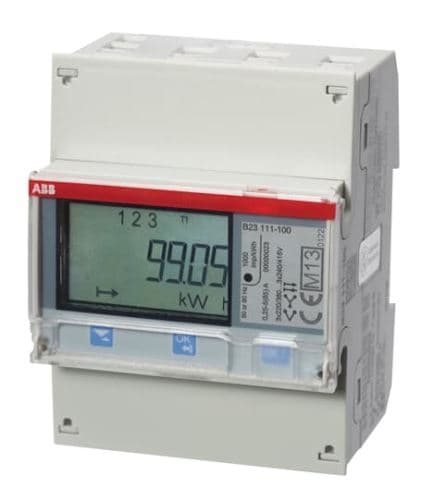
Energy meter ABB B23
Reads energy values from a 3-phase ABB B23 energy meter via Modbus RTU.
Template for the ABB B23 three-phase energy meter over Modbus RTU. It reads per-phase voltage, current, and active power, as well as total active power, total reactive power, and active import energy. No control functions are included.
- Protocol
- Modbus RTU
- Connection
- RS485, 19200 baud
- Registers
- 13, read only
- Brand
- ABB
- Key readings
- Voltage L1 to L3 · Current L1 to L3 · Active power L1 to L3 · Active power total · Reactive power total · Active import energy
- Compatible models
- ABB B23
- Last updated
Registers (13)
13 read, 0 write
| Name | Unit | Access | Address (Hidden until you enter your email) | Function (hidden) | Type (hidden) |
|---|---|---|---|---|---|
| Active power total | W | Read | |||
| Active power L1 | W | Read | |||
| Active power L2 | W | Read | |||
| Active power L3 | W | Read | |||
| Active import low bit | Wh | Read | |||
| Active import high bit | Wh | Read | |||
| Voltage L1-N | V | Read | |||
| Current L3 | A | Read | |||
| Current L2 | A | Read | |||
| Current L1 | A | Read | |||
| Voltage L3-N | V | Read | |||
| Voltage L2-N | V | Read | |||
| Reactive power total | var | Read |
Loading registers…
Send your device list
If a device is not in the library yet, we build the template for free as soon as we have the register data.
Use cases
- Monitor per-phase voltage and current on a live dashboard to detect load imbalance across phases.
- Log total active import energy over time to verify utility billing or track tenant consumption.
- Create an alert when total active power exceeds a predefined threshold to prevent demand charges.
- Compare reactive power readings against active power to assess power factor and plan correction.
- Generate weekly or monthly energy reports for facility managers or building owners.
Installation
Wire the ModbusCloud Gateway to the RS-485 terminals on the ABB B23 using a twisted-pair cable with correct A/B polarity.
On the ABB B23 display menu, verify that Modbus RTU is enabled, the baud rate is set to 19200, and note the configured slave address.
In the ModbusCloud portal, add a new device, select the ABB B23 template, and enter the slave address that matches the meter.
Set the gateway serial port to 19200 baud, 8 data bits, 1 stop bit, and even parity (or match whatever parity is configured on the meter).
Power on the gateway and confirm that live readings for voltage, current, and power appear in the ModbusCloud dashboard.
Things to watch for
I see zero values or communication errors for all registers. What should I check?
Verify that the RS-485 A and B wires are not swapped. Also confirm that the baud rate on the gateway matches the meter setting of 19200. Check that the Modbus slave address in the template matches the address configured on the B23 display.
The active import energy reading seems too low or incorrect. Why?
The active import energy is split across two register pairs (low bit and high bit, each uint32). If only one pair is read, the value will be incomplete. The template combines both pairs automatically, but make sure no register offsets have been manually changed.
Which parity setting should I use?
The ABB B23 defaults to even parity in most firmware versions. Set your gateway to 19200 baud, 8 data bits, even parity, and 1 stop bit. If communication fails, check the parity setting on the meter display and match it on the gateway.
Can I connect multiple ABB B23 meters to the same Modbus gateway?
Yes. Assign a unique slave address to each meter using its front-panel menu. Then add a separate device entry in ModbusCloud for each address, all using the same ABB B23 template.




Want to see how it works?
