








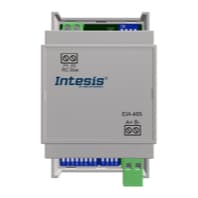
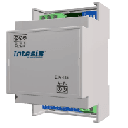
IntesisBox DK-RC-MBS-1
Controls Daikin SKY and VRV air conditioners via Modbus RTU
This template integrates the IntesisBox DK-RC-MBS-1 gateway with ModbusCloud, enabling remote monitoring and control of Daikin SKY and VRV air conditioners via Modbus RTU. It reads HVAC status, temperatures, and alarms, and allows writing setpoints, modes, fan speeds, and vane positions.
- Protocol
- Modbus RTU
- Connection
- RS485, 9600 baud
- Registers
- 12, read and write
- Brand
- Intesis
- Key readings
- On/Off status · Mode · Fan speed · Vane position · Temperature setpoint · Alarm status and error code
- Available commands
- On/Off · Mode and fan speed · Temperature setpoint · Vane position
- Compatible models
- DK-RC-MBS-1
- Last updated
Registers (12)
12 read, 9 write
| Name | Unit | Access | Address (Hidden until you enter your email) | Function (hidden) | Type (hidden) |
|---|---|---|---|---|---|
| FanSpeed | °C | Read and write | |||
| Mode | °C | Read and write | |||
| VanePosition | °C | Read and write | |||
| TemperatureSetpoint | °C | Read and write | |||
| OnOff | °C | Read and write | |||
| WindowContact | °C | Read and write | |||
| RemoteControlDisablement | °C | Read and write | |||
| OperationTime | °C | Read and write | |||
| AlarmStatus | °C | Read | |||
| ErrorCode | °C | Read | |||
| TemperatureAmbient | °C | Read and write | |||
| ReturnPathTemperature | °C | Read |
Loading registers…
Send your device list
If a device is not in the library yet, we build the template for free as soon as we have the register data.
Use cases
- Monitor Daikin SKY and VRV on/off status and room temperatures on a live cloud dashboard across multiple sites.
- Adjust temperature setpoints and operating modes remotely without dispatching a technician to the building.
- Create alerts when an alarm or error code appears on a Daikin unit to enable faster fault response.
- Log fan speed and mode changes over time to verify HVAC schedules and optimize energy consumption.
- Use the window contact register to track when units should be disabled for energy-saving purposes.
Installation
Connect the IntesisBox DK-RC-MBS-1 to the Daikin indoor unit using the appropriate connector on the Daikin communication bus, following the wiring diagram in the IntesisBox manual.
Wire the EIA-485 (A, B, GND) terminals of the DK-RC-MBS-1 to the Modbus RTU port of your ModbusCloud Gateway, observing correct polarity.
Set the Modbus slave address on the DK-RC-MBS-1 using its DIP switches or configuration software, and ensure the baud rate is set to 9600.
Configure the same slave address and baud rate (9600) in the ModbusCloud gateway settings for the corresponding RS-485 port.
Import the IntesisBox DK-RC-MBS-1 template from the ModbusCloud template library and assign it to the configured device.
Verify communication by checking that on/off status, temperature setpoint, and ambient temperature values appear correctly on the ModbusCloud dashboard.
Things to watch for
Why is the ambient temperature reading not updating even though other registers work?
The ambient temperature register is located at address 22, which is not sequential with the other temperature registers. Verify that the template maps this address correctly and that the Daikin unit is actively reporting ambient temperature on its bus.
What baud rate should I use for the DK-RC-MBS-1?
The default baud rate is 9600. Make sure both the IntesisBox device and the ModbusCloud gateway RS-485 port are configured to 9600 baud, 8 data bits, no parity, 1 stop bit.
Can I control the unit remotely and still use the wall-mounted Daikin remote?
Yes, both the Modbus interface and the original remote controller can coexist. However, the remote control disablement register allows you to lock out the local remote if needed. This register is both readable and writable.
What register format does the DK-RC-MBS-1 use?
All registers are int16 (signed 16-bit integer). No floating point conversion or byte order swapping is required.
Want to see how it works?
