








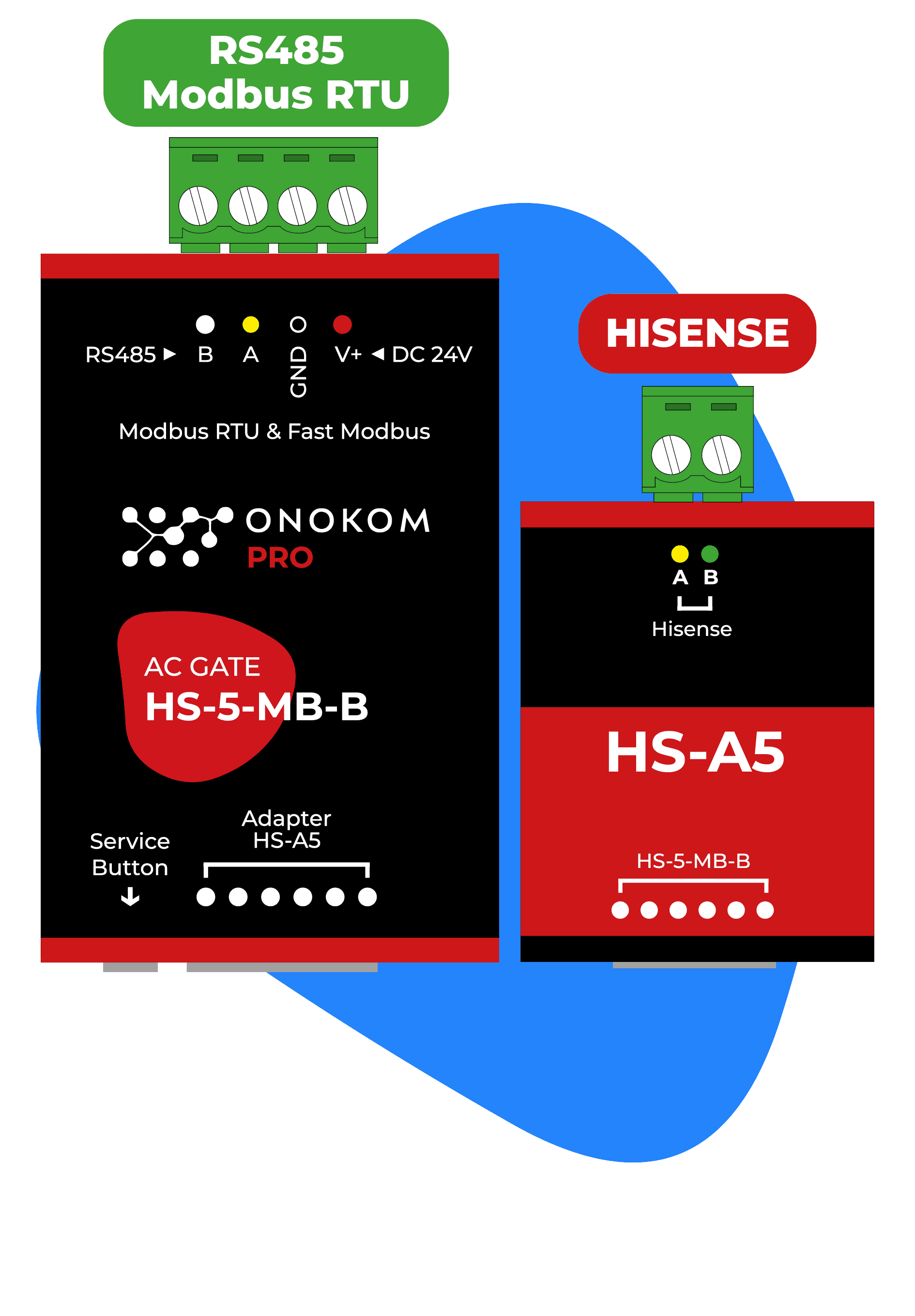
ONOKOM AIR HS-5-MB-B
Controls Hisense air conditioners via the ONOKOM HS-5-MB-B Modbus gateway.
This template integrates Hisense air conditioners via the ONOKOM HS-5-MB-B Modbus RTU gateway into the ModbusCloud platform. It provides indoor temperature readings, AC status monitoring, and full control of operating mode, fan speed, target temperature, and vane positions.
- Protocol
- Modbus RTU
- Connection
- RS485, 9600 baud
- Registers
- 10, read and write
- Brand
- Onokom
- Key readings
- Indoor air temperature · AC connected status · Vertical vanes status · Horizontal vanes status
- Available commands
- Target temperature · Active on/off · Operating mode · Smart fan speed
- Compatible models
- ONOKOM HS-5-MB-B
- Last updated
Registers (10)
4 read, 8 write
| Name | Unit | Access | Address (Hidden until you enter your email) | Function (hidden) | Type (hidden) |
|---|---|---|---|---|---|
| Indoor air temperature | °C | Read | |||
| AC connected (Status) | Read | ||||
| Vertical vanes (Status) | Read and write | ||||
| Horizontal vanes | Read and write | ||||
| Active (Control) | Write | ||||
| Loxone modes (Control) | Write | ||||
| Smart fan speed | Write | ||||
| Target temperature | °C | Write | |||
| Modbus address (Service) | Write | ||||
| Vertical vanes (Control) | Write |
Loading registers…
Send your device list
If a device is not in the library yet, we build the template for free as soon as we have the register data.
Use cases
- Monitor indoor air temperature and AC status remotely on the ModbusCloud dashboard for multiple Hisense units.
- Adjust target temperature and operating mode from the cloud without an on-site visit.
- Create an alert when a Hisense AC unit reports a disconnected status so you can respond quickly.
- Log indoor temperature trends over time to verify comfort levels in rental or commercial properties.
- Control vertical and horizontal vane positions remotely to optimize airflow distribution in occupied zones.
Installation
Connect the ONOKOM HS-5-MB-B gateway to the Hisense air conditioner according to the ONOKOM wiring instructions.
Wire the RS-485 A and B terminals of the ONOKOM gateway to the corresponding RS-485 port on your ModbusCloud Gateway.
Set the Modbus slave address on the ONOKOM gateway by writing the desired address to register 128, ensuring each device on the bus has a unique address.
Configure the ModbusCloud gateway serial port to Modbus RTU with a baud rate of 9600, matching the ONOKOM default settings.
Import the ONOKOM AIR HS-5-MB-B template in the ModbusCloud platform and assign it to the correct serial port and slave address.
Verify communication by checking that indoor temperature and AC connected status appear on the ModbusCloud dashboard.
Things to watch for
What baud rate should I use for the ONOKOM HS-5-MB-B?
The default baud rate is 9600. Make sure the ModbusCloud gateway serial port is configured to 9600 baud, 8 data bits, no parity, and 1 stop bit (8N1) unless ONOKOM documentation specifies otherwise.
How do I change the Modbus slave address on the ONOKOM gateway?
Write the desired slave address value to Modbus register 128. This allows you to place multiple ONOKOM gateways on the same RS-485 bus, each with a unique address.
Can I control both vertical and horizontal vanes through this template?
Yes. Both vertical vane and horizontal vane registers are readable and writable. You can monitor their current position and change them remotely from the ModbusCloud dashboard.
Do I need one ONOKOM HS-5-MB-B per indoor unit?
Yes. Each ONOKOM HS-5-MB-B gateway connects to a single Hisense indoor unit. For multi-split or VRF systems with multiple indoor units, install one gateway per unit and assign each a unique Modbus address.



Want to see how it works?
