








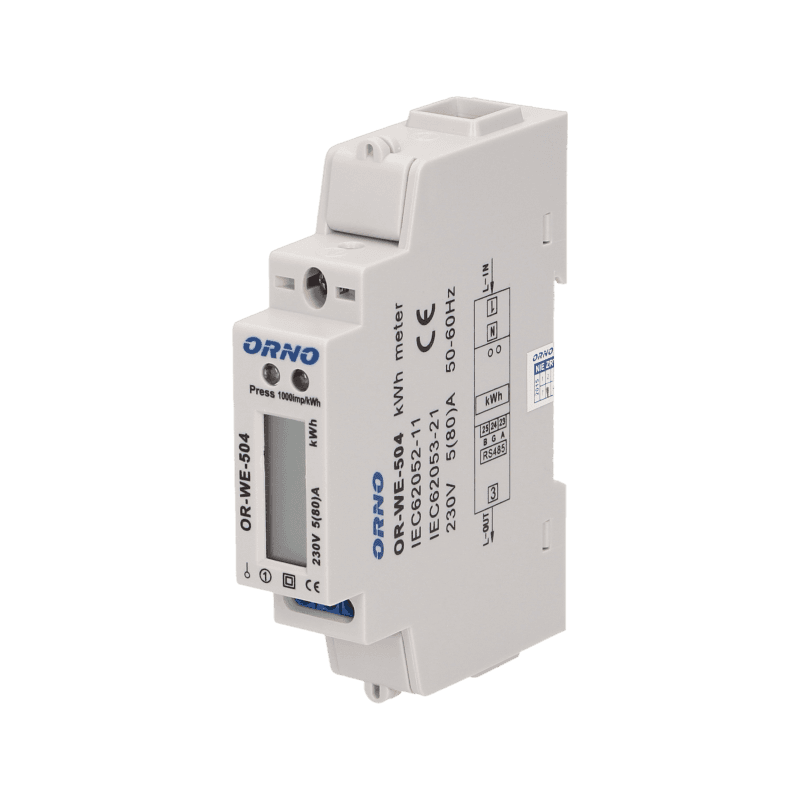
Orno OR-WE-504 Energy Meter
Reads energy values from a single-phase Orno OR-WE-504 energy meter via Modbus RTU.
This template reads the Orno OR-WE-504 single-phase energy meter via Modbus RTU at 9600 baud. It provides voltage, current, active power, power factor, and total active energy. The meter supports up to 80A and is not MID certified.
- Protocol
- Modbus RTU
- Connection
- RS485, 9600 baud
- Registers
- 5, read only
- Brand
- ORNO
- Key readings
- Voltage · Current · Active Power · Total Active Energy · Power Factor
- Compatible models
- OR-WE-504
- Last updated
Registers (5)
5 read, 0 write
| Name | Unit | Access | Address (Hidden until you enter your email) | Function (hidden) | Type (hidden) |
|---|---|---|---|---|---|
| Voltage | V | Read | |||
| Active Power | kW | Read | |||
| Total Active Energy | kWh | Read | |||
| Current | A | Read | |||
| Power Factor | Read |
Loading registers…
Send your device list
If a device is not in the library yet, we build the template for free as soon as we have the register data.
Use cases
- Monitor real-time voltage, current, and active power of a single-phase circuit on a remote dashboard.
- Track total energy consumption over time to identify usage patterns for your customer.
- Create an alert when current exceeds a defined threshold, indicating potential overload conditions.
- Compare power factor readings across multiple installations to detect inefficient loads.
- Log energy data from sub-distribution boards to allocate consumption to specific tenants or zones.
Installation
Mount the Orno OR-WE-504 on a DIN rail inside the electrical panel and wire the single-phase load through the meter according to the manufacturer's wiring diagram.
Connect the RS-485 A and B terminals of the meter to the corresponding terminals on your ModbusCloud Gateway, and ensure proper termination if the meter is at the end of the bus.
Set a unique Modbus slave address on the OR-WE-504 using the meter's front panel buttons, and confirm the baud rate is set to 9600.
In the ModbusCloud platform, add a new device and import the Orno OR-WE-504 template from the template library.
Verify that voltage, current, active power, power factor, and total active energy readings appear correctly on your dashboard.
Things to watch for
I see zero or incorrect values for Total Active Energy. What is wrong?
The Total Active Energy register at address 7 is a uint32 value that spans two consecutive registers. Ensure your gateway is configured to read both registers as a single 32-bit unsigned integer. The template handles this automatically, but manual edits may break the mapping.
The meter is not responding on the RS-485 bus. What should I check?
Verify that the A and B wires are not swapped between the meter and the gateway. Confirm the baud rate is set to 9600 on both the meter and the gateway. Also check that the Modbus slave address configured in the platform matches the address set on the meter.
Can I use this meter for official billing or MID-compliant energy accounting?
No. The Orno OR-WE-504 is not MID certified. It is suitable for internal monitoring and sub-metering only, not for fiscal or billing purposes.
Can I connect multiple OR-WE-504 meters on the same RS-485 bus?
Yes. Assign a unique Modbus address to each meter using the front panel controls. Make sure all meters share the same baud rate of 9600 and that the RS-485 bus is properly terminated at both ends.

Want to see how it works?
