








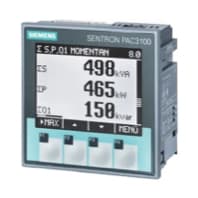
Siemens Sentron PAC3100 Power meter 3 phase
Reads 3-phase power metering data from a Siemens Sentron PAC3100.
This template reads 3-phase power metering data from a Siemens Sentron PAC3100 via Modbus RTU. It covers voltage, current, active and reactive power, power factor, and frequency per phase and as totals, including min/max statistics. All registers are read-only.
- Protocol
- Modbus RTU
- Connection
- RS485, 19200 baud
- Registers
- 70, read only
- Brand
- Siemens
- Key readings
- Voltage L1-N to L3-N · Current L1 to L3 · Active Power L1 to L3 and Total · Reactive Power L1 to L3 and Total · Power Factor cos phi · Frequency
- Compatible models
- Sentron PAC3100
- Last updated
Registers (70)
70 read, 0 write
| Name | Unit | Access | Address (Hidden until you enter your email) | Function (hidden) | Type (hidden) |
|---|---|---|---|---|---|
| Voltage L1-N | V | Read | |||
| Voltage L2-N | V | Read | |||
| Frequency | Hz | Read | |||
| Voltage L3-N | V | Read | |||
| Voltage L1-L2 | V | Read | |||
| Voltage L3-L1 | V | Read | |||
| Current L1 | A | Read | |||
| Current L2 | A | Read | |||
| Current L3 | A | Read | |||
| Apparent Power L1 | VA | Read | |||
| Apparent Power L2 | VA | Read | |||
| Apparent Power L3 | VA | Read | |||
| Active Power L1 | W | Read | |||
| Active Power L2 | W | Read | |||
| Active Power L3 | W | Read | |||
| Reactive Power L1 | var | Read | |||
| Reactive Power L2 | var | Read | |||
| Reactive Power L3 | var | Read | |||
| Neutral Current | A | Read | |||
| Total Apparent Power | VA | Read | |||
| Total Active Power | W | Read | |||
| Total Reactive Power | var | Read | |||
| Power Factor cos φ | Read | ||||
| Max Voltage L1-N | V | Read | |||
| Max Voltage L2-N | V | Read | |||
| Max Voltage L3-N | V | Read | |||
| Max Voltage L1-L2 | V | Read | |||
| Max Voltage L2-L3 | V | Read | |||
| Max Voltage L3-L1 | V | Read | |||
| Max Current L1 | A | Read | |||
| Max Current L2 | A | Read | |||
| Max Current L3 | A | Read | |||
| Max Apparent Power L1 | VA | Read | |||
| Max Apparent Power L2 | VA | Read | |||
| Max Apparent Power L3 | VA | Read | |||
| Max Active Power L1 | W | Read | |||
| Max Active Power L2 | W | Read | |||
| Max Active Power L3 | W | Read | |||
| Max Reactive Power L1 | var | Read | |||
| Max Reactive Power L2 | var | Read | |||
| Max Reactive Power L3 | var | Read | |||
| Max Neutral Current | A | Read | |||
| Max Frequency | Hz | Read | |||
| Max Total Apparent Power | VA | Read | |||
| Max Total Active Power | W | Read | |||
| Max Total Reactive Power | var | Read | |||
| Min Voltage L1-N | V | Read | |||
| Min Voltage L2-N | V | Read | |||
| Min Voltage L3-N | V | Read | |||
| Min Voltage L1-L2 | V | Read | |||
| Min Voltage L2-L3 | V | Read | |||
| Min Voltage L3-L1 | V | Read | |||
| Min Current L1 | A | Read | |||
| Min Current L2 | A | Read | |||
| Min Current L3 | A | Read | |||
| Min Apparent Power L1 | VA | Read | |||
| Min Apparent Power L2 | VA | Read | |||
| Min Apparent Power L3 | VA | Read | |||
| Min Active Power L1 | W | Read | |||
| Min Active Power L2 | W | Read | |||
| Min Active Power L3 | W | Read | |||
| Min Reactive Power L1 | var | Read | |||
| Min Reactive Power L2 | var | Read | |||
| Min Reactive Power L3 | var | Read | |||
| Min Neutral Current | A | Read | |||
| Min Frequency | Hz | Read | |||
| Min Total Apparent Power | VA | Read | |||
| Min Total Active Power | W | Read | |||
| Min Total Reactive Power | var | Read | |||
| Max Power Factor cos φ | Read |
Loading registers…
Send your device list
If a device is not in the library yet, we build the template for free as soon as we have the register data.
Use cases
- Monitor per-phase voltage, current, and active power on a live cloud dashboard for each subdistribution board.
- Create alerts when power factor drops below a defined threshold to detect capacitive or inductive load imbalances.
- Track minimum and maximum power demand over time to support electrical capacity planning for your customer.
- Generate periodic energy consumption reports across multiple sites equipped with Sentron PAC3100 meters.
- Compare reactive power trends between phases to identify potential wiring or load distribution issues.
Installation
Wire the ModbusCloud Gateway to the RS-485 terminals (A and B) on the Siemens Sentron PAC3100, observing correct polarity and using a twisted-pair cable with termination resistor if it is the last device on the bus.
On the PAC3100 front panel, set the Modbus slave address to a unique value and confirm the baud rate is set to 19200, matching the template default.
Ensure the data format on the PAC3100 is configured for float32 (IEEE 754) registers, which is the factory default.
In the ModbusCloud portal, add a new device, select the Siemens Sentron PAC3100 template, and enter the slave address you configured on the meter.
Power on the gateway and verify that live readings for voltage, current, and power appear on the ModbusCloud dashboard.
Things to watch for
I see no data after connecting. What should I check first?
Verify that the RS-485 wiring polarity (A/B) is correct and that the baud rate on both the PAC3100 and the gateway is set to 19200. Also confirm the Modbus slave address in ModbusCloud matches the address configured on the meter.
Why do some register values show as zero or NaN?
The PAC3100 uses float32 encoding across two consecutive registers. If the byte order or word order is mismatched, values may appear as zero or NaN. The template is preconfigured for the PAC3100 default byte order, so make sure no manual byte-swap settings have been changed on the gateway.
Can I connect multiple PAC3100 meters on the same RS-485 bus?
Yes. Assign each meter a unique Modbus slave address via its front panel. In ModbusCloud, create a separate device entry for each meter using the same template but with the corresponding slave address.
Do I need a specific firmware version on the PAC3100?
The Modbus register map used by this template is consistent across standard PAC3100 firmware versions. If you have a very early hardware revision, check the Siemens documentation to confirm that all 70 registers are available.



Want to see how it works?
