









Siemens Siemens
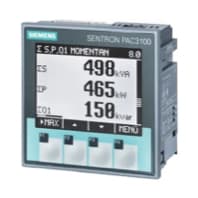
The Siemens SENTRON PAC is a three-phase power monitoring device used in low-voltage distribution panels, switchboards, and building energy management systems. This Modbus TCP template reads per-phase voltage and current on all three phases, per-phase and total active and reactive power, and cumulative energy counters for both consumption and production. Connecting the Siemens SENTRON PAC to ModbusCloud gives operators a continuous, timestamped record of electrical load and generation, enabling energy reporting and threshold alerts without additional hardware.
- Protocol
- Modbus TCP
- Connection
- Ethernet, Modbus TCP
- Registers
- 17, read only
- Brand
- Siemens
- Last updated
Registers (17)
17 read, 0 write
| Name | Unit | Access | Address (Hidden until you enter your email) | Function (hidden) | Type (hidden) |
|---|---|---|---|---|---|
| voltage_l1 | V | Read | |||
| voltage_l2 | V | Read | |||
| voltage_l3 | V | Read | |||
| current_l1 | A | Read | |||
| current_l2 | A | Read | |||
| current_l3 | A | Read | |||
| active_power_l1 | W | Read | |||
| active_power_l2 | W | Read | |||
| active_power_l3 | W | Read | |||
| reactive_power_l1 | W | Read | |||
| reactive_power_l2 | W | Read | |||
| reactive_power_l3 | W | Read | |||
| current | A | Read | |||
| active_power | W | Read | |||
| reactive_power | var | Read | |||
| active_consumption_energy | Wh | Read | |||
| active_production_energy | Wh | Read |
Loading registers…
Send your device list
If a device is not in the library yet, we build the template for free as soon as we have the register data.
Use cases
- Monitor per-phase voltage on L1, L2, and L3 to detect imbalance conditions in distribution panels.
- Track total active power consumption over time to verify load profiles against contracted capacity limits.
- Compare active consumption energy and active production energy to calculate net site import and export.
- Alert on unexpected spikes in reactive power to identify poorly compensated inductive loads.
- Report cumulative energy figures monthly to building owners for tenant sub-metering and cost allocation.
Installation
Enable Modbus TCP on the Siemens SENTRON PAC by navigating to the communication or Modbus section in the device menu or SENTRON powerconfig software, then assign a fixed IP address and confirm port 502 is active.
Connect the meter to the same LAN segment as the ModbusCloud Gateway using a standard Ethernet cable, and verify network reachability with a ping from a PC on the same subnet.
In your ModbusCloud portal, add the Gateway, create a new device, import the Siemens SENTRON PAC template, and set the unit ID to match the Modbus slave address configured on the meter (default is typically 1).
Trigger a manual poll in the portal and spot-check voltage_l1 at address 1: a float32 reading close to your local nominal phase voltage confirms the connection is working correctly.
Things to watch for
Why does voltage_l1 return 0xFFFFFFFF or NaN?
A value of 0xFFFFFFFF in a float32 register indicates the meter has no valid measurement for that channel. Confirm the measuring voltage input is wired and energized, and that the correct connection type is selected in the meter's parameter settings. Gaps in the register frame are filled with 0xFFFFFFFF on SENTRON PAC devices, meaning the slot is unmapped or not yet updated.
The Gateway connects but all register values stay at zero.
Check that the Modbus slave address (unit ID) in the portal matches the one programmed on the meter. The default slave address on many SENTRON PAC models is 1, but it is configurable. Also confirm the meter's Modbus TCP service is enabled and that no firewall rule on the network is blocking port 502.
Float32 values look byte-swapped or obviously wrong.
SENTRON PAC meters transmit 32-bit floats as two consecutive 16-bit holding registers in big-endian (most significant word first) order. If your reading tool applies a different word order, the decoded value will be incorrect. Ensure the ModbusCloud Gateway is set to read two registers per float32 field with big-endian word order.
Active production energy at address 809 reads zero despite known export.
On some SENTRON PAC models, the display of exported (negative) energy must be explicitly activated. Check parameter P02.09 or the equivalent export-energy setting in the meter's configuration menu and set it to ON. Without this, the production energy counter may not increment even when the meter detects reverse power flow.


Want to see how it works?
