








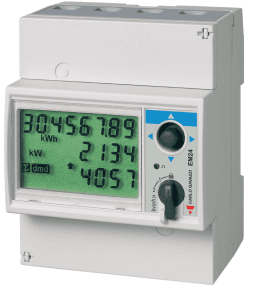
Carlo Gavazzi EM24
Reads energy and power values from a Carlo Gavazzi EM24 three-phase analyzer.
This template reads a Carlo Gavazzi EM24 three-phase energy analyzer over Modbus TCP. It provides voltage per phase, total active power, frequency, and cumulative energy import and export values. No control functions are included.
- Protocol
- Modbus TCP
- Connection
- Ethernet, Modbus TCP
- Registers
- 7, read only
- Brand
- Carlo Gavazzi
- Key readings
- Voltage L1-N to L3-N · Total kWh import (+) · Total kWh export (-) · System kW · Frequency (Hz)
- Compatible models
- Carlo Gavazzi EM24
- Last updated
Registers (7)
7 read, 0 write
| Name | Unit | Access | Address (Hidden until you enter your email) | Function (hidden) | Type (hidden) |
|---|---|---|---|---|---|
| kWh (+) TOT | kWh | Read | |||
| kWh (-) TOT | kWh | Read | |||
| kW sys | kW | Read | |||
| V L1-N | V | Read | |||
| Hz | Hz | Read | |||
| V L2-N | V | Read | |||
| V L3-N | V | Read |
Loading registers…
Send your device list
If a device is not in the library yet, we build the template for free as soon as we have the register data.
Use cases
- Monitor three-phase voltage and total active power on a live dashboard for your customer's site.
- Track cumulative energy import and export to verify utility billing or feed-in tariff accuracy.
- Create an alert when system frequency deviates from the nominal 50 Hz or 60 Hz range.
- Generate monthly energy consumption reports for commercial tenants from historical kWh data.
- Compare per-phase voltages to detect imbalance issues in a three-phase installation.
Installation
Connect the Carlo Gavazzi EM24 to the local Ethernet network using a standard RJ-45 cable and assign it a static IP address via the meter's front panel menu.
Ensure the ModbusCloud Gateway is on the same subnet as the EM24 and can reach it on Modbus TCP port 502.
Verify that Modbus TCP communication is enabled on the EM24 (check the meter's communication settings menu).
Import the Carlo Gavazzi EM24 template in the ModbusCloud platform and enter the meter's IP address and Modbus unit ID.
Confirm live data appears in the ModbusCloud dashboard by checking that voltage, power, and energy readings update correctly.
Things to watch for
I see zero or incorrect voltage readings. What should I check?
Verify that the EM24's voltage input wiring is correct and that all three phases are connected. Also confirm the Modbus unit ID configured in ModbusCloud matches the one set on the meter.
Why does the energy value look very large or very small?
Energy and voltage registers are int32, spanning two consecutive registers. If the register order is swapped, values will be incorrect. The template handles this automatically, but custom modifications may break the pairing.
The gateway cannot connect to the EM24 over Modbus TCP. What could be wrong?
Check that the EM24 has a valid static IP address, that it is reachable from the gateway's subnet, and that no firewall or managed switch is blocking TCP port 502.
Can I use this template with an EM24 that has an RS-485 interface instead of Ethernet?
No. This template is configured for Modbus TCP (Ethernet). For RS-485 models, you would need a Modbus RTU template with the correct baud rate and serial settings.


Want to see how it works?
