








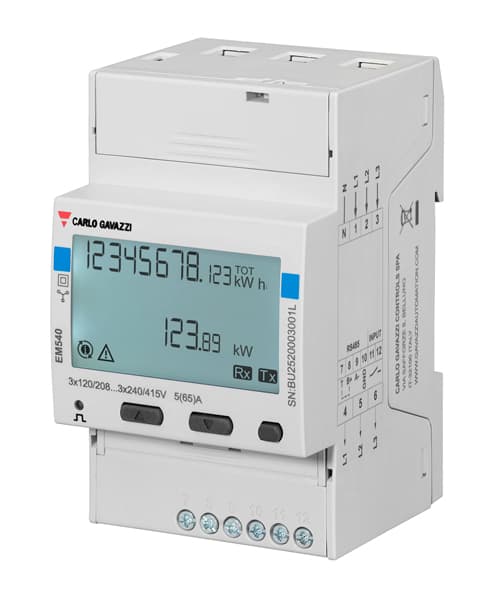
Carlo Gavazzi EM540
Monitors energy consumption and electrical variables on 3-phase Carlo Gavazzi EM540 meters.
This template reads all key electrical variables from a Carlo Gavazzi EM540 3-phase energy meter via Modbus RTU at 9600 baud. It captures per-phase voltage, current, power, frequency, and cumulative imported/exported energy counters. No control registers are included, as this is a read-only metering template.
- Protocol
- Modbus RTU
- Connection
- RS485, 9600 baud
- Registers
- 17, read only
- Brand
- Carlo Gavazzi
- Key readings
- Voltage L1-N to L3-N · Voltage L1-L2 to L3-L1 · Current L1 to L3 · Power kW L1 to L3 · Frequency Hz · Total imported/exported kWh
- Compatible models
- EM 500 Series · EM 540
- Last updated
Registers (17)
17 read, 0 write
| Name | Unit | Access | Address (Hidden until you enter your email) | Function (hidden) | Type (hidden) |
|---|---|---|---|---|---|
| V L1-N | V | Read | |||
| Hz | Hz | Read | |||
| V L2-N | V | Read | |||
| V L3-N | V | Read | |||
| V L1-L2 | V | Read | |||
| V L2-L3 | V | Read | |||
| V L3-L1 | V | Read | |||
| A L1 | A | Read | |||
| A L2 | A | Read | |||
| A L3 | A | Read | |||
| kW L1 | kW | Read | |||
| kW L2 | kW | Read | |||
| kW L3 | kW | Read | |||
| kWh+TOT | kWh | Read | |||
| kWh-TOT | kWh | Read | |||
| kWh+t1 | kWh | Read | |||
| kWh+t2 | kWh | Read |
Loading registers…
Send your device list
If a device is not in the library yet, we build the template for free as soon as we have the register data.
Use cases
- Monitor per-phase voltage, current, and power on a live cloud dashboard for your customer's building.
- Track total imported and exported kWh to verify energy balance in a photovoltaic self-consumption installation.
- Create an alert when grid frequency deviates from nominal range for more than 30 seconds.
- Compare tariff-split energy counters (t1 and t2) to optimize time-of-use electricity contracts.
- Log historical energy data across multiple EM540 meters on one RS-485 bus for monthly billing reports.
- Detect phase imbalance early by monitoring per-phase power readings and setting threshold alerts.
Installation
Wire the RS-485 A and B terminals of the Carlo Gavazzi EM540 to the corresponding RS-485 port on your ModbusCloud Gateway.
Set the Modbus slave address on the EM540 using the front-panel buttons, and ensure it is unique on the RS-485 bus.
Confirm that the EM540 baud rate is set to 9600 with 8 data bits, 1 stop bit, and no parity (8N1), matching the gateway configuration.
Import the Carlo Gavazzi EM540 template in the ModbusCloud platform and assign the correct slave address.
Power on the gateway and verify that voltage, current, and power readings appear on the ModbusCloud dashboard within a few polling cycles.
If multiple EM540 meters share the same bus, add each device in ModbusCloud with its own slave address and apply the same template.
Things to watch for
Why do I get zero or null readings for all registers?
Check the RS-485 wiring polarity. A and B terminals must match between the EM540 and the gateway. Also verify the slave address in ModbusCloud matches the address configured on the meter.
Do I need to change the baud rate on the EM540?
The default baud rate on many EM540 units is 9600. This template expects 9600 baud. If a previous installer changed it, reset it to 9600 via the meter's front panel menu or adjust the gateway to match.
Why are energy counter values unexpectedly large or negative?
All registers are int32 and span two consecutive Modbus addresses. If the byte order or word order in the gateway is set incorrectly, values will appear corrupted. Use Big Endian (AB CD) word order, which is the Carlo Gavazzi default.
Can I use this template with other Carlo Gavazzi EM 500 series meters?
Yes, the template is compatible with EM 500 series meters that share the same register map. Verify the register addresses in the meter's datasheet before deploying.


Want to see how it works?
