








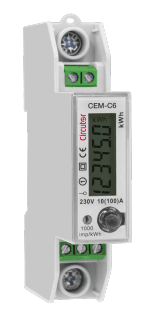
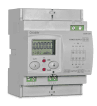
Circutor CEM-C6-MID
Measures single-phase energy bi-directionally with Class B precision via Modbus TCP.
The Circutor CEM-C6-MID is a single-phase energy meter for loads up to 100 A with bi-directional measurement and MID Class B precision. This ModbusCloud template reads voltage, current, frequency, power factor, active power, and total active energy over Modbus TCP.
- Protocol
- Modbus TCP
- Connection
- Ethernet, Modbus TCP
- Registers
- 9, read only
- Brand
- Circutor
- Key readings
- Voltage · Current · Frequency · Power Factor · Active Power · Total Active Energy
- Compatible models
- CEM-C6-MID
- Last updated
Registers (9)
9 read, 0 write
| Name | Unit | Access | Address (Hidden until you enter your email) | Function (hidden) | Type (hidden) |
|---|---|---|---|---|---|
| Voltage | V | Read | |||
| Current | A | Read | |||
| Frequency | Hz | Read | |||
| Power Factor | W | Read | |||
| Reactive Power | var | Read | |||
| Apparent Power | VA | Read | |||
| Active Power | W | Read | |||
| Total Active Energy | kWh | Read | |||
| Total Reactive Energy | kWarh | Read |
Loading registers…
Send your device list
If a device is not in the library yet, we build the template for free as soon as we have the register data.
Use cases
- Monitor real-time voltage, current, and active power of a single-phase circuit on your cloud dashboard.
- Track total active energy consumption and export for tenant sub-metering or billing verification.
- Create an alert when power factor drops below a defined threshold to flag potential power quality issues.
- Log bi-directional energy data over time to verify solar self-consumption versus grid feed-in.
- Generate periodic energy reports for building owners or facility managers from the cloud platform.
Installation
Mount the Circutor CEM-C6-MID on the DIN rail and wire the line and neutral conductors through the meter according to the manufacturer's wiring diagram.
Connect the meter to your local network via its Ethernet interface and assign a static IP address or verify the DHCP lease.
Set a unique Modbus unit ID on the meter if multiple devices share the same network segment.
Connect your ModbusCloud Gateway to the same local network and ensure it can reach the meter's IP address.
Import the Circutor CEM-C6-MID template in the ModbusCloud platform and enter the meter's IP address and Modbus unit ID.
Verify that live readings for voltage, current, and active power appear on the ModbusCloud dashboard before closing the panel.
Things to watch for
Why does the power factor register show a unit of W instead of a dimensionless value?
This is a labeling inconsistency in the device register map. The register does contain the power factor value, not a wattage reading. The ModbusCloud template maps it correctly as power factor.
What data type do the registers use?
All registers on the CEM-C6-MID are uint16. Make sure your gateway and template are configured for unsigned 16-bit integer parsing to avoid incorrect readings.
Where do I find the total active energy register?
Total active energy starts at Modbus register address 40961. Total reactive energy starts at address 40991. Both are pre-configured in the ModbusCloud template.
Can I use this meter for official billing since it is MID certified?
The CEM-C6-MID carries MID Class B certification, which is accepted for billing purposes in many European countries. Check your local regulations to confirm applicability.

Want to see how it works?
