








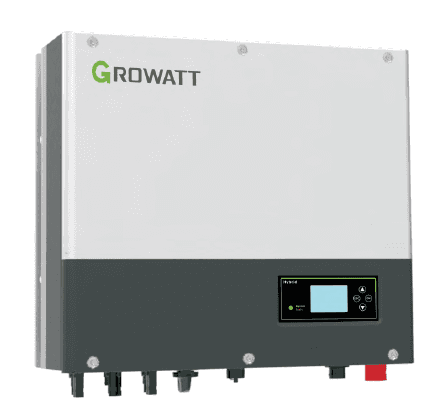
Growatt SPH TL3 BH UP
Monitors and controls Growatt SPH inverter with battery storage management
Template for the Growatt SPH TL3 BH UP hybrid inverter with ARK battery, connected via Modbus RTU at 9600 baud. Reads PV production, grid exchange, battery state of charge, and inverter status. Controls battery charging, discharging, export limiting, and SOC management for spot price optimization.
- Protocol
- Modbus RTU
- Connection
- RS485, 9600 baud
- Registers
- 40, read and write
- Brand
- Growatt
- Key readings
- Inverter status and temperature · Output power and PV energy today/total · Battery SOC, voltage, and temperature · Charge and discharge power/energy · AC power to user and to grid · EPS output power L1 to L3
- Available commands
- Charging Enable/Disable · Charging power rate · Analog export limit · Stop SOC when charge (Battery first mode)
- Compatible models
- Growatt SPH TL3 BH UP
- Last updated
Registers (40)
37 read, 7 write
| Name | Unit | Access | Address (Hidden until you enter your email) | Function (hidden) | Type (hidden) |
|---|---|---|---|---|---|
| Inverter status | Read | ||||
| Output power | kW | Read | |||
| PV energy today | kWh | Read | |||
| PV energy total | kWh | Read | |||
| Battery state of charge | % | Read | |||
| Input power from PV panels | kW | Read | |||
| Input power from PV string 1 | kW | Read | |||
| Input power from PV string 2 | kW | Read | |||
| Inverter temperature | °C | Read | |||
| Battery temperature | °C | Read and write | |||
| Energy to grid total | kWh | Read | |||
| Energy to grid today | kWh | Read | |||
| Battery voltage | V | Read | |||
| Charge power | kW | Read | |||
| Discharge power | kW | Read | |||
| Energy to user total | kWh | Read and write | |||
| Energy to user today | kWh | Read and write | |||
| Discharge energy today | kWh | Read | |||
| Discharge energy total | kWh | Read | |||
| Charge energy today | kWh | Read | |||
| Charge energy total | kWh | Read | |||
| Local load energy today | kWh | Read | |||
| Local load energy total | kWh | Read | |||
| AC power to user | kW | Read | |||
| AC power to grid | kW | Read | |||
| INV power to local load | kW | Read | |||
| EPS output power L1 | kVA | Read | |||
| EPS output power L2 | kVA | Read | |||
| EPS output power L3 | kVA | Read | |||
| Analoge Export limit | Read and write | ||||
| Stop soc when Load mode | % | Read | |||
| ChargePower discharge | % | Read | |||
| Voltage PV1 | V | Read | |||
| Voltage PV2 | V | Read | |||
| PV1 input pwr Low | W | Read | |||
| PV2 input pwr Low | W | Read | |||
| charging enabled | Read | ||||
| Charging Enable Disable | Write | ||||
| Stop soc2 when charge (Battery first Mode) | % | Write | |||
| charging power rate | W | Write |
Loading registers…
Send your device list
If a device is not in the library yet, we build the template for free as soon as we have the register data.
Use cases
- Monitor PV production, battery SOC, and grid exchange on a live cloud dashboard for your customer.
- Create alerts when battery temperature or inverter temperature exceeds safe operating thresholds.
- Automate battery charging during low electricity prices and discharging during peak price windows using spot price data.
- Limit or stop PV export to the grid automatically when energy prices turn negative.
- Track daily and total energy production and consumption to generate periodic performance reports.
- Remotely adjust charging power rate and export limits without an on-site visit.
Installation
Connect the Modbus gateway to the RS485-3 port on the Growatt SPH TL3 BH UP inverter using a twisted-pair cable (A, B, GND).
Configure the RS485 connection on the gateway to 9600 baud, 1 stop bit, no parity, and set the Modbus slave address to 1 (default).
On the inverter, set Export mode to ON (manual ref 6.4.4 par 6) and change the RS485 setting to VPP (manual ref 6.4.4 par 7).
If AC charging is required, enable it on the inverter or via server.growatt.com and set the time frame to 00:00 to 23:59.
Do not connect the Growatt energy meter on the same Modbus data link as the gateway, as this causes inverter reboots.
Import the Growatt SPH TL3 BH UP template in the ModbusCloud platform and verify that live readings appear on the dashboard.
Things to watch for
Why does my Growatt inverter keep rebooting after connecting the Modbus gateway?
The Growatt energy meter and the Modbus gateway must not share the same RS485 bus. Keep the meter on its dedicated link to the inverter and connect the gateway to the RS485-3 port only.
I cannot control battery charging or export limits. What settings are missing?
Ensure the RS485 setting on the inverter is set to VPP (manual ref 6.4.4 par 7). Also verify that Export mode is ON. If AC charging is needed, enable it with a 00:00 to 23:59 time frame via the inverter menu or server.growatt.com.
What baud rate and serial settings should I use?
Use 9600 baud, 1 stop bit, and no parity. The default Modbus slave address on the Growatt SPH is 1.
Can I use Grid First mode to discharge the battery back to the grid?
Yes. Enable Grid First mode and set the time frame to 00:00 to 23:59 via server.growatt.com. The template then allows you to control discharge timing based on energy prices.

Want to see how it works?
