








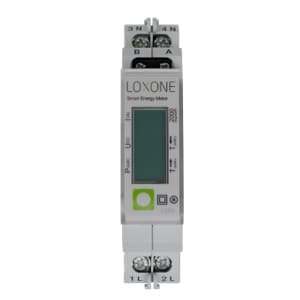
Loxone Modbus Electricity Meter (Single Phase)
Reads energy consumption and production from a single-phase Modbus electricity meter.
This template reads energy consumption, energy production, and power values from a single-phase Modbus electricity meter via Modbus RTU at 19200 baud. It provides real-time insight into energy flow for residential or light commercial installations. No control registers are included, as the meter is read-only.
- Protocol
- Modbus RTU
- Connection
- RS485, 19200 baud
- Registers
- 3, read only
- Brand
- Loxone
- Key readings
- Energy Consumption · Energy Production · Power
- Compatible models
- Modbus Electricity Meter (Single Phase)
- Last updated
Registers (3)
3 read, 0 write
| Name | Unit | Access | Address (Hidden until you enter your email) | Function (hidden) | Type (hidden) |
|---|---|---|---|---|---|
| Energy Consumption | kWh | Read | |||
| Power | kW | Read | |||
| Energy Production | kWh | Read |
Loading registers…
Send your device list
If a device is not in the library yet, we build the template for free as soon as we have the register data.
Use cases
- Monitor real-time power draw of a single-phase circuit on a live cloud dashboard.
- Track cumulative energy consumption and production over time to generate monthly reports.
- Create an alert when instantaneous power exceeds a predefined threshold for demand management.
- Compare energy production against consumption to evaluate self-sufficiency of a solar installation.
- Aggregate readings from multiple single-phase meters across different circuits in one overview.
Installation
Wire the single-phase electricity meter into the supply line following the manufacturer wiring diagram and ensure the RS-485 A and B terminals are connected to the ModbusCloud Gateway.
Set the Modbus slave address on the meter to a unique value on the RS-485 bus, and confirm the baud rate is 19200 with odd parity.
In the ModbusCloud platform, add a new Modbus RTU device and import the Modbus Electricity Meter (Single Phase) template.
Enter the configured slave address in the device settings and verify that Energy Consumption, Energy Production, and Power values appear on the dashboard.
If multiple meters share one bus, repeat the process for each meter with a distinct slave address and a separate device entry in ModbusCloud.
Things to watch for
I see zero values for Energy Consumption and Energy Production but Power reads correctly. What is wrong?
The energy registers are uint32 and span two consecutive addresses (27-28 and 29-30). Make sure the template is imported correctly and that no manual register offset has been applied. The template handles 32-bit register pairing automatically.
Communication fails after wiring the RS-485 bus. What should I check?
Verify that the baud rate is set to 19200 and parity is set to odd (1 stop bit) on both the meter and the gateway. Also confirm that the A and B lines are not swapped and that a 120 ohm termination resistor is present at the end of the bus.
Can I connect multiple single-phase meters to one gateway?
Yes. Each meter must have a unique Modbus slave address. Add a separate device in ModbusCloud for each meter and assign the matching address. All meters can share the same RS-485 wiring.
The Power register shows negative values. Is this normal?
Yes. The Power register is a signed int16 value. A negative value typically indicates energy being fed back into the grid, which represents production. This is expected behavior for bidirectional metering.

Want to see how it works?
