








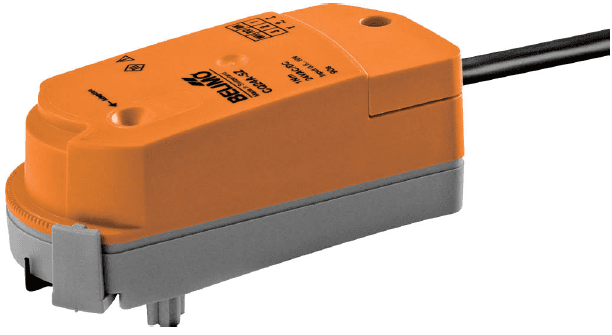
Belimo CQ24A-BAC Modbus RTU
Controls communicative rotary actuators for zone valves via Modbus RTU.
Template for the Belimo CQ24A-BAC communicative rotary actuator connected via Modbus RTU at 38400 baud. It reads actuator position, firmware version, and malfunction status, and allows setpoint control, override, maximum position limiting, and bus fail configuration.
- Protocol
- Modbus RTU
- Connection
- RS485, 38400 baud
- Registers
- 15, read and write
- Brand
- Belimo
- Key readings
- Actuator Type · Relative Position (%) · Absolute Position (°) · Series Number · Firmware Version · Malfunction and Service Information
- Available commands
- Setpoint (%) · Override Control · Maximum Position (%) · Bus Fail Position
- Compatible models
- CQ24A-BAC
- Last updated
Registers (15)
8 read, 7 write
| Name | Unit | Access | Address (Hidden until you enter your email) | Function (hidden) | Type (hidden) |
|---|---|---|---|---|---|
| Actuator Type | Read | ||||
| Relative Position | % | Read | |||
| Absolute Position | °C | Read | |||
| Series Number 1st Part | Read | ||||
| Series Number 2nd Part | Read | ||||
| Series Number 4th Part | Read | ||||
| Firmware Version | Read | ||||
| Malfunction and Service Information | Read | ||||
| Setpoint | % | Write | |||
| Override Control | Write | ||||
| Command | Write | ||||
| Maximum Position in Percent | % | Write | |||
| Sensor 1 Type | Write | ||||
| Bus Fail Position | Write | ||||
| Timeout for Bus Watchdog in s | s | Write |
Loading registers…
Send your device list
If a device is not in the library yet, we build the template for free as soon as we have the register data.
Use cases
- Monitor relative and absolute actuator position remotely to verify zone valve operation across multiple rooms.
- Create an alert when a malfunction or service flag is reported by the actuator.
- Adjust the setpoint percentage from the cloud dashboard during commissioning without being on site.
- Configure the bus fail position to ensure zone valves move to a safe state on communication loss.
- Log actuator position data over time to identify valves that are not responding correctly to demand.
- Set maximum position limits remotely to balance flow across multiple zone valves in a building.
Installation
Wire the Modbus RTU bus (A and B terminals) from the Belimo CQ24A-BAC to the RS-485 port on your ModbusCloud Gateway.
Set the Modbus slave address on the CQ24A-BAC actuator according to the device documentation, ensuring each actuator on the bus has a unique address.
Configure the gateway serial port to 38400 baud, 8 data bits, no parity, and 1 stop bit to match the CQ24A-BAC default settings.
Import the Belimo CQ24A-BAC template from the ModbusCloud template library and assign the correct Modbus slave address.
Configure register 109 (Bus Watchdog timeout) and register 108 (Bus Fail Position) to define safe fallback behavior in case of communication loss.
Verify the connection by checking that actuator position and firmware readings appear on the ModbusCloud dashboard.
Things to watch for
The gateway cannot communicate with the CQ24A-BAC. What should I check?
Verify that the baud rate on the gateway is set to 38400, matching the CQ24A-BAC default. Also confirm that the A and B wires are not swapped and that the Modbus slave address matches the address configured on the actuator.
What happens if the Modbus connection is lost?
The actuator moves to the position defined in register 108 (Bus Fail Position) after the timeout period set in register 109 (Bus Watchdog). Both registers must be configured during commissioning to ensure safe operation.
Can I use multiple CQ24A-BAC actuators on the same RS-485 bus?
Yes. Assign a unique Modbus address to each actuator. Ensure proper bus termination and keep total cable length within RS-485 limits.
The position reading shows 0% even though the valve should be open. What is wrong?
Check that the actuator is powered and mechanically coupled to the valve. Also verify that the correct registers are being polled by confirming the template is properly assigned in ModbusCloud.
Want to see how it works?
