








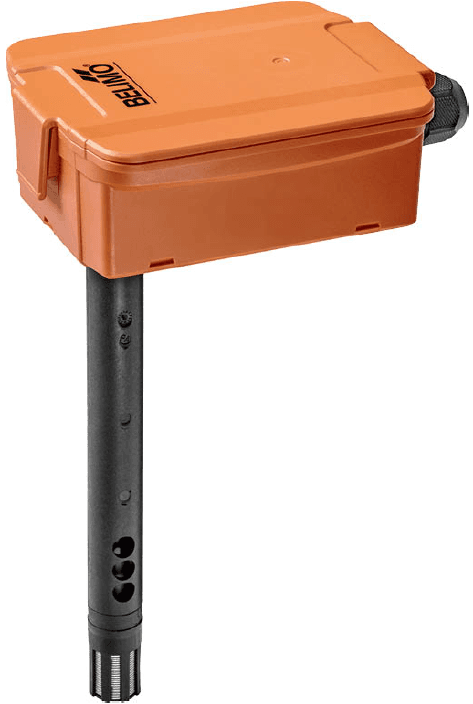
Belimo Temperature Humidity CO2 Sensor Modbus RTU
Measures CO2, humidity, and temperature for duct applications via Modbus RTU.
Belimo Temperature Humidity CO2 Sensor template for Modbus RTU. Reads CO2 concentration, relative and absolute humidity, temperature, dew point, and enthalpy from duct-mounted sensors. Also allows configuration of offsets, output limits, channel assignments, and unit system selection.
- Protocol
- Modbus RTU
- Connection
- RS485, 38400 baud
- Registers
- 39, read and write
- Brand
- Belimo
- Key readings
- Temperature · Relative Humidity · Absolute Humidity · Enthalpy · Dew Point · CO2
- Available commands
- Offsets (Temp, RH, CO2) · Output limits (upper/lower) · Channel assignments · Unit system selection
- Last updated
Registers (39)
14 read, 25 write
| Name | Unit | Access | Address (Hidden until you enter your email) | Function (hidden) | Type (hidden) |
|---|---|---|---|---|---|
| Temperature | °C | Read | |||
| Relative Humidity | %RH | Read | |||
| Absolute Humidity | g/m3 | Read | |||
| Enthalpy | kJ/kg | Read | |||
| Dew Point | °C | Read | |||
| CO2 | ppm | Read | |||
| Sensor Detection | Read | ||||
| Hardware version main circuit board | Read | ||||
| Firmware version main circuit board | Read | ||||
| Hardware version RS 485 module | Read | ||||
| Firmware version RS 485 module | Read | ||||
| Maximum output voltage | V | Read | |||
| Operating hours counter | h | Read | |||
| Device Detection | Read | ||||
| Offset Temperature | °C | Write | |||
| Offset Relative Humidity | %RH | Write | |||
| Offset CO2 | ppm | Write | |||
| Lower Limit Temperature | °C | Write | |||
| Upper Limit Temperature | °C | Write | |||
| Lower Limit Relative Humidity | %RH | Write | |||
| Upper Limit Relative Humidity | %RH | Write | |||
| Lower Limit Absolute Humidity | g/m3 | Write | |||
| Upper Limit Absolute Humidity | g/m3 | Write | |||
| Lower Limit Enthalpy | kJ/kg | Write | |||
| Upper Limit Enthalpy | kJ/kg | Write | |||
| Lower Limit Dew Point | °C | Write | |||
| Upper Limit Dew Point | °C | Write | |||
| Lower Limit CO2 | ppm | Write | |||
| Upper Limit CO2 | ppm | Write | |||
| Channel Temperature | °C | Write | |||
| Channel Relative Humidity | % | Write | |||
| Channel Absolute Humidity | Write | ||||
| Channel Enthalpy | Write | ||||
| Channel Dew Point | °C | Write | |||
| Channel CO2 | ppm | Write | |||
| Selection of the Unitary System | Write | ||||
| Minimum output voltage | V | Write | |||
| Countdown for maintenance | h | Write | |||
| Countdown for visual inspection | h | Write |
Loading registers…
Send your device list
If a device is not in the library yet, we build the template for free as soon as we have the register data.
Use cases
- Monitor CO2 concentration, temperature, and humidity in HVAC ducts on a live cloud dashboard.
- Create alerts when CO2 levels exceed a defined threshold to ensure timely ventilation response.
- Remotely adjust temperature, humidity, or CO2 offsets to calibrate the sensor without on-site access.
- Log dew point and enthalpy data over time for energy optimization in air handling units.
- Configure analog output voltage ranges remotely via registers 508 and 509 for integration with BMS systems.
- Track long-term CO2 measurement stability across multiple duct sensors in a building portfolio.
Installation
Mount the Belimo CO2 sensor in the duct according to the manufacturer installation guide and connect the RS485 wiring (A, B, GND) to the Modbus gateway.
Set the sensor Modbus slave address using the configuration method described in the Belimo documentation, ensuring it does not conflict with other devices on the bus.
Confirm the baud rate is set to 38400 on both the sensor and the Modbus gateway.
Connect the ModbusCloud Gateway to your local network and ensure it has internet access for cloud communication.
Import the Belimo Temperature Humidity CO2 Sensor template in the ModbusCloud platform and assign it to the correct gateway and slave address.
Verify that live readings for CO2, temperature, and humidity appear on the ModbusCloud dashboard before completing the installation.
Things to watch for
The sensor does not respond on the Modbus bus. What should I check?
Verify that the RS485 wiring is correct (A to A, B to B, GND to GND) and that the baud rate on both the sensor and the gateway is set to 38400. Also confirm there is no slave address conflict with other devices on the same bus.
CO2 readings seem inaccurate or drifting. Can I correct this remotely?
Yes. The template includes a write register for CO2 offset starting at address 100. You can apply a correction value through ModbusCloud without visiting the site. The dual-channel CO2 technology should minimize long-term drift.
How do I change the measurement units from Celsius to Fahrenheit?
Use the unit system selection register at address 400. Writing the appropriate value will switch temperature and related readings to the desired unit system.
Can I configure the 0 to 10 V analog output range via Modbus?
Yes. Registers 508 and 509 allow you to set the minimum and maximum output voltage. Output range limits can also be adjusted through registers starting at address 200.
Want to see how it works?
